

Driven: Car Dashboard
Ilija Ivkovic Navigation iPhoneiPadiPod touch
Driven: Car Dashboard is a free Navigation app for iPhone and iPad by Ilija Ivkovic. Requires iOS 26.0. Updated September 22, 2026.
- Price
- Free
- on the App Store
- Size
- 33 MB
- Age 4+
- Updated
- Sep 22
- 2026 · v2026.9
Screenshots


About Driven: Car Dashboard
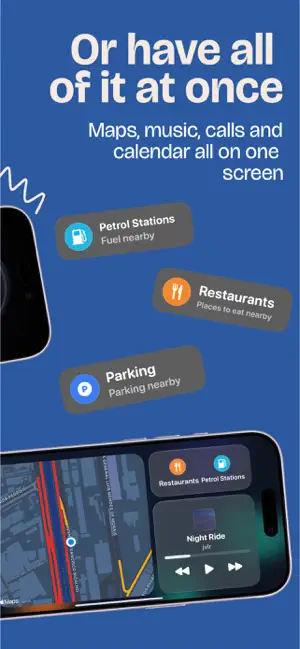
Turn your phone into a dashboard: speed, live maps, music, calls, and today's calendar, all in one glance. Perfect if your car's screen looks like it's stuck in the last century, or doesn't have one. There are two dashboards to choose from. The minimal one is a speed dial, a live map, and whatever's playing, nothing else on screen. The full one is a proper home screen with Maps, Music, Now Playing, Phone, Contacts, Calendar, and Settings, your own photo behind all of it. Switch between them whenever you like. WHAT YOU GET - Speed in km/h or mph, your choice. - Live speed limits, right on your screen. - Speed camera alerts. - A live map, no destination needed. - Turn-by-turn directions that reroute the second you miss a turn. - Confusing interchange ahead? The 3D map makes it obvious. - Search a place, compare routes, see the real distance and time. - Fuel, food, and parking nearby, one tap each. - Your whole Apple Music library, right there. - Calls and contacts without switching apps. - Today's calendar. - Six wallpapers behind the dashboard, or any photo you want. - The screen stays on while you drive. NOTHING TO SIGN UP FOR No account, no ads, no analytics, no tracking. Driven doesn't log where you go, and your contacts and calendar never leave your phone. Speed camera warnings are turned off by default where warning drivers about cameras is restricted, including Germany, France, and Switzerland. Local rules still apply. Camera and speed limit data comes from OpenStreetMap contributors, licensed under the ODbL. Apple Music and Apple Maps are trademarks of Apple Inc, registered in the U.S. and other countries and regions. Terms of Use (EULA): https://www.apple.com/legal/internet-services/itunes/dev/stdeula/
What’s new
Version 2026.9 · Updated September 22, 2026
Driven is a dashcam too now. Put your iPhone on the dash and it records the road while you drive. The footage stays on your iPhone. Tap Save Moment to keep the last three minutes, and save anything worth keeping to Photos or Files. Your recordings are stored in the new Recordings tab. New to Driven Pro? The yearly plan now starts with a free week. Also in this update: - Speed cameras and speed limits now come from our own server instead of a public one. - On the minimal dashboard, the map turns with you right away and no longer sits a quarter-turn off when your phone is sideways. - Fixes for the music screen, and long song names on the dial no longer get cut off mid-word. If you have any suggestions or face any issues, let us know at [email protected]
App privacy
The developer, Ilija Ivkovic, reported these privacy practices to Apple.
Data Not Linked to You
The following data, which may be collected but is not linked to your identity, may be used for the following purposes:
- Purchases: Purchase History
Used for: Analytics, App Functionality
Alternatives to Driven: Car Dashboard
Looking for apps like Driven: Car Dashboard? Here are 6 similar apps on the App Store.
-
 Car Sync Connect
-
 GapMeter: Following Distance
-
 Ologgi Gps
-
 路寶 RoadPartner
-
 Car,Play CarSync Speedometer
-
 NOVAETC - Lái Xe An Toàn
| App | Rating | Price | Last updated | Compare |
|---|---|---|---|---|
| Driven: Car Dashboard | – | Free | September 22, 2026 | |
| Car Sync Connect | – | Free | Sep 2, 2026 | Compare |
| GapMeter: Following Distance | – | Free | Oct 5, 2026 | Compare |
| Ologgi Gps | – | Free | Apr 11, 2026 | Compare |
| 路寶 RoadPartner | – | Free | Oct 17, 2026 | Compare |
| Car,Play CarSync Speedometer | – | Free | Sep 11, 2026 | Compare |
| NOVAETC - Lái Xe An Toàn | – | Free | Sep 18, 2026 | Compare |