

FrameGlimpse: Video to Photo
名楷 王 Graphics & Design iPhoneiPadiPod touch
FrameGlimpse: Video to Photo is a free Graphics & Design app for iPhone and iPad by 名楷 王. Rated 5.0/5 from 2 ratings. Requires iOS 17.0.
- Rating
- 5.0
- 2 ratings
- Price
- Free
- on the App Store
- Size
- 45 MB
- Age 4+
- Updated
- Oct 27
- 2026 · v1.2.4
Screenshots
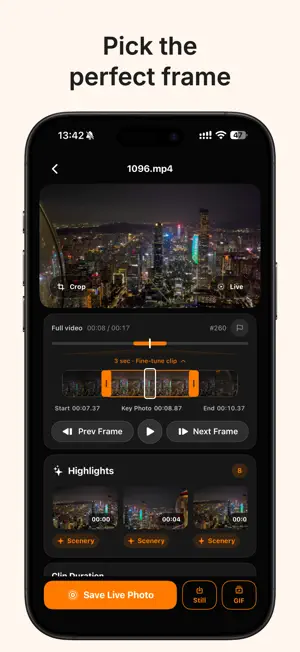


About FrameGlimpse: Video to Photo
FrameGlimpse helps you find and save memorable moments. You can go through videos frame by frame, choose a cover frame, crop images and save them as new photos. You can also clean up your photo library by finding screenshots, duplicate photos, screen recordings, receipts, barcodes, photos of where you parked and empty albums to help free up space. The Memories feature lets you look back at moments from this day in years past. Key Features: - Extract frames from videos and Live Photos. Go through footage frame by frame and save moments as Live Photos, still images or GIFs, while keeping the original date, time and location information. - Find the best moments in your videos using on-device intelligence. - Adjust clip duration, playback mode, playback speed, image quality and frame rate. - Crop images using a custom aspect ratio or choose the original ratio, 1:1, 4:3, 3:2 or 16:9. - Support for HDR and SDR video, with HDR exports that preserve HDR quality. - Revisit moments from this day in years past, browse memories by location or view them in a Home Screen widget. - Swipe through your library like you would short videos to rediscover memorable moments. You can also explore memories from the same day or nearby locations. - Clean up your photo library. Find old screenshots, duplicate photos, similar photos, very short videos, screen recordings, selfies, photos of where you parked, barcodes, receipts and ID documents. More categories will be added over time. - Create GIF stickers for WeChat directly from the GIF export screen. Pro Features: - Export to the Files app. Exporting to your photo library is completely free. - Unlock more options, including GIFs that play forward and backward, advanced photo cleanup tools and Live Photo exports longer than 10 seconds. - Batch-export candidate frames and organize your photo library in bulk. Useful for: - Saving a special moment from a video of your baby, pet, vacation, party, concert or sporting event. - Getting a high-quality still image from a video when you forgot to take a photo. - Turning video clips into Live Photos or GIFs to share. - Looking back on old memories. - Quickly clearing unwanted items from your photo library. Privacy: - Only accesses the photos and videos you authorize. - All recognition, analysis and organization happen on your device. Your photos and videos are never uploaded. - No account required. No ads. Privacy Policy: https://wwmmkk.github.io/FrameGlimpse/PrivacyPolicy Terms of Use (EULA): https://www.apple.com/legal/internet-services/itunes/dev/stdeula/
What’s new
Version 1.2.4 · Updated October 27, 2026
• New: The Moments tab now supports auto-advance. Just tap the “Auto-advance” button next to the volume button in the bottom-left corner. • New: It's now easier to find things you've liked or saved. Just tap “Saved” in the top-right corner of the Moments or Memories tab. • Improved: The frame extraction editor now supports a wider range of source aspect ratios. Recent updates: • New: Use the Moments tab to find memorable moments in your photo library and browse memories from the same day or nearby places. It's free, with no viewing limits. • New: Choose which tab opens when you launch the app: Memories or Moments. • New: When viewing a memory, tap its location name to find other memories captured nearby. • New: A Home Screen widget for revisiting moments from this day in years past. • New: Frame-by-frame trimming controls — set a Live Photo's start and end points and choose its cover frame. • New: Create GIF stickers for WeChat — just select “WeChat Sticker” on the GIF export screen. • Improved: Made restoring purchases easier. You can send feedback or suggestions through the in-app feedback option. You can also leave a review on the App Store!
App privacy
The developer, 名楷 王, reported these privacy practices to Apple.
Data Not Collected
The developer does not collect any data from this app.
Alternatives to FrameGlimpse: Video to Photo
Looking for apps like FrameGlimpse: Video to Photo? Here are 6 similar apps on the App Store. The highest rated is AR Builder: Pixel Art 3D Voxel (5.0/5), and 4 of the 6 are free to download.
-
 Paintly: Draw, Trace & Paint
4.2
-
 AR Builder: Pixel Art 3D Voxel
5.0
-
 Lens - AI Prompt Gallery
-
 Edit Text In Photo - Forgeit
4.3
-
 ImageLab: AI Anime Generator
-
 GridQuilt: Collage & Split
5.0
| App | Rating | Price | Last updated | Compare |
|---|---|---|---|---|
| FrameGlimpse: Video to Photo | 5.0 / 5 (2 ratings) | Free | October 27, 2026 | |
| Paintly: Draw, Trace & Paint | 4.2 / 5 (6) | 7.99 USD | Sep 5, 2026 | Compare |
| AR Builder: Pixel Art 3D Voxel | 5.0 / 5 (3) | Free | Sep 24, 2026 | Compare |
| Lens - AI Prompt Gallery | – | 0.99 USD | Sep 8, 2026 | Compare |
| Edit Text In Photo - Forgeit | 4.3 / 5 (13) | Free | Oct 13, 2026 | Compare |
| ImageLab: AI Anime Generator | – | Free | Oct 22, 2026 | Compare |
| GridQuilt: Collage & Split | 5.0 / 5 (3) | Free | Oct 5, 2026 | Compare |