

DexoPad
Palmblock Technology Co., Limited Utilities iPhoneiPadiPod touch
DexoPad is a free Utilities app for iPhone and iPad by Palmblock Technology Co., Limited. Requires iOS 15.1. Updated August 13, 2026.
- Price
- Free
- on the App Store
- Size
- 31 MB
- Age 4+
- Updated
- Aug 13
- 2026 · v1.0
Screenshots



About DexoPad
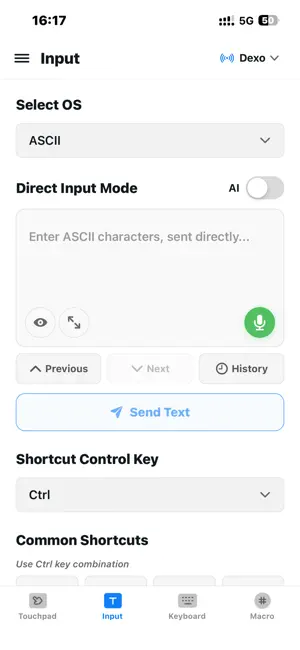
DexoPad is a companion app for the DexoPad hardware dongle — a wireless BLE-to-USB HID bridge that turns your iPhone or iPad into a keyboard, trackpad, and shortcut controller for any computer. The DexoPad dongle (sold separately) plugs into your target computer's USB port and communicates with the app over Bluetooth Low Energy — no drivers, no companion software, no network configuration required. Because the DexoPad dongle presents itself to your computer as a standard USB keyboard and mouse (HID), it works everywhere: Windows, macOS, Linux, ChromeOS, and even at the BIOS/UEFI level before any operating system boots. Type into BIOS setup, navigate boot menus, unlock encrypted drives, or run keyboard-only servers — DexoPad works when nothing else can. Key features: • Full keyboard input with modifier combos: Ctrl+C, Cmd+V, Ctrl+Alt+Del, Win+R, and every F-key (F1–F12) plus arrow, Home/End, PageUp/Down, and Insert/Delete. • Precision touchpad with two-finger scroll, tap-to-click, drag, and left/right/middle mouse buttons. • Multi-OS Unicode input: Type Chinese, Japanese, Korean, emoji, and other Unicode characters into any target OS — DexoPad handles keyboard layout translation for Windows (Alt+Numpad), macOS (Unicode Hex Input), and Linux (Ctrl+Shift+U). • ASCII mode for pre-OS environments: Send raw HID scancodes when no IME is available (BIOS, GRUB, recovery consoles, embedded systems). • Custom shortcut buttons: Save your favorite key combinations as one-tap actions. • Low-latency BLE: Real-time typing and pointer control over Bluetooth. • Multi-device pairing: Manage several DexoPad dongles from one iPhone. Perfect for: • Remote IT support and system administration • Developers working with headless machines and embedded devices • Presenters who need a discrete, wireless remote • Anyone who wants their phone to double as a keyboard/mouse for a nearby computer
App privacy
The developer, Palmblock Technology Co., Limited, reported these privacy practices to Apple.
Data Linked to You
The following data, which may be collected and linked to your identity, may be used for the following purposes:
- Usage Data: Product Interaction
- Contact Info: Email Address, Name
- Identifiers: User ID
Used for: Analytics, App Functionality
Data Not Linked to You
The following data, which may be collected but is not linked to your identity, may be used for the following purposes:
- Identifiers: Device ID
- Diagnostics: Crash Data, Performance Data, Other Diagnostic Data
Used for: Analytics, App Functionality
Alternatives to DexoPad
Looking for apps like DexoPad? Here are 6 similar apps on the App Store. The highest rated is Rorolee (4.0/5), and all 6 are free to download.


| App | Rating | Price | Last updated | Compare |
|---|---|---|---|---|
| DexoPad | – | Free | August 13, 2026 | |
| Rorolee | 4.0 / 5 (5) | Free | Oct 6, 2026 | Compare |
| MakaGiC L7 | – | Free | Jul 30, 2026 | Compare |
| Remote Mouse by Sidrion Labs | – | Free | Sep 4, 2026 | Compare |
| Countie Live | – | Free | Apr 9, 2026 | Compare |
| MyOwnKeyboard PHONE | – | Free | Jul 28, 2026 | Compare |
| PadKeys | – | Free | Oct 13, 2026 | Compare |
Compare DexoPad with the top alternatives: ratings, updates, ASO score and keyword gaps →