

iPerf Falcon
博 邢 Utilities iPhoneiPadiPod touchMac
iPerf Falcon is a free Utilities app for iPhone and iPad by 博 邢. Rated 5.0/5 from 1 ratings. Requires iOS 17.0. Updated October 24, 2026.
- Rating
- 5.0
- 1 ratings
- Price
- Free
- on the App Store
- Size
- 14 MB
- Age 4+
- Updated
- Oct 24
- 2026 · v1.14.1
Screenshots


About iPerf Falcon
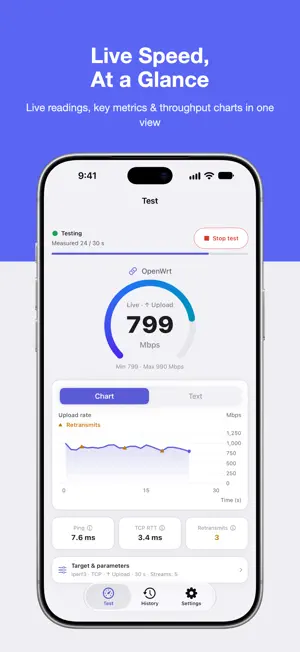
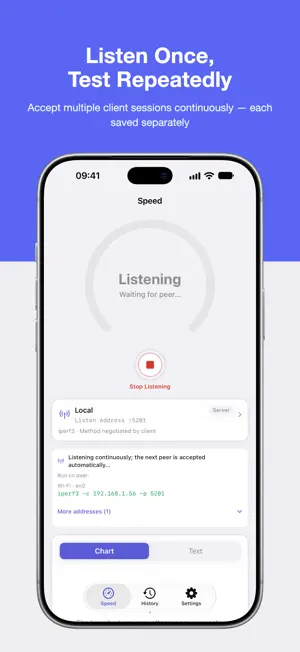
iPerf Falcon brings native iPerf testing to iPhone, iPad, and Mac. Measure Wi-Fi, LAN, routers, NAS devices, servers, or broadband to find network bottlenecks. Connect to your chosen endpoint, listen locally, or automate the test over SSH. You control the target and method. Three ways to get started Connect • Enter any iPerf host and port, or choose from 8 free public servers • Check port reachability with one tap; Falcon Pro can also save and pin frequent targets Listen • Turn your iPhone, iPad, or Mac into an iPerf server • Listen on all interfaces or choose an IPv4 address from Wi-Fi, Ethernet, cellular, or VPN • See exactly which address and port the other device should use • Start once and accept multiple client connections until you stop listening; results follow your automatic or manual saving preference SSH (Falcon Pro) • Connect to OpenWrt, Linux, or another SSH device; start the iPerf server, run the test, and clean up automatically • Authenticate with a password, an OpenSSH private key, or no credential on a lab device configured to allow it • Run the server remotely, or listen locally and have the SSH endpoint connect back Professional measurement without the friction • Both iPerf3 and iPerf2 engines, switchable in one place • TCP and UDP with upload and download modes; iPerf3 also supports simultaneous bidirectional tests • A graphical form for direction, protocol, duration, parallel streams, bitrate, and more • Chart-focused results with clear live and average speeds, minimums and peaks, test stages, and elapsed measurement time • Throughput charts label direction, time, and units, follow your bits/s or bytes/s preference, and let you tap to inspect each sample • Open current test details during or after a run to see the connection and full configuration • Separate upload and download speeds, charts, and metrics for bidirectional tests • Live Ping, TCP RTT, retransmissions, UDP jitter, and packet loss • Text details for each measurement interval, plus a searchable parameter and command reference Keep the results that matter • Save every run automatically, or keep only the tests you choose • Add notes, search instantly, and load a saved configuration for your next test • History details share the test screen's readings and layouts, with direction, measured time, averages, extrema, protocol metrics, charts, interval text, and saved parameters and commands • Export individual results as CSV or JSON, or create a shareable result card Falcon Pro One purchase unlocks these features on iPhone, iPad, and Mac: • SSH remote orchestration • Advanced graphical options and iPerf command-line configuration—paste a command to parse and synchronize the graphical form, then save complete commands for quick reuse • Five built-in scenarios for VoIP, 4K streaming, gaming, NAS backup, and Wi-Fi roaming, plus custom presets • Saved targets and SSH endpoints • Charts and metric comparisons for up to 6 runs, plus batch history export Designed for Apple devices On iPhone, landscape keeps readings and run controls visible while charts and details scroll independently. Wide iPad and Mac windows show parameters and results together. On iPhone Duo, layouts adapt to both displays and place content on either side of the fold when space allows, preserving your page, drafts, and current test state. Larger text, light and dark appearances, and nine languages are supported: Simplified Chinese, Traditional Chinese, English, Japanese, Korean, German, French, Spanish, and Russian. On iOS 27 and macOS 27, App Shortcuts can open Speed Test, History, or Settings, or load a saved preset. Privacy first No account is required, and there are no ads or analytics trackers. Test history stays on your device. SSH passwords and private keys are stored only in the system Keychain. Test traffic goes only to the target you choose; the target list briefly checks port reachability.
What’s new
Version 1.14.1 · Updated October 24, 2026
This update improves the experience across window sizes and screen layouts. • Refined adaptive layouts for tests, parameters and history details, with smoother scrolling and more readable long text • More reliable preservation of open details, configuration drafts and test state when resizing windows or switching fold layouts • Improved speed readings and navigation in history details on partially folded screens, with a clearer compact layout when space is limited • Updated App Store descriptions and artwork in all nine supported languages
App privacy
The developer, 博 邢, reported these privacy practices to Apple.
Data Not Collected
The developer does not collect any data from this app.
Alternatives to iPerf Falcon
Looking for apps like iPerf Falcon? Here are 6 similar apps on the App Store. The highest rated is NetDiag (5.0/5), and all 6 are free to download.
-
 iPerf NetTest
-
 WiFi Diag - Latency & Roaming
-
 OpenPacketLoss-Server
-
 Tessabyte
-
 YgciPerf3
4.0
YgciPerf3
4.0
-
 NetDiag
5.0
NetDiag
5.0
| App | Rating | Price | Last updated | Compare |
|---|---|---|---|---|
| iPerf Falcon | 5.0 / 5 (1 rating) | Free | October 24, 2026 | |
| iPerf NetTest | – | Free | Jun 2, 2026 | Compare |
| WiFi Diag - Latency & Roaming | – | Free | Aug 6, 2026 | Compare |
| OpenPacketLoss-Server | – | Free | Apr 17, 2026 | Compare |
| Tessabyte | – | Free | Mar 24, 2026 | Compare |
| YgciPerf3 | 4.0 / 5 (1) | Free | Sep 8, 2025 | Compare |
| NetDiag | 5.0 / 5 (9) | Free | Apr 9, 2026 | Compare |
Compare iPerf Falcon with the top alternatives: ratings, updates, ASO score and keyword gaps →