

PawVault: Pet Health Records
Ivan Chernoknizhnikov Medical iPhoneiPadiPod touch
PawVault: Pet Health Records is a free Medical app for iPhone and iPad by Ivan Chernoknizhnikov. Rated 5.0/5 from 8 ratings. Requires iOS 15.0.
- Rating
- 5.0
- 8 ratings
- Price
- Free
- on the App Store
- Size
- 54 MB
- Age 4+
- Updated
- Oct 12
- 2026 · v1.0.13
Screenshots


About PawVault: Pet Health Records
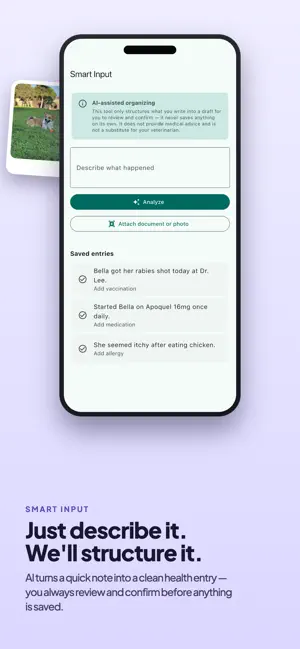
PawVault is the simple, private home for your pet's health records — vaccinations, vet visits, medications, documents, and reminders, all in one organized archive you actually keep up to date. Stop digging through emails, photos, and folders for your dog or cat's paperwork. PawVault gives every pet a clean profile and a complete health timeline you can pull up in seconds — at the vet, at boarding, or at home. WHY PET OWNERS LOVE PAWVAULT • Multiple pet profiles — track species, breed, weight, allergies, conditions, and notes for each animal. • Health timeline — log vaccinations, vet visits, medications, lab tests, surgeries, symptoms, grooming, and allergies, then filter by type or date. • Document vault — store vaccination certificates, insurance, lab results, prescriptions, and passports as images or PDFs, with expiry tracking so nothing lapses. • Reminders — schedule one-off or repeating reminders with on-device notifications, and mark them complete when done. • Smart Input (AI) — type or paste free-form notes and the assistant organizes them into a structured draft entry. You review and confirm before anything is saved. • Document scanning (AI) — snap a photo or pick a PDF and the assistant reads it to pre-fill an editable form. Nothing is stored until you confirm. • Paw Scan (AI) — photograph your pet's paw and the assistant describes what is visible, so you can keep a record and compare it over time. It does not tell you what something is. • Vet summary export — generate a clean PDF of your pet's records to share with your vet, sitter, or new clinic, and save a copy. • Cloud backup & sync — works instantly and anonymously; sign in with email, Google, or Apple to back up and sync, and your existing data links to your account. HOW IT WORKS 1. Add your pet and the key details. 2. Log health events to the timeline, or use Smart Input to draft them from your notes. 3. Upload or scan documents — certificates, lab results, insurance, prescriptions. 4. Set reminders so the next vaccine or dose is never missed. 5. Export a vet summary PDF whenever you need to share records. PRIVATE BY DEFAULT PawVault starts working immediately with no account required. When you choose to sign in, your data is backed up securely to the cloud and synced across your devices. PAWVAULT PRO Upgrade to Pro for unlimited pets and the AI features (Smart Input, document scanning, and Paw Scan). Pro is an annual subscription with a free trial; the core record-keeping features are free. A NOTE ON AI The AI features in PawVault turn what you give it into editable drafts you review before anything is saved. Paw Scan describes what is visible in a photo of your pet's paw and nothing more — it does not tell you what something is. PawVault helps you keep records: it does not diagnose conditions, give medical or veterinary advice, or replace your veterinarian. Always consult a qualified vet for health decisions. Bring order to your pet's health records. Download PawVault and build your pet's complete health archive today. Terms of Use (EULA): https://www.apple.com/legal/internet-services/itunes/dev/stdeula/
Ratings & reviews
5.0
8 ratings
What’s new
Version 1.0.13 · Updated October 12, 2026
Attachments • Every file you attach is kept and shown, including the extra pages of a scan. • Document and Smart Input lists say which entries carry files, without waiting for the images to download. • Pick several photos from your library at once. Reminders • An event reminder now takes a time as well as a date, and event reminders actually arrive. Documents • The issue date is clearly marked as required, and an expiry date can be removed. Vet Summary • A summary saved in the app keeps the name you gave it, and the history no longer breaks while a save is still settling. Paw Scan • Open a saved check from History, with the photos it was made from. • Clearer colours for what a check found, and a photo too unclear to describe is never shown as reassurance. Bigger screens • On iPad and on a foldable iPhone, a list and what it opens sit side by side, and content no longer stretches across the whole display. Also: the time picker opens ready to type, and the keyboard no longer lingers after a form closes.
App privacy
The developer, Ivan Chernoknizhnikov, reported these privacy practices to Apple.
Data Used to Track You
The following data may be used to track you across apps and websites owned by other companies:
- Identifiers: User ID, Device ID
- Usage Data: Advertising Data
Data Not Linked to You
The following data, which may be collected but is not linked to your identity, may be used for the following purposes:
- Identifiers: User ID, Device ID
- Usage Data: Advertising Data, Product Interaction
- Diagnostics: Crash Data, Performance Data, Other Diagnostic Data
- Contact Info: Email Address
Used for: Developer’s Advertising or Marketing, Analytics, Product Personalization, App Functionality
Alternatives to PawVault: Pet Health Records
Looking for apps like PawVault: Pet Health Records? Here are 6 similar apps on the App Store. The highest rated is Fasting — Intermittent Timer (4.9/5), and all 6 are free to download.
-
 Kegel Men Trainer: Full Power
4.7
-
 SecondStrength
3.9
-
 Fasting — Intermittent Timer
4.9
-
 Unchecked: AI Protein Tracker
4.4
-
 Baby Tracker: Robin
4.9
-
 Abify: Six Pack Abs at Home
4.3
| App | Rating | Price | Last updated | Compare |
|---|---|---|---|---|
| PawVault: Pet Health Records | 5.0 / 5 (8 ratings) | Free | October 12, 2026 | |
| Kegel Men Trainer: Full Power | 4.7 / 5 (13) | Free | Jun 27, 2026 | Compare |
| SecondStrength | 3.9 / 5 (12) | Free | Jul 24, 2026 | Compare |
| Fasting — Intermittent Timer | 4.9 / 5 (25) | Free | Oct 22, 2026 | Compare |
| Unchecked: AI Protein Tracker | 4.4 / 5 (75) | Free | Sep 29, 2026 | Compare |
| Baby Tracker: Robin | 4.9 / 5 (54) | Free | Oct 21, 2026 | Compare |
| Abify: Six Pack Abs at Home | 4.3 / 5 (739) | Free | Jun 26, 2026 | Compare |