

MP3 Trimmer
Jeny Goentoro Music iPhoneiPadiPod touch
MP3 Trimmer is a free Music app for iPhone and iPad by Jeny Goentoro. Requires iOS 16.0. Updated June 25, 2026.
- Price
- Free
- on the App Store
- Size
- 40 MB
- Age 4+
- Updated
- Jun 25
- 2026 · v1.0
Screenshots



About MP3 Trimmer
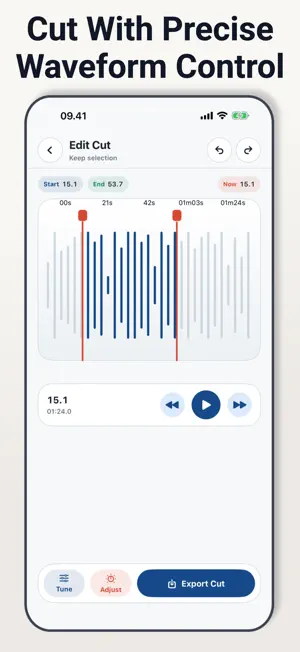
MP3 Trimmer helps you cut audio into the exact section you want to keep. Import a clip from Photos, Files, or a direct URL, then use the waveform editor to choose the start and end points before saving the result. The app is built for practical audio edits: shortening a recording, cutting a song section, preparing a sound bite, cleaning up a voice note, or keeping only the useful part of a longer file. You can preview the selected range, switch between regular cut and middle cut, and make small adjustments with zoom, playback controls, and undo or redo. Edit Audio With Control - Import audio from Photos, Files, or URL - Trim with draggable waveform handles - Use regular cut or middle cut mode - Zoom into the waveform for finer timing - Preview playback before exporting - Undo or redo trim changes while editing Adjust the Output - Change volume before saving - Adjust tempo when needed - Add fade in and fade out - Choose output quality options - Save the finished audio file - Share the result from the export screen Keep Your Clips Organized - View saved audio in History - Preview previous exports - Rename saved clips - Share or delete saved files - Reopen a saved clip for another edit MP3 Trimmer works well for audio notes, music snippets, ringtone-style clips, podcast cuts, study recordings, voice memos, and quick social media sound edits. Most editing happens on your device after you choose the source file. URL import requires network access to download the audio. MP3 Trimmer is free to use. Optional Pro access removes ads, unlocks unlimited trims, and enables all output options. Terms of Use: https://alderpathstudio.github.io/MP3-Trimmer/term-of-use.html Privacy Policy: https://alderpathstudio.github.io/MP3-Trimmer/privacy-policy.html
App privacy
The developer, Jeny Goentoro, reported these privacy practices to Apple.
Data Used to Track You
The following data may be used to track you across apps and websites owned by other companies:
- Purchases: Purchase History
- Identifiers: Device ID
- Usage Data: Advertising Data
- Diagnostics: Crash Data
Data Not Linked to You
The following data, which may be collected but is not linked to your identity, may be used for the following purposes:
- Identifiers: Device ID
- Usage Data: Advertising Data
- Purchases: Purchase History
- Diagnostics: Crash Data
Used for: Third-Party Advertising, Analytics, App Functionality
Alternatives to MP3 Trimmer
Looking for apps like MP3 Trimmer? Here are 6 similar apps on the App Store. The highest rated is Vocal Remover - Music Splitter (5.0/5), and all 6 are free to download.
-
 Riconoscimento Tonalità
-
 OtoCanvas
-
 Vocal Remover - Music Splitter
5.0
-
 Music Cutter ™
5.0
-
 Audio Converter - Axyonit
-
 Session: Vocal Remover & Loop
| App | Rating | Price | Last updated | Compare |
|---|---|---|---|---|
| MP3 Trimmer | – | Free | June 25, 2026 | |
| Riconoscimento Tonalità | – | Free | May 1, 2026 | Compare |
| OtoCanvas | – | Free | Apr 8, 2026 | Compare |
| Vocal Remover - Music Splitter | 5.0 / 5 (1) | Free | Aug 24, 2026 | Compare |
| Music Cutter ™ | 5.0 / 5 (1) | Free | Apr 27, 2026 | Compare |
| Audio Converter - Axyonit | – | Free | Mar 14, 2026 | Compare |
| Session: Vocal Remover & Loop | – | Free | Aug 18, 2026 | Compare |
Compare MP3 Trimmer with the top alternatives: ratings, updates, ASO score and keyword gaps →