

Notebble: Notes & Reminders
Oleksandr Syrota Productivity iPhoneiPadiPod touch
Notebble: Notes & Reminders is a free Productivity app for iPhone and iPad by Oleksandr Syrota. Requires iOS 13.0. Updated November 2, 2026.
- Price
- Free
- on the App Store
- Size
- 39 MB
- Age 4+
- Updated
- Nov 2
- 2026 · v1.3.0
Screenshots

About Notebble: Notes & Reminders
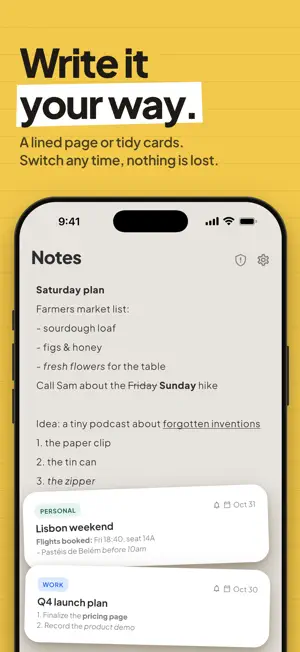
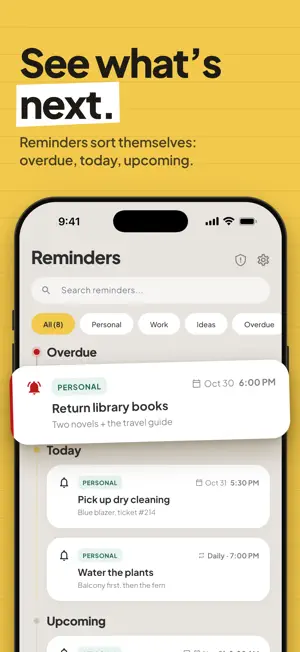
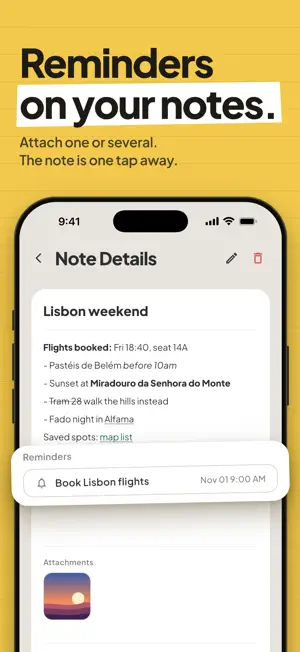
Notebble is a notes and reminders app that keeps to itself. No account to create, no cloud to sync with, no analytics, no ads. Everything you write stays on your device. WRITE THE WAY YOU THINK Pick the style that suits you, and switch whenever you like: • Structured — notes as cards with a title, description, category and attachments. Search and filter them as the list grows. • Freeform — one blank ruled page. No fields, no structure. Just write. Format as you go with bold, italic, underline, strikethrough, bullet and numbered lists, and links you can tap straight through to your browser. Attach photos and files to any note. SET YOUR OWN REMINDERS Set a one-off reminder, or repeat it daily, weekly or monthly. Notebble schedules them as local notifications on your device. LINK NOTES AND REMINDERS Attach a reminder to a note and jump between them. Your research and the nudge to act on it live in the same place. YOURS ALONE • No account, no sign-in, no email address • No backend — the developer cannot see your notes, because there is nowhere for them to go • No analytics, no crash reporting, no advertising identifiers, no tracking • Notes and reminders work fully offline Because everything lives on your device and Notebble has no cloud sync or backup of its own, uninstalling Notebble deletes your notes permanently. Notebble is not a medical device and must not be used for medication, medical appointments, or any other health-related or critical reminders or notes. Notifications can be delayed or missed, and notes can be lost, so always keep another way to remember what matters. Terms of Use (EULA): https://www.apple.com/legal/internet-services/itunes/dev/stdeula/ Privacy Policy: https://alexbuildsthings1.github.io/notebble-legal/privacy_policy.html
What’s new
Version 1.3.0 · Updated November 2, 2026
• Open the app and write in a blink: a new launch screen and no pop-ups in your way. We ask about notifications only when you open Reminders. • Freeform or Structured? Switch in one tap on the Notes page. • Freeform: tap the pencil to jump to the end of your page and keep writing. No more scrolling down. • Smoother writing: hide the keyboard in one tap, add a link by just pasting it. • New quick tour in Settings.
App privacy
The developer, Oleksandr Syrota, reported these privacy practices to Apple.
Data Not Linked to You
The following data, which may be collected but is not linked to your identity, may be used for the following purposes:
- Purchases: Purchase History
Used for: Analytics, App Functionality
Alternatives to Notebble: Notes & Reminders
Looking for apps like Notebble: Notes & Reminders? Here are 6 similar apps on the App Store. The highest rated is Remind Me Faster (4.8/5), and all 6 are free to download.
-
 Notty - Notes & Reminders
-
 Aheado: Reminders & Deadlines
-
 Paso: Timeline Planner
3.8
-
 Remind Me Faster
4.8
-
 Reminder - Widget & Routine
4.6
-
 Parking Dnipro
| App | Rating | Price | Last updated | Compare |
|---|---|---|---|---|
| Notebble: Notes & Reminders | – | Free | November 2, 2026 | |
| Notty - Notes & Reminders | – | Free | Apr 23, 2026 | Compare |
| Aheado: Reminders & Deadlines | – | Free | Oct 29, 2026 | Compare |
| Paso: Timeline Planner | 3.8 / 5 (5) | Free | Oct 26, 2026 | Compare |
| Remind Me Faster | 4.8 / 5 (458) | Free | Nov 1, 2026 | Compare |
| Reminder - Widget & Routine | 4.6 / 5 (5) | Free | Sep 17, 2026 | Compare |
| Parking Dnipro | – | Free | Oct 28, 2026 | Compare |