

Screen Time Control: ScreenPup
Soleia Technologies (OPC) Private Limited Productivity iPhoneiPadiPod touch
Screen Time Control: ScreenPup is a free Productivity app for iPhone and iPad by Soleia Technologies (OPC) Private Limited. Requires iOS 16.4.
- Price
- Free
- on the App Store
- Size
- 57 MB
- Age 4+
- Updated
- Aug 27
- 2026 · v1.0.11
Screenshots


About Screen Time Control: ScreenPup
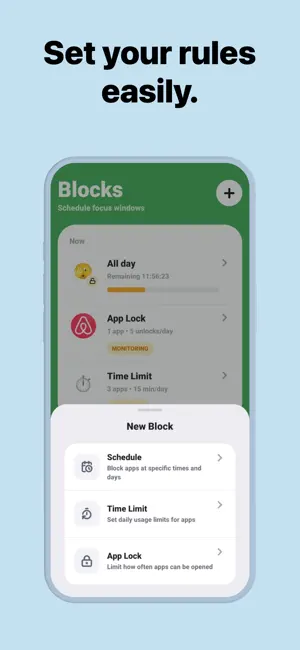
Take back your screen time with ScreenPup, a playful focus blocker that helps you spend less time inside the apps you open by accident. Start focus sessions, block distracting apps, set daily limits, schedule screen-free windows, and track your progress with real usage reports. ScreenPup is built for people who want fewer compulsive pickups, less doomscrolling, better sleep, and more time back in their day. What You Get - Focus sessions that block distracting apps while you work, study, or reset - App Lock to limit how often certain apps can be opened each day - Daily time limits for the apps that drain the most attention - Smart schedules for mornings, deep work, wind-down, and bedtime - Limited unlocks and breaks so you can stay flexible without losing control - Real screen time reports with weekly and monthly trends - Focus score, streaks, pickups, and top app insights - Personalized onboarding based on your habits and goals - Reminders and progress signals to help you stay consistent Private & Secure ScreenPup uses your device's Screen Time and usage permissions to power blocking, schedules, and reports. Your focus controls are designed to run on your phone, and ScreenPup does not need access to the specific content you view inside apps. *Note: All features described above require a subscription. Terms of Use: https://www.screenpup.app/terms Privacy Policy: https://www.screenpup.app/privacy
What’s new
Version 1.0.11 · Updated August 27, 2026
Bug fixes and performance improvements.
App privacy
The developer, Soleia Technologies (OPC) Private Limited, reported these privacy practices to Apple.
Data Used to Track You
The following data may be used to track you across apps and websites owned by other companies:
- Purchases: Purchase History
- Identifiers: Device ID
- Usage Data: Product Interaction
Data Not Linked to You
The following data, which may be collected but is not linked to your identity, may be used for the following purposes:
- Purchases: Purchase History
- Identifiers: Device ID
- Usage Data: Product Interaction, Other Usage Data
Used for: Third-Party Advertising, Analytics, App Functionality
Alternatives to Screen Time Control: ScreenPup
Looking for apps like Screen Time Control: ScreenPup? Here are 6 similar apps on the App Store. The highest rated is ScrollPal: Screen Time Blocker (3.3/5), and all 6 are free to download.
-
 App Blocker Focus Fomo Fast
-
 ScrollPal: Screen Time Blocker
3.3
ScrollPal: Screen Time Blocker
3.3
-
 Screen Time & Focus: Pausora
-
 Screen Time Control: memu lock
-
 Sapiens: Screen Time Control
-
 Pupmeter : Screen Time Control
| App | Rating | Price | Last updated | Compare |
|---|---|---|---|---|
| Screen Time Control: ScreenPup | – | Free | August 27, 2026 | |
| App Blocker Focus Fomo Fast | – | Free | Sep 10, 2026 | Compare |
| ScrollPal: Screen Time Blocker | 3.3 / 5 (3) | Free | Jun 29, 2026 | Compare |
| Screen Time & Focus: Pausora | – | Free | Jul 28, 2026 | Compare |
| Screen Time Control: memu lock | – | Free | Jun 12, 2026 | Compare |
| Sapiens: Screen Time Control | – | Free | Jul 20, 2026 | Compare |
| Pupmeter : Screen Time Control | – | Free | Dec 17, 2025 | Compare |