

CarHA
Veghes Lucian Utilities iPhoneiPadiPod touch
CarHA is a paid Utilities app for iPhone and iPad by Veghes Lucian. Requires iOS 17.0. Updated October 15, 2026.
- Price
- 9.99 USD
- on the App Store
- Size
- 7 MB
- Age 4+
- Updated
- Oct 15
- 2026 · v2.2
Screenshots


About CarHA
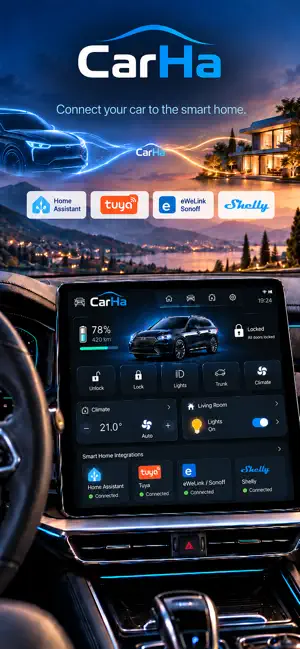
CarHA lets you control your Home Assistant smart home directly from your car's touch screen while driving. Configure buttons for lights, switches, covers, and any Home Assistant entity. Monitor sensors, battery levels, water tanks, and power consumption — all from your car dashboard with large, color-coded buttons designed for driving. FEATURES - Control any Home Assistant switch, light, or automation - Monitor sensors in real time with WebSocket updates - Fully customizable tabs and buttons with colored icons - Supports multiple Home Assistant instances - Geofence zones — get notified or trigger automations automatically when you arrive near home, work, or any location - iOS Widget — check battery and sensor status from your home screen - Backup & Restore — export and import your configuration - Works over local network or remote connection (Tailscale, Nabu Casa) - No cloud, no subscriptions — connects directly to your server MQTT support — connect any MQTT broker directly (ESPHome, Zigbee2MQTT, Mosquitto) eWeLink support — control Sonoff devices directly without Home Assistant Tuya support — control Tuya and Smart Life devices directly REQUIREMENTS - A running Home Assistant instance - Home Assistant URL and Long-Lived Access Token - iPhone with iOS 16+ - A car with a compatible car dashboard system CarHA is not affiliated with Nabu Casa, Inc. or the Home Assistant project.
What’s new
Version 2.2 · Updated October 15, 2026
Thanks for the feedback - this update is about reach and reliability. • NEW Car Preview: your CarPlay dashboard right in the app - and it actually works • Geofencing is dependable now (fixed the permission flow; allow Location "Always") • Binary sensors can colour by state (e.g. gate open = green), plus an Invert option • The widget shows live values, and tapping it performs the action • Tuya: much broader device support - curtains, locks, lights, plugs, multi-channel • Fresh screenshots, branded look, assorted fixes
App privacy
The developer, Veghes Lucian, reported these privacy practices to Apple.
Data Not Collected
The developer does not collect any data from this app.
Alternatives to CarHA
Looking for apps like CarHA? Here are 6 similar apps on the App Store. The highest rated is HA Monitor for Home Assistant (5.0/5), and all 6 are free to download.


| App | Rating | Price | Last updated | Compare |
|---|---|---|---|---|
| CarHA | – | 9.99 USD | October 15, 2026 | |
| Hi-Lights | – | Free | Nov 3, 2025 | Compare |
| Freedom Won | – | Free | Oct 17, 2026 | Compare |
| CCA Remote | – | Free | Jul 6, 2026 | Compare |
| GdAhome | – | Free | Nov 4, 2026 | Compare |
| Car_Pod | – | Free | Dec 14, 2023 | Compare |
| HA Monitor for Home Assistant | 5.0 / 5 (1) | Free | Nov 8, 2026 | Compare |
Compare CarHA with the top alternatives: ratings, updates, ASO score and keyword gaps →