

SentryGuard
Benjamin Barghoud Utilities iPhoneiPadiPod touch
SentryGuard is a free Utilities app for iPhone and iPad by Benjamin Barghoud. Requires iOS 15.1. Updated October 7, 2026.
- Price
- Free
- on the App Store
- Size
- 36 MB
- Age 4+
- Updated
- Oct 7
- 2026 · v1.1.0
Screenshots

About SentryGuard
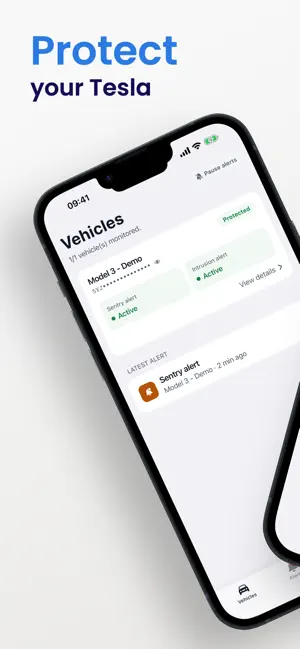
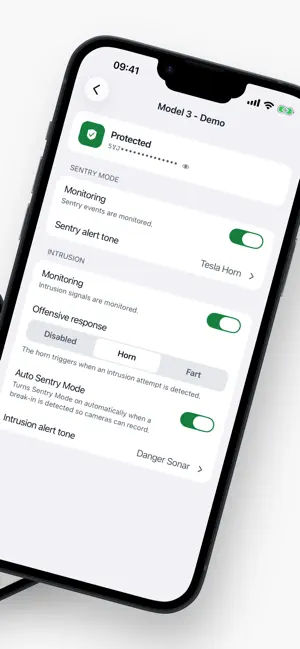
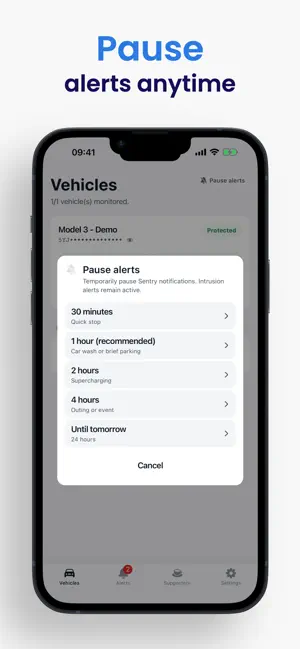
Protect and monitor your Tesla with SentryGuard – the open-source, 100% free, and privacy-respecting security app. Designed specifically for Tesla owners, SentryGuard transforms your vehicle's Sentry Mode into a connected, responsive, and intelligent alarm system: receive instant push alerts and automatically trigger Sentry Mode camera recording the second an intrusion attempt is detected—even if Sentry Mode was turned off to save battery. --- OPEN-SOURCE PROJECT & COMMITTED TO SECURITY SentryGuard is not a commercial application. It is developed transparently and ethically: • 100% FREE: No hidden subscriptions, no in-app purchases, no ads, and no trackers. • COMMUNITY-FUNDED: The development and infrastructure of SentryGuard rely entirely and solely on user donations. • OPEN SOURCE: The application's code is public and auditable by anyone. You know exactly how your data is processed. • STRICT SECURITY: SentryGuard uses Tesla's official authentication protocol (Tesla OAuth). Your Tesla tokens are encrypted (AES-256) on our servers, and your session is kept in your phone's secure storage. --- COMPREHENSIVE FEATURES FOR YOUR VEHICLE • AUTO SENTRY MODE (Emergency Recording): Turned Sentry Mode off at home or work to save battery? When a door handle pull or breach attempt is detected, SentryGuard automatically wakes up and turns Sentry Mode ON to record the intruder on video. • REAL-TIME ALERTS: Get notified immediately of any suspicious event. Receive instant notifications on your phone or directly on Telegram via our dedicated bot. Every notification names the vehicle involved. • CRITICAL ALERTS: Break-in alerts ring even in Silent mode or Do Not Disturb. • ONE TONE PER ALERT: Pick from 5 tones (Sentry Siren, Tesla Horn, Danger Sonar…), with a different one per vehicle and per alert type. • PAUSE ALERTS: Silence Sentry alerts from 30 minutes to until tomorrow, from the app or right from the notification. Break-in alerts stay on. • STRAIGHT TO THE CAMERA: Tap an alert to open the Tesla app on the Sentry camera view of the vehicle. • ACTIVE DETERRENCE (Remote Horn & Boombox): In case of a confirmed intrusion attempt, scare away intruders by automatically triggering your Tesla's horn or sounds to alert bystanders. • ZERO BATTERY DRAIN TELEMETRY: Passive listening to Tesla's official telemetry stream with no constant polling and zero phantom drain at rest. • VIRTUAL KEY PAIRING: Securely associate a Tesla virtual key to send encrypted commands to your vehicle reliably and safely. • ALERT HISTORY: View a complete and detailed history of your vehicle's events at a glance, with filters for severity level (Critical / Warning). • SIMPLIFIED CONTROL: Enable or disable Sentry Mode or the intrusion alarm system with a simple gesture. • VISUAL COMFORT: A modern interface with automatic dark and light themes, and full support for French and English. --- HOW DOES IT WORK? 1. Log in securely via the official Tesla login page. 2. Configure your notification preferences (on your phone and/or Telegram). 3. Pair your Tesla virtual key by following our step-by-step guide. 4. Enable Auto Sentry and Break-in monitoring in your vehicle settings. 5. SentryGuard is now watching over your vehicle. SentryGuard is an independent project created for the community, by the community. Join us and give your vehicle the protection it deserves!
What’s new
Version 1.1.0 · Updated October 7, 2026
What's new in 1.1.0 • Pause Sentry alerts: temporarily silence Sentry notifications (from 30 minutes to until tomorrow) from the dashboard, settings, or right from the notification. Break-in alerts always stay on. • Custom alert sounds: pick from 5 tones (Sentry Siren, Tesla Horn, Danger Sonar…) and set a different sound per vehicle for Sentry and break-in alerts. • Critical alerts: break-in alerts can sound even in Silent mode or Do Not Disturb. You can turn them on during setup. If you had already allowed notifications, delete and reinstall SentryGuard so iOS offers this permission. • Straight to the camera: tap an alert to open the Tesla app on the Sentry camera view of the vehicle that triggered it. • Vehicle name in notifications: see at a glance which car raised the alert. • Richer dashboard: your latest alert is shown with its vehicle and time, and each vehicle gets a colored status dot. Fixes • The back button on the vehicle screen works again on iOS 26. • The refresh spinner now only appears when you pull down to refresh. • The dashboard pause button is no longer cut off.
App privacy
The developer, Benjamin Barghoud, reported these privacy practices to Apple.
Data Linked to You
The following data, which may be collected and linked to your identity, may be used for the following purposes:
- Identifiers: User ID, Device ID
- Diagnostics: Crash Data, Performance Data, Other Diagnostic Data
Used for: App Functionality
Alternatives to SentryGuard
Looking for apps like SentryGuard? Here are 6 similar apps on the App Store. The highest rated is TSL Check: Delivery Checklist (5.0/5), and all 6 are free to download.
-
 T4U for Tesla
-
 TSL Check: Delivery Checklist
5.0
TSL Check: Delivery Checklist
5.0
-
 Delivery Status For Tesla
4.5
Delivery Status For Tesla
4.5
-
 Boring Order Tracker
4.5
Boring Order Tracker
4.5
-
 Wattly
4.5
Wattly
4.5
-
 T-Bridge
5.0
T-Bridge
5.0
| App | Rating | Price | Last updated | Compare |
|---|---|---|---|---|
| SentryGuard | – | Free | October 7, 2026 | |
| T4U for Tesla | – | Free | Oct 10, 2026 | Compare |
| TSL Check: Delivery Checklist | 5.0 / 5 (11) | Free | Oct 15, 2026 | Compare |
| Delivery Status For Tesla | 4.5 / 5 (129) | Free | Oct 12, 2026 | Compare |
| Boring Order Tracker | 4.5 / 5 (6) | Free | Oct 20, 2026 | Compare |
| Wattly | 4.5 / 5 (40) | Free | Oct 18, 2026 | Compare |
| T-Bridge | 5.0 / 5 (2) | Free | Jul 7, 2026 | Compare |
Compare SentryGuard with the top alternatives: ratings, updates, ASO score and keyword gaps →