

DeferDeck
Yasuko Shikiuchi Utilities iPhoneiPadiPod touch
DeferDeck is a free Utilities app for iPhone and iPad by Yasuko Shikiuchi. Requires iOS 18.0. Updated October 21, 2026.
- Price
- Free
- on the App Store
- Size
- 12 MB
- Age 4+
- Updated
- Oct 21
- 2026 · v1.0.22
Screenshots



About DeferDeck
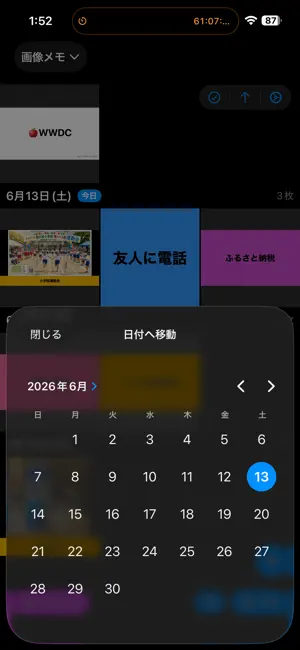
Organizing your photos has never been easier. DeferDeck lays out your Photo Library albums in clean, date-by-date sections—your "deck"—so you can organize, browse, and even defer photos to the future, all in one simple place. **What you can do** Clear out screenshots in bulk Select all those piled-up screenshots at once and delete them in a tap. Align several photos to the same date or move them into other albums together—no more one-by-one. Got a photo to send a friend? Share & Delete shares it and tidies up in a single step. Turn images into reminders A sale flyer, a school-event pamphlet, a concert announcement—just set a photo's date to the day it matters, and it'll quietly catch your eye every time you open Photos. Anything you'd rather handle later? Defer it to tomorrow, next Saturday, next month, a specific time of day, or even a random future date. Deferred by mistake? Undo it right after, straight from the toast. Build daily routines Add a photo to Routine and its date rolls forward to today automatically, every day—perfect for a medication note, a stretching routine, or anything you want in front of you daily. Check or remove routine photos anytime from Quick Access. Copy text from screenshots A Wi-Fi password, an order number, a URL—copy any text you spot in a screenshot straight from the detail view, no retyping required. Create images with text Tap the + button and choose Create Memo to turn a note into a photo. Add a label and it's automatically filed into a matching album, so it's easy to find later. Relive your memories Open an album from a trip or a special day, choose a date, and jump straight to that day's photos. The moments you're looking for, right at your fingertips. **Key features** - Albums shown in date-by-date sections - One-tap jump to any date - Bulk select, delete, and add to albums - Share & Delete—share and organize at once - Batch-change or defer photo dates, with time-of-day and random options - Undo a postpone right after you make it - Routine photos roll forward to today automatically - Copy text from screenshots in one tap - Create text images, auto-filed by label
What’s new
Version 1.0.22 · Updated October 21, 2026
- Improved stability
App privacy
The developer, Yasuko Shikiuchi, reported these privacy practices to Apple.
Data Used to Track You
The following data may be used to track you across apps and websites owned by other companies:
- Identifiers: Device ID
- Usage Data: Advertising Data
Data Linked to You
The following data, which may be collected and linked to your identity, may be used for the following purposes:
- Identifiers: Device ID
Used for: Third-Party Advertising
Data Not Linked to You
The following data, which may be collected but is not linked to your identity, may be used for the following purposes:
- Usage Data: Advertising Data
- Diagnostics: Crash Data
Used for: Third-Party Advertising, Analytics, App Functionality
Alternatives to DeferDeck
Looking for apps like DeferDeck? Here are 6 similar apps on the App Store. The highest rated is Super Simplest Note (5.0/5), and all 6 are free to download.
-
 打てるんです。
-
 Super Simplest Note
5.0
-
 Wristwatch calendar
4.8
-
 Secret Notepad with Password
5.0
-
 EZ Sign(TM) NFC
3.9
-
 裁判官マップ
| App | Rating | Price | Last updated | Compare |
|---|---|---|---|---|
| DeferDeck | – | Free | October 21, 2026 | |
| 打てるんです。 | – | Free | Oct 23, 2026 | Compare |
| Super Simplest Note | 5.0 / 5 (1) | Free | Aug 12, 2026 | Compare |
| Wristwatch calendar | 4.8 / 5 (4) | Free | Feb 11, 2026 | Compare |
| Secret Notepad with Password | 5.0 / 5 (4) | Free | Jul 1, 2026 | Compare |
| EZ Sign(TM) NFC | 3.9 / 5 (7) | Free | Sep 8, 2026 | Compare |
| 裁判官マップ | – | Free | Mar 13, 2026 | Compare |
Compare DeferDeck with the top alternatives: ratings, updates, ASO score and keyword gaps →