

Shift Scheduler - Shiftmate
Toshihiro Nakao Business iPhoneiPadiPod touch
Shift Scheduler - Shiftmate is a free Business app for iPhone and iPad by Toshihiro Nakao. Requires iOS 18.0. Updated October 27, 2026.
- Price
- Free
- on the App Store
- Size
- 13 MB
- Age 4+
- Updated
- Oct 27
- 2026 · v1.6.0
Screenshots

About Shift Scheduler - Shiftmate
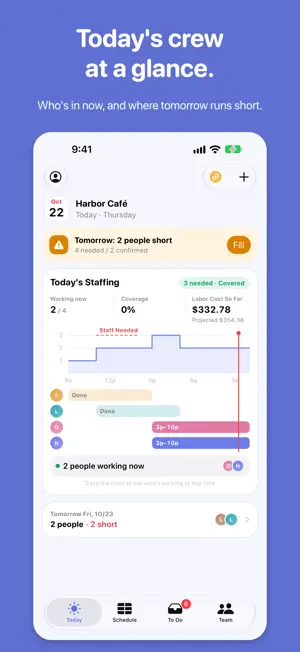
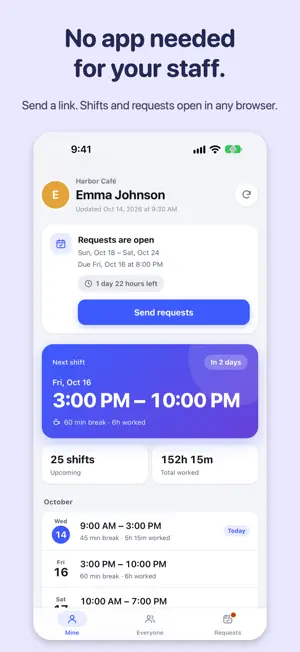
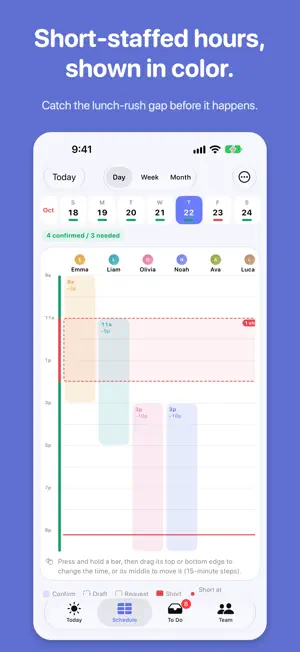
Still building the schedule on paper, a whiteboard or a spreadsheet? Shiftmate puts it in your pocket: tap a shift and the week fills in, and short-staffed days and hours stand out at a glance. Then send it to staff with one link, even if they don't have the app. For small shops with up to about 20 staff: cafes, restaurants, salons and retail. Add names and go. No account needed. [BUILD THE SCHEDULE] - A staff-by-day grid, just like paper. Tap a template to add a shift; copy last week in one go - Day, Week and Month views, plus an hourly headcount heatmap. Swipe to the next week or day [SEE WHERE YOU'RE SHORT] - Set staffing needs by weekday, by time of day (say, 3 people from 11a to 2p) and by role - Short days turn red, short hours are outlined, and the Day view lists what's missing - "Add Here" suggests the shift that covers the most missing hours, and who can work it - Alerts for empty hours, long streaks, short breaks and short rest [KNOW EACH PERSON'S LIMITS] - Save each person's unavailable times, temporary conflicts, weekly limits and shift length - Give staff several roles (front, kitchen) and mark trainees - Get alerted when no one can open, close or lead - Mismatches are flagged as you schedule (nothing is blocked) [CALL-OUTS AND COVER] - Mark a call-out; the original hours are kept - See who can step in, with overtime notes, and give them the shift - Hand off the rest of a shift partway through [COLLECT STAFF REQUESTS] - Staff check their shifts and send shift, day-off and swap requests - Weekly Requests cover a whole week; late ones are marked - To Do puts the most urgent shortage first; approve or decline requests right there - Swaps show who can take them, and the effect on hours, roles and cost [SHIFTMATE LINK] (separate auto-renewable subscription) - Each person gets their own page: their shifts and everyone's, in any browser - The same link always shows the latest - Collect requests by a deadline; staff send them from a browser to your To Do - Use on a PC: edit the week and approve requests in a browser (Premium: view only) - End-to-end encrypted; we can't read it. Wages, phone numbers and notes aren't included - Monthly or yearly; separate from one-time Premium [FILL GAPS AUTOMATICALLY] (Premium) - Drafts shifts for short days from needs and requests - Respects each person's limits and roles, rest between shifts and fairness - Nothing is final until you confirm [LABOR COST AND HOURS] - Hours and estimated labor cost per person - U.S. federal overtime (1.5x over 40 hours a week), or a custom rule with daily overtime and night premiums - Totals follow your payroll period - Schedule raises ahead; overnight shifts split the rate at midnight - Staff see their estimated gross pay (before taxes and deductions) [TODAY AT A GLANCE] - Today's Staffing: headcount through the day, who's on now and today's labor cost. Contact or adjust anyone from their row - Tomorrow's shortages show here and in the day-before reminder - Home Screen and Lock Screen widgets show today's lineup, shortages and to-dos [SHARE AND EXPORT] - Add confirmed shifts to your device's calendar - Share the schedule as an image or PDF, or send a calendar file (Premium) - Export totals as CSV by pay period (Premium) [ON SUPPORTED DEVICES] - Ask about shifts by voice, or describe changes in plain words in the To Do chat (saved only when you apply; stays on-device) [PRIVATE AND OFFLINE] - Data stays on your device and works offline (except Shiftmate Link) - Lock manager screens with an admin PIN (biometric unlock supported) - Light or dark appearance [PREMIUM (ONE-TIME PURCHASE)] Without Premium: up to 3 active staff. Premium adds unlimited staff, multiple locations, sync and backup across your devices, automatic scheduling, and sharing and export. Buy once; restore on your other devices. Terms of Use: https://www.apple.com/legal/internet-services/itunes/dev/stdeula/ Privacy Policy: https://kobako-apps.github.io/shiftmate/privacy/en/
What’s new
Version 1.6.0 · Updated October 27, 2026
- New: Use on a PC (Shiftmate Link). Scan the QR code in your computer's browser with "Use on a PC" on your iPhone, then see the week, add, change or delete shifts and approve requests there. Your iPhone checks and saves each change - With Premium, you can view the same pages on a computer (view only) - Open "Use on a PC" from the computer icon at the top right of Today and To Do, and send its address to your computer by AirDrop or email - Encrypted on your iPhone and in the browser. No account needed, and we can't read it
App privacy
The developer, Toshihiro Nakao, reported these privacy practices to Apple.
Data Not Collected
The developer does not collect any data from this app.
Alternatives to Shift Scheduler - Shiftmate
Looking for apps like Shift Scheduler - Shiftmate? Here are 6 similar apps on the App Store.
-
 自動シフト作成 SalonShift - サロン向け
-
 Shift_Mate
-
 APieceOfCake-easy scheduling
-
 EaseShift: Staff Scheduler
-
 Work Assignment Sheet
-
 Onlyシフト なぞるだけ簡単 シフト表・シフト作成
| App | Rating | Price | Last updated | Compare |
|---|---|---|---|---|
| Shift Scheduler - Shiftmate | – | Free | October 27, 2026 | |
| 自動シフト作成 SalonShift - サロン向け | – | Free | Oct 15, 2026 | Compare |
| Shift_Mate | – | Free | Oct 25, 2026 | Compare |
| APieceOfCake-easy scheduling | – | Free | Nov 25, 2025 | Compare |
| EaseShift: Staff Scheduler | – | Free | Oct 19, 2026 | Compare |
| Work Assignment Sheet | – | Free | Oct 12, 2026 | Compare |
| Onlyシフト なぞるだけ簡単 シフト表・シフト作成 | – | Free | Oct 18, 2026 | Compare |