

Dispatch Screen
FOOD HUB LIMITED Business iPhoneiPadiPod touch
Dispatch Screen is a free Business app for iPhone and iPad by FOOD HUB LIMITED. Requires iOS 15.5. Updated October 27, 2026.
- Price
- Free
- on the App Store
- Size
- 71 MB
- Age 4+
- Updated
- Oct 27
- 2026 · v5.4
Screenshots
About Dispatch Screen
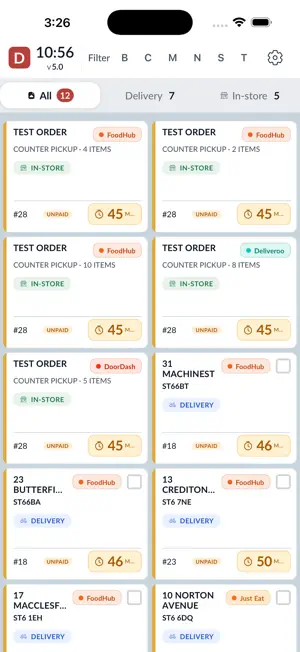
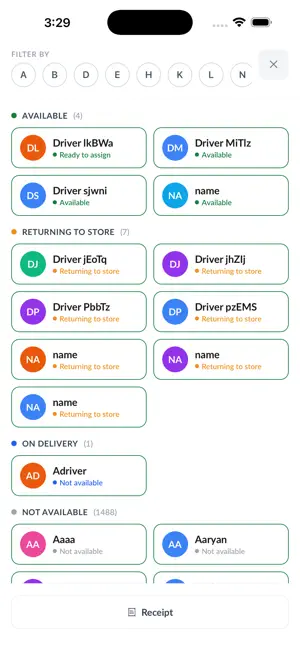
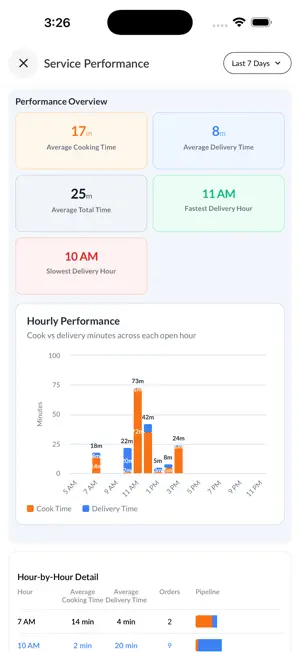
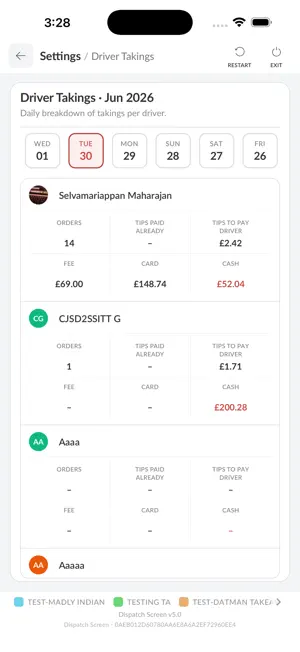
Dispatch Screen is the in-store operations app for Foodhub restaurants. It gives your kitchen and front-of-house team a live view of incoming orders, driver activity, and delivery progress — all in one place. Manage orders from start to finish • View orders across New, Cooking, Ready, and Out for Delivery stages • Mark orders ready and move them through your workflow quickly • See order details, customer information, and delivery addresses at a glance • Filter and sort orders to match how your team works Driver dispatch made simple • Assign drivers to single orders or multiple orders at once • View driver status on the home screen when enabled • Track which drivers are on delivery or returning • Use the map view to see orders and drivers on a live map Built for busy restaurant teams • Designed for tablets and in-store use during service • Real-time order updates so your board stays in sync • Print receipts and delivery labels when configured • Customisable settings for tabs, layout, service types, and display options Reports and insights • Access driver takings and store performance reports • Review order history and operational data to support your team Settings and control • Configure how orders are displayed and grouped • Manage account and device settings for your store • Adjust appearance, order management, and dispatch preferences Note: This app is intended only for registered Foodhub partners. To learn more or to become a partner, visit www.foodhub.com.
What’s new
Version 5.4 · Updated October 27, 2026
This release includes Staff Login, new Tip & Incentive Leakage and Delivery Area & Delay reports, improved offline order handling, Scan-to-Ready functionality, and a new Order ID (Last 4) display option.
App privacy
The developer, FOOD HUB LIMITED, reported these privacy practices to Apple.
Data Not Linked to You
The following data, which may be collected but is not linked to your identity, may be used for the following purposes:
- Contact Info: Name, Phone Number, Physical Address
- Diagnostics: Crash Data, Performance Data, Other Diagnostic Data
- Identifiers: User ID, Device ID
- Usage Data: Other Usage Data, Product Interaction
- Financial Info: Other Financial Info
- Location: Precise Location
Used for: Analytics, App Functionality, Other Purposes
Alternatives to Dispatch Screen
Looking for apps like Dispatch Screen? Here are 6 similar apps on the App Store.
-
 HyGenius
-
 Seito: Food Safety Checklists
-
 Clock-In Master: Staff App
-
 Clock In Master
-
 DigiSlides
-
 Super44: Local Business AI
| App | Rating | Price | Last updated | Compare |
|---|---|---|---|---|
| Dispatch Screen | – | Free | October 27, 2026 | |
| HyGenius | – | Free | Oct 29, 2026 | Compare |
| Seito: Food Safety Checklists | – | Free | Aug 19, 2026 | Compare |
| Clock-In Master: Staff App | – | Free | Aug 29, 2026 | Compare |
| Clock In Master | – | Free | Aug 23, 2026 | Compare |
| DigiSlides | – | Free | Aug 26, 2026 | Compare |
| Super44: Local Business AI | – | Free | Oct 30, 2026 | Compare |
Compare Dispatch Screen with the top alternatives: ratings, updates, ASO score and keyword gaps →