

Offline Translator: Live Voice
SIC Company Limited Utilities iPhoneiPadiPod touch
Offline Translator: Live Voice is a free Utilities app for iPhone and iPad by SIC Company Limited. Requires iOS 26.0. Updated June 25, 2026.
- Price
- Free
- on the App Store
- Size
- 7 MB
- Age 4+
- Updated
- Jun 25
- 2026 · v1.1
Screenshots


About Offline Translator: Live Voice
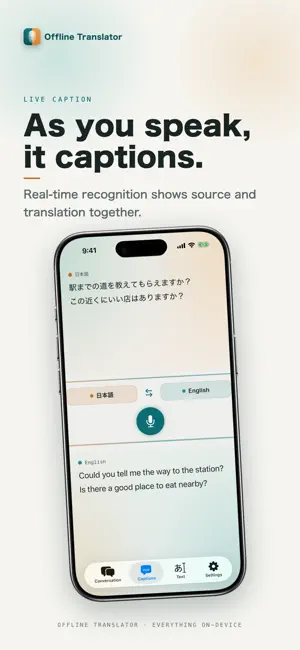
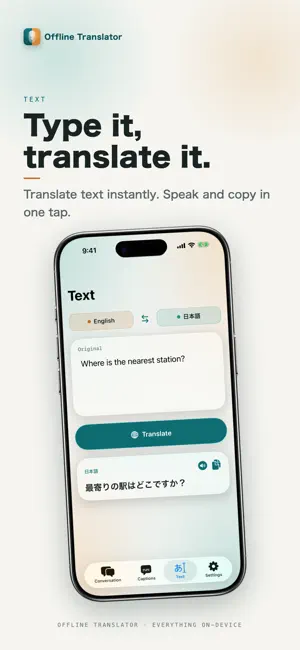
No internet needed — just talk, and be understood. A privacy-first, fully on-device offline translator and interpreter. Voice translation, conversation, real-time captions and text translation — speech and text are recognized, translated and read aloud entirely on your device. Nothing is sent to the cloud, so it works on a plane, abroad, or with no signal. Great for personal use such as travel and study, and for business too: store counters, reception desks, and customer service. One device for multilingual interpreting and inbound customer support. * Each language's translation and voice models download once. After that, everything works offline. ■ Why Offline Translator - No connection required: works even in airplane mode or with no signal. - Privacy-first: no account, no cloud. Your speech and text are never sent to a server for translation. - Real-time: as you speak, your words are translated and captioned into the other language. - Multilingual: many languages, starting with English and Japanese. ■ Four translation modes 【Conversation — two-way voice, face to face】 The screen splits in two so people across a table can talk naturally — you speak and it translates into their language, they speak and it translates back, in real time, with optional read-aloud. Ideal for travel or serving international customers. 【Live captions】 Recognizes speech on the spot and shows the source and translation together — great for meetings, seminars, or checking what you heard. 【Text translation】 Translate typed or pasted text. Tap once to read the result aloud or copy it — for emails, signs, menus and drafts. 【Read aloud】 Reads translations in a natural voice at an adjustable speed — to check pronunciation or let the other person hear it. ■ Where it shines - Stores, reception & customer service (commercial use OK): checkout counters, hotel front desks, restaurants, clinics and government windows — for international customers and inbound visitors. - Travel & business trips: airports, hotels, restaurants, taxis, shopping. - Learning: English conversation, listening and pronunciation practice. - Privacy-sensitive moments: translate confidential text without sending it out. ■ Supported languages English, Japanese, Chinese (Simplified / Traditional), Korean, Spanish, French, German, Italian, Portuguese, Russian, Thai, Vietnamese, Indonesian, Arabic, and Hindi. * Which languages and voices are available depends on your device and OS on-device support. Each language's model downloads once. ■ Privacy Speech recognition, translation and read-aloud all run on the device — your audio and text are never sent to a server, no account is required, and nothing is stored in the cloud. Networking is used only to serve ads. ■ Main features - Face-to-face conversation translation (two-way, real-time voice) - Live captions (source and translation together) - Text translation (type or paste → translate) - Read translations aloud (adjustable speed, optional auto read-aloud) - One-tap copy of translations - Translation history - Multilingual; store language models on the device for offline use - Fully on-device (no account, no cloud) ■ FAQ Q. Does it really work offline? A. Yes. Once you download a language's models, you can translate, recognize speech, and read aloud with no connection. Q. Is my speech or text sent anywhere? A. No. Everything runs on the device; your audio and text are never sent to a server for translation. Networking is used only for ads. Q. Can I use it for business, at a store or reception? A. Yes — it's suitable for commercial use such as store counters, reception desks, customer service, and inbound support. Q. Is there a cost? A. It's free to use (ads are shown). Translation that needs no connection and respects your privacy — from travel and study to store counters and reception desks. Offline, real-time voice translation, conversation, captions and text in one app. Cross the language barrier on your device today.
What’s new
Version 1.1 · Updated June 25, 2026
Fixed an app crash issue.
App privacy
The developer, SIC Company Limited, reported these privacy practices to Apple.
Data Used to Track You
The following data may be used to track you across apps and websites owned by other companies:
- Location: Coarse Location
- Identifiers: Device ID
- Usage Data: Product Interaction, Advertising Data
- Diagnostics: Crash Data, Performance Data
Data Linked to You
The following data, which may be collected and linked to your identity, may be used for the following purposes:
- Location: Coarse Location
- Identifiers: Device ID
- Usage Data: Product Interaction, Advertising Data
- Diagnostics: Performance Data
Used for: Third-Party Advertising
Data Not Linked to You
The following data, which may be collected but is not linked to your identity, may be used for the following purposes:
- Diagnostics: Crash Data
Used for: Third-Party Advertising
Alternatives to Offline Translator: Live Voice
Looking for apps like Offline Translator: Live Voice? Here are 6 similar apps on the App Store. The highest rated is Parley Live Translate (5.0/5), and all 6 are free to download.
-
 Parley Live Translate
5.0
Parley Live Translate
5.0
-
 CanadaUnits
-
 Video Compress Guy Space Clean
-
 LasPlayer - Local AI Subtitle
-
 Safe Translator
-
 Simply Ask
5.0
Simply Ask
5.0
| App | Rating | Price | Last updated | Compare |
|---|---|---|---|---|
| Offline Translator: Live Voice | – | Free | June 25, 2026 | |
| Parley Live Translate | 5.0 / 5 (1) | Free | Jun 2, 2026 | Compare |
| CanadaUnits | – | Free | Oct 20, 2024 | Compare |
| Video Compress Guy Space Clean | – | Free | Jun 5, 2026 | Compare |
| LasPlayer - Local AI Subtitle | – | Free | Oct 2, 2026 | Compare |
| Safe Translator | – | Free | Jun 8, 2026 | Compare |
| Simply Ask | 5.0 / 5 (1) | Free | May 8, 2025 | Compare |