

Slideshow Maker – Photo Video
APP TEAM Photo & Video iPhoneiPadiPod touch
Slideshow Maker – Photo Video is a free Photo & Video app for iPhone and iPad by APP TEAM. Requires iOS 18.6. Updated July 29, 2026.
- Price
- Free
- on the App Store
- Size
- 42 MB
- Age 12+
- Updated
- Jul 29
- 2026 · v1.2
Screenshots
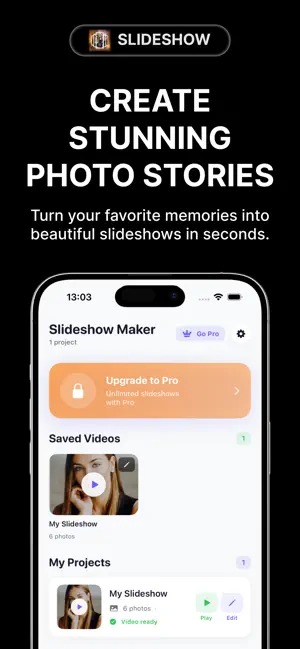
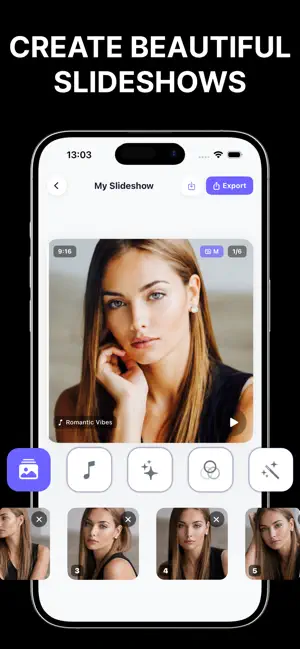
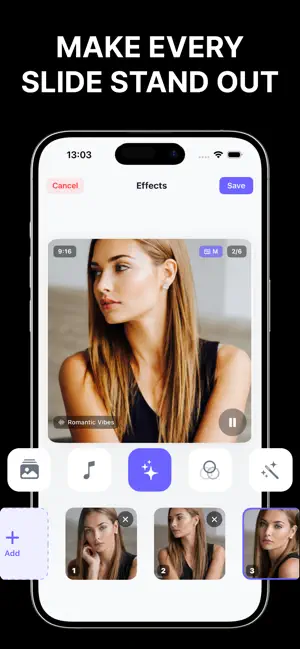

About Slideshow Maker – Photo Video
Turn your photos into stunning videos in seconds — with music, transitions, effects, and text. Slideshow Maker is the fastest and easiest way to create beautiful photo slideshows. Pick your photos, choose a song, and export a shareable HD video in just a few taps. Perfect for birthdays, weddings, anniversaries, graduations, travel memories, and every special moment in between. -> HOW IT WORKS 1. Add Photos — pick any photos from your library, arrange in any order 2. Add Music — choose from our built-in library or add your own songs 3. Export & Share — save to your gallery and share instantly to Instagram, TikTok, Facebook, YouTube, and WhatsApp -> FEATURES - Unlimited photos in every slideshow - 20+ animated transitions — fade, zoom, flip, slide, and more - Auto beat-sync music with your photos - Built-in royalty-free music library - Add your own music from Files or your library - Photo filters — vintage, vivid, mono, fade, noir, and more - Occasion themes — Wedding, Birthday, Travel, Graduation, Anniversary, Summer - Multiple aspect ratios — 9:16, 1:1, 16:9, 4:5, 4:3 - Customizable photo duration and transition speed - Export in HD 1080p - Share directly to any app -> PRO FEATURES - 4K Ultra HD export - All premium transitions and effects - Full music library with exclusive tracks - All fonts and text styles - Remove watermark - No ads -> PERFECT FOR Birthdays - Weddings - Anniversaries - Graduations - Baby photos Travel memories - Family reunions - Holiday cards - Instagram Reels TikTok videos - Facebook videos - WhatsApp status - YouTube Shorts Create your first slideshow today — it takes less than a minute. --- SUBSCRIPTION TERMS Slideshow Maker Pro is available as a weekly, monthly, or annual auto-renewing subscription. - Payment is charged to your Apple ID account at purchase confirmation - Subscription automatically renews unless cancelled at least 24 hours before the end of the current period - Your account will be charged for renewal within 24 hours before the end of the current period - You can manage or cancel your subscription in your App Store account settings - Any unused portion of a free trial period will be forfeited when you purchase a subscription Privacy Policy: https://sites.google.com/view/slideshowtc/home Apple Terms of Use: https://www.apple.com/legal/internet-services/itunes/dev/stdeula/
What’s new
Version 1.2 · Updated July 29, 2026
This update includes quality improvements, performance optimizations, and minor bug fixes to enhance your overall experience.
App privacy
The developer, APP TEAM, reported these privacy practices to Apple.
Data Used to Track You
The following data may be used to track you across apps and websites owned by other companies:
- Usage Data: Advertising Data
Data Not Linked to You
The following data, which may be collected but is not linked to your identity, may be used for the following purposes:
- Usage Data: Advertising Data
Used for: Third-Party Advertising, Analytics
Alternatives to Slideshow Maker – Photo Video
Looking for apps like Slideshow Maker – Photo Video? Here are 6 similar apps on the App Store. The highest rated is Slide Show Movie Maker (5.0/5), and all 6 are free to download.
-
 Slideshow Maker Video Editor
-
 Auto Slideshow
-
 Memories - Your Moments
-
 Moments Pick: Video to Photo
-
 Slide Show Movie Maker
5.0
-
 GalleryShow: Slideshow & Frame
| App | Rating | Price | Last updated | Compare |
|---|---|---|---|---|
| Slideshow Maker – Photo Video | – | Free | July 29, 2026 | |
| Slideshow Maker Video Editor | – | Free | Aug 21, 2026 | Compare |
| Auto Slideshow | – | Free | Sep 17, 2026 | Compare |
| Memories - Your Moments | – | Free | Mar 12, 2026 | Compare |
| Moments Pick: Video to Photo | – | Free | Aug 27, 2026 | Compare |
| Slide Show Movie Maker | 5.0 / 5 (3) | Free | Mar 31, 2026 | Compare |
| GalleryShow: Slideshow & Frame | – | Free | Oct 6, 2026 | Compare |