

Marigold — Screen Time & Focus
Lakshmikar Reddy Lakkireddy Productivity iPhoneiPadiPod touch
Marigold — Screen Time & Focus is a free Productivity app for iPhone and iPad by Lakshmikar Reddy Lakkireddy. Rated 5.0/5 from 1 ratings. Requires iOS 17.0.
- Rating
- 5.0
- 1 ratings
- Price
- Free
- on the App Store
- Size
- 4 MB
- Age 4+
- Updated
- Jun 17
- 2026 · v1.1.0
Screenshots


About Marigold — Screen Time & Focus
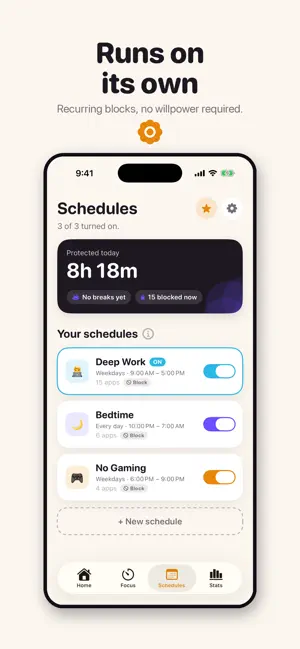
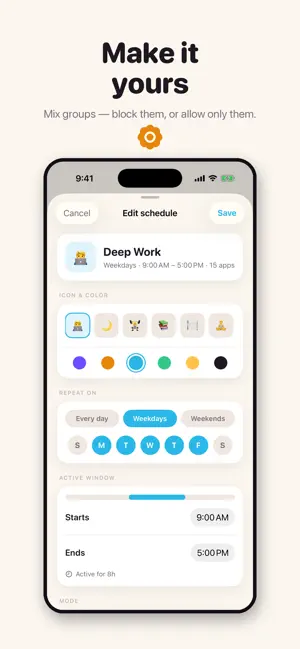
Your phone, on your side. Marigold holds the apps that eat your day — on schedules that run themselves, and on demand when you need to lock in. No shame, no lectures, no tricks. Just a calm minute between you and the scroll. HOW IT WORKS • Pick the apps you're avoiding. They're held during your schedules — work hours, bedtime, gym — and during focus sessions you start anytime. • Need one anyway? Take a break: sixty seconds of guided breathing, then five honest minutes. The pause is the point. • Changing your mind costs the same calm minute. Marigold is friction, not a prison — every door opens, just never on autopilot. FOCUS, ON DEMAND One tap starts a focus session — 25, 45, 90 minutes, or your own timer. Your apps are tucked away, a live countdown sits in the Dynamic Island, and finished minutes bank toward your day and your streak. Give up early and nothing is counted — the numbers never lie to you. SCHEDULES THAT RUN THEMSELVES Set your hours once. Marigold starts and stops on time with the app closed, overnight windows included. A home-screen widget shows what's held right now and what's next. HONEST NUMBERS Focused minutes are minutes you actually focused. Protected time is time your schedules actually covered. Breaks are counted, not judged. And the Screen Time report shows the week's truth: how much still got through, app by app, the number that should shrink. PRIVATE BY DESIGN Everything stays on your phone. Marigold uses Apple's Screen Time technology, sees your app choices only as anonymous tokens, collects nothing, and sends nothing anywhere. There is no account. The marigold opens at sunrise and closes at dusk. Your apps can learn the same rhythm. Terms of Use (EULA): https://www.apple.com/legal/internet-services/itunes/dev/stdeula/ Privacy Policy: https://lakkireddylabs.com/marigold/privacy-policy/
What’s new
Version 1.1.0 · Updated June 17, 2026
Introducing Marigold Pro • Unlimited app groups & schedules • Allow-only focus — block everything except the apps you choose • Daily limits — a soft daily budget for any group • Custom-length focus timers Also new: • A calmer Home with your past week at a glance — reclaimed time, breaks, and your streak • Step back through previous weeks in Stats • In-app guides that explain every feature • Subtle sounds, and a new Settings screen
App privacy
The developer, Lakshmikar Reddy Lakkireddy, reported these privacy practices to Apple.
Data Not Collected
The developer does not collect any data from this app.
Alternatives to Marigold — Screen Time & Focus
Looking for apps like Marigold — Screen Time & Focus? Here are 6 similar apps on the App Store. The highest rated is OFF: Disconnect now (5.0/5), and all 6 are free to download.
-
 Habit Tracker - Dayrise
4.5
-
 OFF: Disconnect now
5.0
-
 Vellum Assistant
4.1
-
 Detoxify - Short Block YT
2.5
-
 Feedless for YouTube
4.1
-
 Screen Time Control: Inscreen
4.6
| App | Rating | Price | Last updated | Compare |
|---|---|---|---|---|
| Marigold — Screen Time & Focus | 5.0 / 5 (1 rating) | Free | June 17, 2026 | |
| Habit Tracker - Dayrise | 4.5 / 5 (15) | Free | Oct 18, 2026 | Compare |
| OFF: Disconnect now | 5.0 / 5 (3) | Free | May 11, 2026 | Compare |
| Vellum Assistant | 4.1 / 5 (19) | Free | Sep 30, 2026 | Compare |
| Detoxify - Short Block YT | 2.5 / 5 (4) | Free | May 15, 2025 | Compare |
| Feedless for YouTube | 4.1 / 5 (49) | Free | Jul 16, 2024 | Compare |
| Screen Time Control: Inscreen | 4.6 / 5 (39) | Free | Feb 10, 2026 | Compare |