

Azlotv Stream
Adrian Dominguez Photo & Video iPhoneiPadiPod touch
Azlotv Stream is a free Photo & Video app for iPhone and iPad by Adrian Dominguez. Requires iOS 18.0. Updated August 12, 2026.
- Price
- Free
- on the App Store
- Size
- 43 MB
- Age 12+
- Updated
- Aug 12
- 2026 · v3.0.0
Screenshots
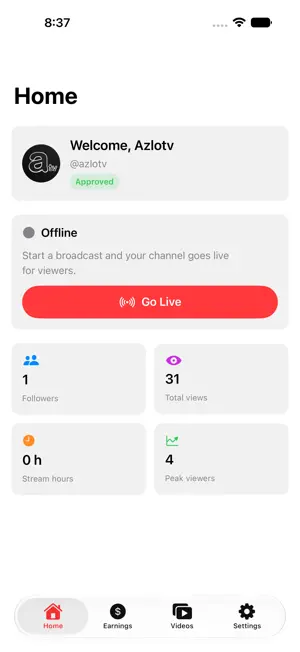


About Azlotv Stream
Azlotv Stream is the broadcaster app for Azlotv creators. Go live from your iPhone or iPad, grow your audience, and earn directly from your streams. GO LIVE IN SECONDS Start a high-quality live broadcast straight from your camera and microphone. Switch cameras, mute, and monitor your stream status in real time. ENGAGE YOUR AUDIENCE See live chat as you broadcast, welcome new followers, and keep viewers engaged with real-time messaging. EARN FROM YOUR STREAMS Receive Super Chat support from your community and connect your Stripe account to get paid out directly to your bank. Track total revenue, available balance, and payout history. TRACK YOUR GROWTH Follow your channel stats — followers, total views, stream hours, and peak viewers — and review past streams once they end. MANAGE EVERYTHING Customize donation alerts, chat ticker, and text-to-speech; manage your stream key for OBS and other encoders; and control chat with followers-only and slow mode. An Azlotv creator account is required.
What’s new
Version 3.0.0 · Updated August 12, 2026
BRING IN ANY CAMERA Plug a USB-C capture card into an iPad and your DSLR, mirrorless or camcorder appears in the camera list. Or send a camera to this device over your network using SRT or RTMP, with step-by-step setup for Sony, Panasonic, Blackmagic and hardware encoders. WILL MY GEAR WORK? Search any camera, capture card or microphone by name and get a straight answer before you rely on it — including the models that can't stream, and why. COMPANION CAMERA Turn a second iPhone or iPad into a camera. Open Azlotv Stream on it, choose "Use this device as a camera", scan the code, and it joins your broadcast over Wi-Fi. MULTI-CAMERA Go live with your front and rear cameras at once. The second sits in a picture-in-picture inset — pick its corner and size, and swap which camera leads without stopping your stream. One tap lights both: the flash for the back camera, a screen glow for the front. EXTERNAL MICROPHONES USB-C microphones, wireless receivers and audio interfaces show up in a microphone picker, with guidance on what works — and what doesn't, like Lightning mics on a USB-C device and why Bluetooth mics sound poor. STANDBY CLIPS Loop a clip of your own while you set up or step away, instead of a static be-right-back card. Your microphone can mute itself while standby is up. RECORD TO THIS PHONE Keep a full-quality copy of your broadcast. A Record button in the live console starts and stops a take at any point, and finished recordings save to your photo library. YOUR OWN OVERLAY IMAGES Add your own images, including animated GIFs, on top of your stream — alongside donation alerts, the chat ticker and the name & title bar. A REDESIGNED LIVE CONSOLE The controls you reach for mid-stream now sit in a rail along the edge of the screen instead of behind a More menu, with cleaner contrast over your camera feed. EASIER ON YOUR PHONE Dim the screen while you're live to save battery. And when the phone runs hot, the app now tells you what it is doing about it — lowering quality, pausing the beauty filter, or dropping back to one camera. ACCOUNT AND SIGN-IN Reset a forgotten password, change it from Settings without breaking your stream key, and see exactly where your channel stands: active, still under review, or not yet applied for. STABILITY Fixed a bug that could end a broadcast a few seconds after going live. Capture Diagnostics can now record what the app sees when you connect a camera, so a misbehaving feed can be reported with real detail.
App privacy
The developer, Adrian Dominguez, reported these privacy practices to Apple.
Data Linked to You
The following data, which may be collected and linked to your identity, may be used for the following purposes:
- Contact Info: Email Address, Name, Phone Number
- User Content: Photos or Videos, Audio Data, Other User Content
- Identifiers: User ID
- Other Data: Other Data Types
Used for: App Functionality
Alternatives to Azlotv Stream
Looking for apps like Azlotv Stream? Here are 6 similar apps on the App Store. The highest rated is Whistlr - Creator Studio (5.0/5), and all 6 are free to download.
-
 Whistlr - Creator Studio
5.0
Whistlr - Creator Studio
5.0
-
 LivestreamToolkit
-
 MoyStream Mobile
-
 Sando Tube
-
 StreamSim: Live Chat Simulator
-
 Swae: Pro IRL Live Streaming
5.0
Swae: Pro IRL Live Streaming
5.0
| App | Rating | Price | Last updated | Compare |
|---|---|---|---|---|
| Azlotv Stream | – | Free | August 12, 2026 | |
| Whistlr - Creator Studio | 5.0 / 5 (2) | Free | Oct 23, 2026 | Compare |
| LivestreamToolkit | – | Free | Jun 16, 2026 | Compare |
| MoyStream Mobile | – | Free | Mar 26, 2026 | Compare |
| Sando Tube | – | Free | Mar 8, 2026 | Compare |
| StreamSim: Live Chat Simulator | – | Free | Jul 10, 2026 | Compare |
| Swae: Pro IRL Live Streaming | 5.0 / 5 (4) | Free | Oct 26, 2026 | Compare |
Compare Azlotv Stream with the top alternatives: ratings, updates, ASO score and keyword gaps →