

Inkrest: Private Dictation
Lampblack Labs LLC Productivity iPhoneiPadiPod touchApple Watch
Inkrest: Private Dictation is a paid Productivity app for iPhone and iPad by Lampblack Labs LLC. Rated 5.0/5 from 4 ratings. Requires iOS 17.0.
- Rating
- 5.0
- 4 ratings
- Price
- 4.99 USD
- on the App Store
- Size
- 93 MB
- Age 4+
- Updated
- Sep 24
- 2026 · v3.0.1
Screenshots

About Inkrest: Private Dictation
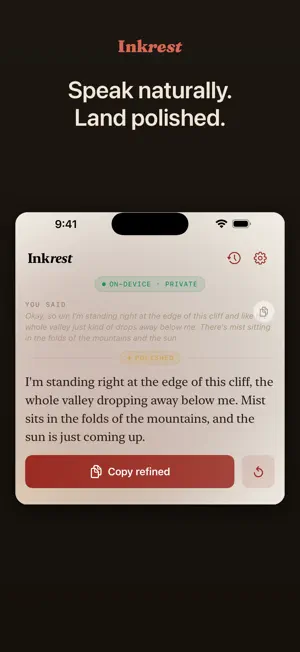
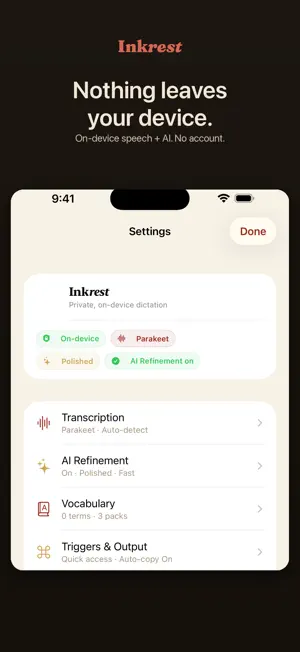
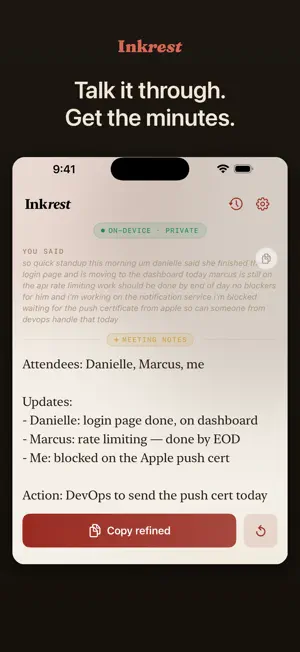
Speak however it comes out. Inkrest turns your voice into clean, finished text — right on your iPhone and iPad, with nothing sent to a server. Most dictation just transcribes. Inkrest goes further: it captures what you say, then quietly refines the "ums," the false starts, and the run-ons into clear, polished prose in the style you choose. Speak a half-formed thought; get back a finished paragraph. And it all happens on your device. Speech-to-text and the AI rewriting both run locally on Apple silicon. No accounts. No servers. No telemetry. After a one-time model download, Inkrest works with no internet connection at all — on a plane, on a trail, anywhere. Your words never leave your device. CAPTURE ANYWHERE - A system keyboard that turns speech into refined text in any app - A home-screen widget and the Action Button for instant capture - A Share Sheet to clean up text you already have - On Apple Watch: catch a thought from your wrist - A Live Activity that keeps your session in the Dynamic Island and on the Lock Screen BUILT FOR IPAD Inkrest is a real iPad app, not a stretched-up phone screen — a wider dictation layout and a two-column settings view that make the most of the display. Dictate a note, refine it, and move on without leaving the page. PICK YOUR STYLE The same spoken note, refined for where it's going — Email, Message, Document, Bullets, or Verbatim. Let Inkrest choose, or set it yourself. SPELLED THE WAY YOU MEAN IT Curated dictionaries plus your own custom terms, so names, jargon, and product names come out right — without spelling them out loud. PRIVATE BY DESIGN No analytics. No crash reporters. No ad SDKs. The only thing Inkrest ever sends over the network is a one-time model download. After that: silence. NO SUBSCRIPTION. NO ADS. NO ACCOUNT. Inkrest doesn't track you, doesn't show ads, and never asks you to sign in. Your words, at rest.
What’s new
Version 3.0.1 · Updated September 24, 2026
• Fixed the keyboard's top row on iOS 27: suggestions and emoji are sharp again instead of blurred. • The keyboard's top row and the "Tap to dictate" label under the mic now show in full.
App privacy
The developer, Lampblack Labs LLC, reported these privacy practices to Apple.
Data Not Collected
The developer does not collect any data from this app.
Alternatives to Inkrest: Private Dictation
Looking for apps like Inkrest: Private Dictation? Here are 6 similar apps on the App Store. The highest rated is Lume Voice: Flow Keyboard AI (5.0/5), and 5 of the 6 are free to download.
-
 Don Forgetto
-
 Tendril Mindmap
-
 Lume Voice: Flow Keyboard AI
5.0
Lume Voice: Flow Keyboard AI
5.0
-
 Transcribe audio to text - AI
5.0
Transcribe audio to text - AI
5.0
-
 Passport Photo Booth App
4.7
Passport Photo Booth App
4.7
-
 Quick Notes - Supasend
4.7
Quick Notes - Supasend
4.7
| App | Rating | Price | Last updated | Compare |
|---|---|---|---|---|
| Inkrest: Private Dictation | 5.0 / 5 (4 ratings) | 4.99 USD | September 24, 2026 | |
| Don Forgetto | – | 0.99 USD | Sep 9, 2026 | Compare |
| Tendril Mindmap | – | Free | Jun 7, 2026 | Compare |
| Lume Voice: Flow Keyboard AI | 5.0 / 5 (1) | Free | Sep 24, 2026 | Compare |
| Transcribe audio to text - AI | 5.0 / 5 (3) | Free | Sep 29, 2026 | Compare |
| Passport Photo Booth App | 4.7 / 5 (7) | Free | Sep 30, 2026 | Compare |
| Quick Notes - Supasend | 4.7 / 5 (31) | Free | Sep 20, 2026 | Compare |