

Threo: Secure AI for Work
Synthreo, Inc. Business iPhoneiPadiPod touch
Threo: Secure AI for Work is a free Business app for iPhone and iPad by Synthreo, Inc. Rated 5.0/5 from 2 ratings. Requires iOS 16.4.
- Rating
- 5.0
- 2 ratings
- Price
- Free
- on the App Store
- Size
- 58 MB
- Age 17+
- Updated
- Oct 28
- 2026 · v1.5.12
Screenshots


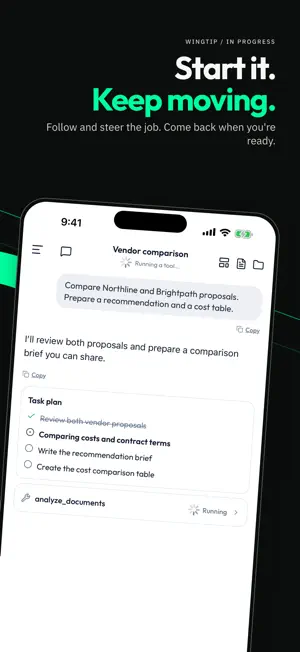
About Threo: Secure AI for Work
Send your agents to work with Wingtip in Threo — your organization's secure AI for work, delivered by Synthreo. Start a task from your phone, give Wingtip the context, and keep moving. Follow and steer the work while it runs, then pick up the session on your computer when you're ready to continue. WINGTIP SESSIONS • Set the goal, send it off — give Wingtip your sources, templates, and context, and let the work begin. • Follow and steer — check progress and redirect the job from your phone. • Get more than an answer — put agent-created reports, documents, dashboards, and files to work. • Start on your phone, finish on your computer — pick up your Wingtip session on the web. EVERYDAY SECURE AI CHAT • Secure AI chat — get answers, write, summarize, and brainstorm with advanced AI models. • AI Agents and Experts — find, pin, and chat with your organization's agents and Experts. • Talk, don't type — hands-free voice input converts speech to text right on your device. • Bring your context — attach photos, documents, and files directly to a conversation. • Pick up where you left off — your chats stay in sync with Threo on the web. • Quick Actions widget — start a chat, open an agent, or talk to Threo from your Home and Lock Screen. • Light and dark mode. BUILT FOR WORK, BUILT FOR PRIVACY • Encrypted in transit (HTTPS/TLS). • No advertising, no ad tracking, no selling your data. • Administered by your organization under your company's policies. REQUIRES AN ORGANIZATION ACCOUNT Threo is an enterprise app. You need an account provided by your organization to sign in — there is no consumer sign-up. Some features, including Wingtip, depend on what your organization has enabled. If your company uses Threo, sign in with your work account to get started. Support is provided through your organization's administrator.
What’s new
Version 1.5.12 · Updated October 28, 2026
What's new: - Fixes file attachments in Wingtip - Keyboard improvements: it follows a swipe down, the composer tracks it, and tapping empty space keeps it up - The welcome screen rises with the composer, which starts as a compact one-row pill - Polish and reliability fixes
App privacy
The developer, Synthreo, Inc., reported these privacy practices to Apple.
Data Linked to You
The following data, which may be collected and linked to your identity, may be used for the following purposes:
- Contact Info: Email Address
- Identifiers: User ID
- Diagnostics: Crash Data, Other Diagnostic Data
Used for: App Functionality
Data Not Linked to You
The following data, which may be collected but is not linked to your identity, may be used for the following purposes:
- Contact Info: Name
- User Content: Photos or Videos, Other User Content
- Diagnostics: Performance Data
Used for: App Functionality
Alternatives to Threo: Secure AI for Work
Looking for apps like Threo: Secure AI for Work? Here are 6 similar apps on the App Store. The highest rated is CyberQP - QTech (5.0/5), and all 6 are free to download.


| App | Rating | Price | Last updated | Compare |
|---|---|---|---|---|
| Threo: Secure AI for Work | 5.0 / 5 (2 ratings) | Free | October 28, 2026 | |
| IT Nation Events | 3.0 / 5 (2) | Free | Jun 25, 2026 | Compare |
| CyberQP - QTech | 5.0 / 5 (5) | Free | Oct 23, 2026 | Compare |
| Pax8 Beyond | – | Free | Sep 3, 2026 | Compare |
| Pax8 | 5.0 / 5 (8) | Free | Dec 30, 2025 | Compare |
| Avoma | 3.8 / 5 (16) | Free | Oct 29, 2026 | Compare |
| IT Glue | 2.1 / 5 (9) | Free | Jan 15, 2026 | Compare |