

Keylet: 2FA Authenticator
Studio Fifteen Utilities iPhoneiPadiPod touchApple Watch
Keylet: 2FA Authenticator is a free Utilities app for iPhone and iPad by Studio Fifteen. Requires iOS 16.4. Updated July 22, 2026.
- Price
- Free
- on the App Store
- Size
- 108 MB
- Age 4+
- Updated
- Jul 22
- 2026 · v2026.7.20
Screenshots


About Keylet: 2FA Authenticator
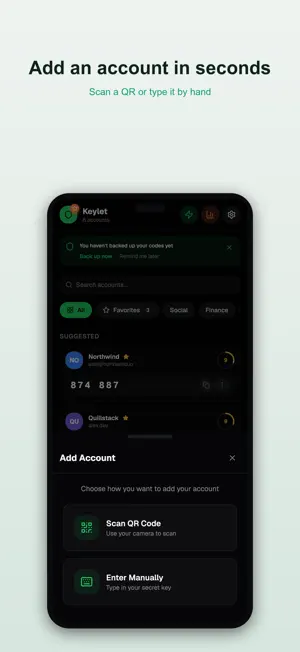
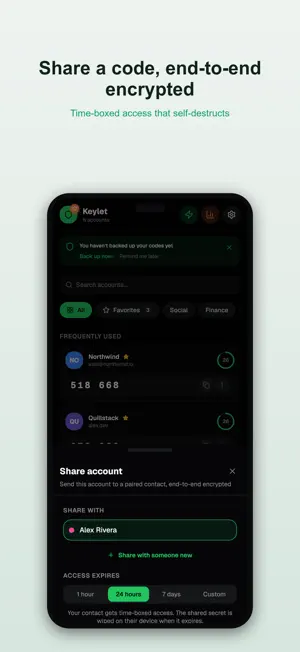
Keylet is the privacy-first authenticator that fills your 2FA codes right above the keyboard — without opening the app, and without ever showing a code on screen. From the makers of Authenticator+ — and switching is effortless. Import your accounts in seconds, straight from Authenticator+, Google Authenticator, Authy, Microsoft, 1Password and more — or even from a single screenshot, with no second device needed. Your secrets never leave your phone. Everything lives in an encrypted, zero-knowledge vault (AES-256-GCM) that only you can open. No account. No cloud. No tracking. No ads. WHY KEYLET • AutoFill, done right — tap a verification-code field and Keylet offers the right code. It fills it; it never displays it. Nothing to shoulder-surf. • Import in seconds — from Authenticator+, Google Authenticator, Authy, Microsoft, 1Password, a backup file, or a screenshot. No second device required. • Multiple vaults — keep work and personal completely separate, each encrypted on its own. • Encrypted sharing — hand a code to someone you trust over end-to-end encryption, with a self-destructing expiry. • Backed up, safely — automatic daily encrypted backups on your device, plus password-protected export. No cloud needed. • Yours to organise — biometric lock per account, categories, recovery keys and home-screen widgets. • No ads. Ever. Unlimited accounts, free. Keylet keeps your second factor exactly where it belongs: in your hands, encrypted, and out of sight. Terms of Use (EULA): https://www.apple.com/legal/internet-services/itunes/dev/stdeula/ Privacy Policy: https://studiofifteen.nl/app/keylet/privacy
What’s new
Version 2026.7.20 · Updated July 22, 2026
• Bigger code digits — pick from three sizes in Appearance. • Prefer the account name first? Swap how issuer and label are shown. • AutoFill now asks for Face ID/Touch ID before filling a code, and picks count toward Frequently Used. • Expired shares you sent can now be cleaned up.
App privacy
The developer, Studio Fifteen, reported these privacy practices to Apple.
Data Not Collected
The developer does not collect any data from this app.
Alternatives to Keylet: 2FA Authenticator
Looking for apps like Keylet: 2FA Authenticator? Here are 6 similar apps on the App Store.
-
 Vaultic: 2FA Authenticator
-
 Auth Mate - 2FA Authenticator
-
 2FA iAtomos: Authenticator
-
 Opty - 2FA Authenticator
-
 2FA Vault - TOTP Authenticator
-
 2FA4G:2FA Authenticator
| App | Rating | Price | Last updated | Compare |
|---|---|---|---|---|
| Keylet: 2FA Authenticator | – | Free | July 22, 2026 | |
| Vaultic: 2FA Authenticator | – | Free | Sep 18, 2026 | Compare |
| Auth Mate - 2FA Authenticator | – | Free | Aug 20, 2026 | Compare |
| 2FA iAtomos: Authenticator | – | Free | Oct 11, 2026 | Compare |
| Opty - 2FA Authenticator | – | Free | Mar 22, 2026 | Compare |
| 2FA Vault - TOTP Authenticator | – | Free | Jan 26, 2026 | Compare |
| 2FA4G:2FA Authenticator | – | Free | Apr 29, 2026 | Compare |