

Cozy Timer
Mikhail Grankin Productivity iPhoneiPadiPod touch
Cozy Timer is a free Productivity app for iPhone and iPad by Mikhail Grankin. Requires iOS 15.0. Updated July 8, 2026.
- Price
- Free
- on the App Store
- Size
- 124 MB
- Age 4+
- Updated
- Jul 8
- 2026 · v1.0.4
Screenshots
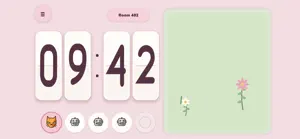


About Cozy Timer
Cozy Timer is a calm focus timer for anyone who wants to spend time with more intention: students, remote workers, readers, makers, parents, planners, and anyone building a daily habit one session at a time. Instead of turning productivity into another dashboard, Cozy Timer gives your focus time a small peaceful place to grow. Choose a character, set a session length, and start focusing. As the timer moves forward, your garden grows with you, turning quiet minutes into visible progress. USE IT FOR REAL LIFE Cozy Timer works well for study sessions, writing time, homework, deep work, admin tasks, creative projects, reading, cleaning, practice routines, and short resets between busy parts of the day. You do not need a complicated system to begin. Pick a session length that fits the moment, start the timer, and let the garden hold the pace while you focus on the task in front of you. FOCUS ON YOUR OWN - Start a solo focus session whenever you want quiet concentration. - Choose a session length that matches your energy and schedule. - Pause and resume a local session when life interrupts. - Receive an optional local notification when your timer finishes. - Review your completed session before starting the next one. FOCUS WITH OTHERS Some days are easier when you are not focusing alone. Cozy Timer includes optional shared rooms so you can work alongside friends or other people who are also trying to stay on task. - Join a public lobby and focus with people in a similar session. - Create a private room and share the room code with friends. - Join a friend's room with a simple code. - See up to five participants together in the garden. - Share an invitation using your device's normal sharing options. STAY GENTLY CONNECTED Shared focus should feel supportive, not distracting. During online sessions, you can send quick emoji reactions, share simple status updates, or encourage another participant with a heart. The goal is a quiet sense of company while everyone keeps working. WATCH YOUR GARDEN GROW Your plants grow as the timer advances, making progress easy to see without checking a long list of numbers. When a session is complete, you can celebrate the moment, save a completion image, and begin again when you are ready. KEEP YOUR PROGRESS LOCAL Cozy Timer stores focus statistics on your device. Photos access is optional and is used only if you choose to save a completed-session image. The app does not read your existing photo library. No name, email address, phone number, contacts, precise location, advertising identifier, or payment information is required. Online rooms use an anonymous account only to synchronize the shared session. Whether you are preparing for exams, working from home, building a reading habit, finishing a creative project, or simply trying to protect a calmer part of your day, Cozy Timer gives your focus time a friendly place to grow.
What’s new
Version 1.0.4 · Updated July 8, 2026
Welcome to the first release of Cozy Timer. - Focus with a customizable Pomodoro timer. - Use solo mode or join public and private rooms. - Share private room codes with friends. - Send emoji reactions and status updates. - Grow a garden as your focus session progresses. - Save a completion image and track focus statistics on your device.
App privacy
The developer, Mikhail Grankin, reported these privacy practices to Apple.
Data Linked to You
The following data, which may be collected and linked to your identity, may be used for the following purposes:
- User Content: Gameplay Content
- Identifiers: User ID, Device ID
- Usage Data: Product Interaction
Used for: App Functionality
Data Not Linked to You
The following data, which may be collected but is not linked to your identity, may be used for the following purposes:
- Usage Data: Product Interaction
- Diagnostics: Crash Data
Used for: Analytics, App Functionality
Alternatives to Cozy Timer
Looking for apps like Cozy Timer? Here are 6 similar apps on the App Store. The highest rated is Loofy - Pomodoro Focus Timer (1.0/5), and all 6 are free to download.
-
 Focus Garden: Pomodoro Timer
-
 Loofy - Pomodoro Focus Timer
1.0
Loofy - Pomodoro Focus Timer
1.0
-
 Pomira
-
 Focus Island: Temps d'écran
-
 EggDoro: Focus Timer
-
 Was Zählt - Timer und Zähler
| App | Rating | Price | Last updated | Compare |
|---|---|---|---|---|
| Cozy Timer | – | Free | July 8, 2026 | |
| Focus Garden: Pomodoro Timer | – | Free | Oct 5, 2026 | Compare |
| Loofy - Pomodoro Focus Timer | 1.0 / 5 (1) | Free | Feb 3, 2026 | Compare |
| Pomira | – | Free | May 14, 2026 | Compare |
| Focus Island: Temps d'écran | – | Free | Jun 22, 2026 | Compare |
| EggDoro: Focus Timer | – | Free | May 8, 2026 | Compare |
| Was Zählt - Timer und Zähler | – | Free | Jul 6, 2026 | Compare |
Compare Cozy Timer with the top alternatives: ratings, updates, ASO score and keyword gaps →