

Poof: Magic Planner
Zachary Carter Productivity iPhoneiPadiPod touch
Poof: Magic Planner is a free Productivity app for iPhone and iPad by Zachary Carter. Rated 5.0/5 from 4 ratings. Requires iOS 18.0.
- Rating
- 5.0
- 4 ratings
- Price
- Free
- on the App Store
- Size
- 11 MB
- Age 4+
- Updated
- Sep 28
- 2026 · v1.1
Screenshots



About Poof: Magic Planner
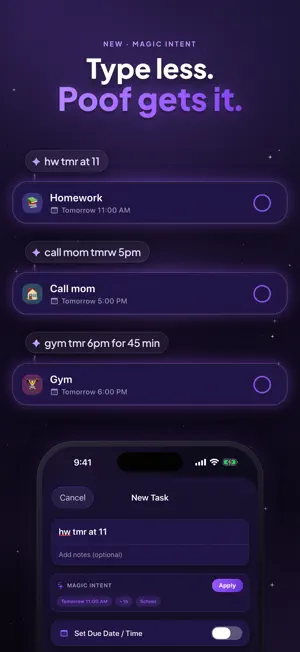
Do. Done. Gone. Poof is a to-do app with a little magic in it. Write down what you need to do, then finish it and watch it vanish in a puff. No clutter, no guilt, no endless list staring back at you. Just today, handled. Get it done. Watch it vanish. Complete a task and it disappears in a satisfying little burst, in the finisher you pick. Every one lands on the same quick beat, and Undo is always one tap away. Finished work waits quietly in your history for as long as you choose to keep it. Write it like you'd say it. Type "hw tmr at 11" and Magic Intent fills in the rest: Homework, filed under School, due tomorrow at 11 AM. It reads shorthand, picks a category and estimates how long a task will take. Every guess shows up as a chip you can tap off before anything is saved, and each behavior has its own switch. Right on your Home Screen. The Poof widget keeps your next tasks in view, small or medium. Tap the ring to poof one right there, with three seconds to take it back. Your day, planned like magic. Tap Plan and Magic Planner turns your list into a real day: overdue first, deadlines next, quick wins up front for momentum, and breaks built in, all fitted before your bedtime. Every choice comes with a plain-English reason, and the plan is always yours to reshape. It only ever suggests. It never touches your due dates. Your tasks never leave your phone. This is the part that matters most. Poof has no servers and no account. Nothing you write is ever sent anywhere; your tasks stay right here on your device. No analytics, no trackers, no ad IDs, nothing to sign in to. And if you'd rather leave no trace at all, turn on Auto-Delete and finished tasks disappear for good. Make it yours. Themes, app icons and the way your tasks vanish all live in one Customize screen with a live preview: see your own list in a new theme, your icon on a Home Screen, your poof as it plays. Every theme has a matching light and dark flavor. Sort your list the way you think, whether that's Smart, Due Date, Date Added or Time Estimate. Seasons, earned by using it. Now and then Poof opens a seasonal pack. Poof-o-ween runs until November 2: three looks, three icons and three new ways for a task to vanish, earned along a five-stop trail of ordinary things like poofing a task or making a plan. Whatever you reach is yours to keep, even after the season ends. Nothing to buy. Free where it counts. Everything you need to plan and finish your day is free, and always will be: no ads, no subscriptions, no account. Features • Finish tasks and watch them poof away, with a choice of completion effects • One-tap Undo and a completed-task history you control • Magic Intent: write tasks the way you'd say them • Magic Planner: your whole day arranged in a single tap, with reasons • Home Screen widgets, small and medium, with poof-from-the-widget • Per-task reminders and an optional daily planning nudge • Recurring tasks, priorities, time estimates and emoji categories • Themes with matching light and dark, alternate app icons, and seasonal packs • Sort by Smart, Due Date, Date Added or Time Estimate • Auto-Delete options to make finished tasks vanish for good • Your tasks stay on your device: no account, no servers, no tracking • Free, with no ads and no subscriptions Nothing to sign in to. Just you, your day, and a little magic.
What’s new
Version 1.1 · Updated September 28, 2026
More Magic — Poof's first major update MAGIC INTENT Type "hw tmr at 11" and Poof fills in the rest: Homework, filed under School, due tomorrow at 11 AM. It expands shorthand, picks a category, and estimates how long a task takes. Every assumption is a chip you can keep or remove, and each behavior has its own toggle. WIDGETS The new widget puts your next tasks on the Home Screen, small or medium. Tap to poof right from your Home Screen. CUSTOMIZE Theme, app icon and poof effects are now one screen with a live preview, opened from the top of your list. POOF-O-WEEN, UNTIL NOVEMBER 2 Three new looks, three new app icons, and new ways for a task to vanish: a cauldron, a ghost, a headstone. Earn them by using Poof, completely for free. Whatever you unlock is yours forever. And for October, Poof has a festive new default icon. Minor bug fixes and UI changes.
App privacy
The developer, Zachary Carter, reported these privacy practices to Apple.
Data Not Collected
The developer does not collect any data from this app.
Alternatives to Poof: Magic Planner
Looking for apps like Poof: Magic Planner? Here are 6 similar apps on the App Store. The highest rated is ReadyLists (5.0/5), and all 6 are free to download.
-
 MomoFish: Screen Time Pet
-
 ReadyLists
5.0
ReadyLists
5.0
-
 XeNo: AI Files Assistant
5.0
XeNo: AI Files Assistant
5.0
-
 FaceRecall
-
 Shiken: AI Meeting Notetaker
-
 Dotty: Habit & Task Planner
| App | Rating | Price | Last updated | Compare |
|---|---|---|---|---|
| Poof: Magic Planner | 5.0 / 5 (4 ratings) | Free | September 28, 2026 | |
| MomoFish: Screen Time Pet | – | Free | Jul 31, 2026 | Compare |
| ReadyLists | 5.0 / 5 (1) | Free | Mar 23, 2026 | Compare |
| XeNo: AI Files Assistant | 5.0 / 5 (1) | Free | Sep 2, 2026 | Compare |
| FaceRecall | – | Free | Aug 10, 2026 | Compare |
| Shiken: AI Meeting Notetaker | – | Free | Oct 17, 2026 | Compare |
| Dotty: Habit & Task Planner | – | Free | Aug 6, 2026 | Compare |