

SAFE Budgeting
Gallahadd Software LLC Finance iPhoneiPadiPod touchMacApple Watch
SAFE Budgeting is a free Finance app for iPhone and iPad by Gallahadd Software LLC. Rated 5.0/5 from 1 ratings. Requires iOS 26.0. Updated October 25, 2026.
- Rating
- 5.0
- 1 ratings
- Price
- Free
- on the App Store
- Size
- 50 MB
- Age 4+
- Updated
- Oct 25
- 2026 · v2.0.1
Screenshots



About SAFE Budgeting
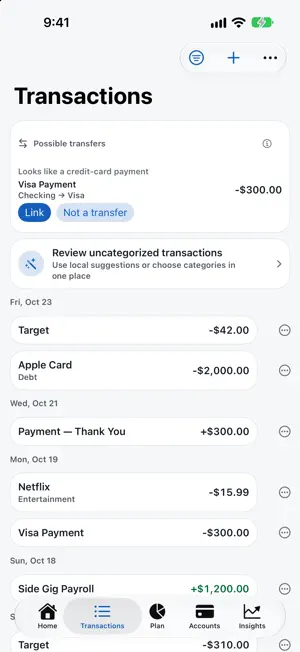
SAFE Budget is the personal finance app where your money stays with you. Your ledger lives in the app's protected storage on your devices and in your own private — or explicitly shared — iCloud. SAFE Budget operates no financial-data server. NEW IN 2.0: SIMPLER EVERYWHERE, MADE FOR IPHONE DUO - Five tabs that never move: Home, Transactions, Plan, Accounts and Insights. - Plan › Bills is one list: bills, subscriptions, recurring charges and loan payments, grouped by month, with the ones we found in your bank ready to confirm. - One "Needs attention" inbox replaces the scattered review counters. - On iPhone Duo, the cover screen is a focused phone budget; unfold it for a sidebar and more room. Folding or unfolding mid-entry keeps your place and anything you were typing. SAFE TO SPEND, NOT JUST A BUDGET Safe to Spend is the lowest your balance is projected to reach before your next paycheck — after bills, debt payments and your safety cushion. See the math behind it any time. PRIVATE BY ARCHITECTURE No account to create and no hosted ledger backend. Synced ledger values use CloudKit encrypted fields, and attachments use CloudKit assets. Apple documents these as end-to-end encrypted when Advanced Data Protection is on; otherwise they are encrypted in transit and on Apple's servers under standard iCloud protection. Unlocking the app uses your device's own Face ID, Touch ID or passcode. CONNECT A BANK ONLY IF YOU WANT TO - Apple Wallet: link Apple Card, Apple Cash and Savings through Apple's FinanceKit. Read on your iPhone, stored in your ledger, never sent to the developer. Off until you turn it on; revocable in Settings. - Bank sync through SimpleFIN, or bring your own Plaid developer keys. Credentials stay in your Keychain. SimpleFIN and Plaid are independent services you authorize directly and process bank data under their own privacy policies. - Or type a balance in and import a file — CSV, OFX/QFX or CAMT.053. PLANNING THAT GOES BEYOND BUDGETING - Budget envelopes with rollover, and Move Money between them - Savings goals with a required-contribution solver - Loans and debt payoff (avalanche vs. snowball) - Mortgage analytics: equity, LTV, PMI, payoff dates, affordability - Tax estimate: brackets, FICA and withholding (an estimate, not tax advice) - Retirement and 401(k) projections, home project budgets FORECASTS, INSIGHTS AND REPORTS A day-by-day running balance from your real pay dates and bills, a what-if slider, and a long-term net-worth forecast with conservative, expected and optimistic bands. Reports for spending, income vs. expense, cash flow, net-worth trend and a money-flow Sankey, plus a report builder. RECEIPTS AND WARRANTIES On-device text recognition reads receipts — every page — so you can split a purchase line by line. Track warranties and get a heads-up before coverage ends. HOUSEHOLD SHARING Invite a partner through Apple's CloudKit sharing, with owner, editor and guest permissions. Settle Up keeps shared expenses fair. ACROSS YOUR APPLE DEVICES Native SwiftUI for iPhone, iPhone Duo, iPad, Mac and Apple Watch. Widgets that redact when your device is locked, Siri ("What's left in SAFE Budget", "Mark a bill paid in SAFE Budget"), Control Center quick add and keyboard shortcuts. NO ADS. NO DATA SELLING. NO TRACKING. No advertising, no analytics, no advisory commission and no developer-operated ledger server. PRICING Free to download, and your first month of SAFE Budget Plus is free. Then $9.99 a year, or $29.99 once for lifetime. Family Sharing supported. If your subscription ends, you can still export everything you saved, at any time, without paying again. Subscriptions renew automatically unless cancelled at least 24 hours before the end of the period; manage them in your Apple Account settings. Terms of Use: https://www.apple.com/legal/internet-services/itunes/dev/stdeula/ Privacy Policy: https://gallahadd.com/privacy-safebudget.html
What’s new
Version 2.0.1 · Updated October 25, 2026
Clearer bills and faster categorizing. BILLS ON HOME - Upcoming bills now show each bill's own due date. Anything overdue is marked "Overdue since" its date, oldest first, so missed months no longer look like the same bill listed again. A bill due today shows today. - A pending bank charge no longer counts as paying an automatic bill until it posts. REVIEW CATEGORIES - Suggestions from your bank's own category (Plaid) and the merchant code on Apple Card, Apple Cash and Savings purchases, matched to your categories. - Select all: take every suggestion on screen in one tap. Nothing changes until you tap Apply, and Undo takes the whole batch back. - Re-review: for transactions with no suggestion yet, SAFE Budget checks again and can ask Apple's on-device model, which only chooses from your own categories and runs entirely on your device. Suggestions are never applied without you. - Safer Apply: if a transaction or category changes on another device while you are reviewing, nothing is applied and the list refreshes.
App privacy
The developer, Gallahadd Software LLC, reported these privacy practices to Apple.
Data Linked to You
The following data, which may be collected and linked to your identity, may be used for the following purposes:
- Purchases: Purchase History
- Financial Info: Other Financial Info
- Identifiers: User ID
Used for: App Functionality
Alternatives to SAFE Budgeting
Looking for apps like SAFE Budgeting? Here are 6 similar apps on the App Store. The highest rated is Expense & Budget (5.0/5), and all 6 are free to download.
-
 Mileage Tracker & Log: ODMiles
4.7
-
 MoneyPlan – Budget Tracker
-
 Expense & Budget
5.0
-
 Money IQ: Expenses & Income
-
 Chipp: Split Bills & Expenses
4.1
-
 MoneyBe
4.8
| App | Rating | Price | Last updated | Compare |
|---|---|---|---|---|
| SAFE Budgeting | 5.0 / 5 (1 rating) | Free | October 25, 2026 | |
| Mileage Tracker & Log: ODMiles | 4.7 / 5 (9) | Free | Oct 30, 2026 | Compare |
| MoneyPlan – Budget Tracker | – | Free | Aug 9, 2026 | Compare |
| Expense & Budget | 5.0 / 5 (6) | Free | Oct 21, 2026 | Compare |
| Money IQ: Expenses & Income | – | Free | Sep 8, 2026 | Compare |
| Chipp: Split Bills & Expenses | 4.1 / 5 (18) | Free | Oct 12, 2026 | Compare |
| MoneyBe | 4.8 / 5 (13) | Free | Aug 28, 2026 | Compare |
Compare SAFE Budgeting with the top alternatives: ratings, updates, ASO score and keyword gaps →