

Next Thing: Daily Focus
JEREMIAH DANIEL ROBERTS Productivity iPhoneiPadiPod touch
Next Thing: Daily Focus is a free Productivity app for iPhone and iPad by JEREMIAH DANIEL ROBERTS. Rated 5.0/5 from 4 ratings. Requires iOS 17.6.
- Rating
- 5.0
- 4 ratings
- Price
- Free
- on the App Store
- Size
- 5 MB
- Age 4+
- Updated
- Oct 7
- 2026 · v2.1
Screenshots


About Next Thing: Daily Focus
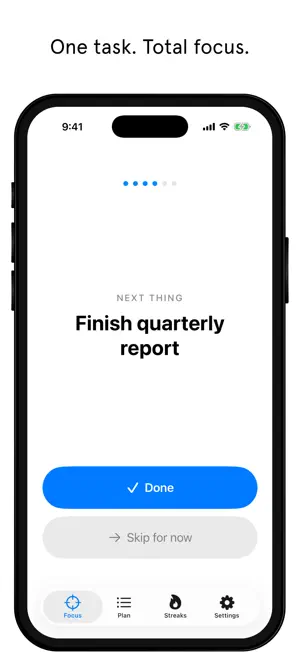
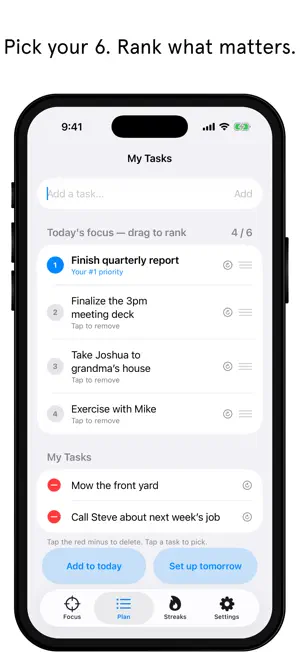
Most productivity apps make you more stressed, not less. Endless lists, complex systems, notifications pulling you in every direction. Next Thing is different: one list, one task at a time. Built on the Ivy Lee Method, a century-old system famously used by Charles Schwab, Next Thing strips productivity down to its most powerful form. Each evening, choose your most important tasks and rank them in order of priority. The next day, focus on one thing at a time. That's it. We've heard from users with ADHD that this single-task approach is a game changer. No overwhelming lists, just the next thing in front of you. How it works: - Add tasks to your list anytime a thought crosses your mind - Each evening, pick your top 6 and rank them by priority - The next day, focus on one task at a time. Done or skip. Nothing else. - Build the habit with streaks and satisfying completion moments - Optional morning and evening reminders, off unless you turn them on NEW: Projects Some work is bigger than a day. Tap the pill in the corner to switch to Projects mode, with the same calm, one-thing-at-a-time focus. - Break projects into tasks and subtasks - Add owners, start dates, and due dates - Progress rings fill as you check off subtasks - Rank your projects and see each one's next step on your focus screen - Check off the next step with one tap, right from the focus screen - Archive finished projects and restore them anytime Free to use, including one active project. Upgrades are one-time purchases. No subscription, ever. Ivy Lee Pro: - Live Activity and Dynamic Island - your current task, always in view - Lock screen widgets - see your #1 task without unlocking your phone - Home screen widget - see your #1 task without opening the app - Focus bell - set a reminder to check in on your current task - Streaks heatmap - track your consistency over time - Recurring tasks - daily habits auto-return to your list - Custom app icons and focus screen themes - Unlimited task list Projects Pro: - Unlimited active projects Complete: - Everything in Ivy Lee Pro and Projects Pro, for less than buying both Already own Pro from an earlier version? Thank you. Projects Pro is included, free. Your privacy matters. No account required, no login, no data sharing. Your tasks live on your device and nowhere else. Stop managing your productivity system. Start doing your next thing.
What’s new
Version 2.1 · Updated October 7, 2026
Fixed a crash when deleting project tasks, subtasks, or projects. Subtasks now have a cleaner, more compact look.
App privacy
The developer, JEREMIAH DANIEL ROBERTS, reported these privacy practices to Apple.
Data Not Collected
The developer does not collect any data from this app.
Alternatives to Next Thing: Daily Focus
Looking for apps like Next Thing: Daily Focus? Here are 6 similar apps on the App Store. The highest rated is Claridy - Ivy Lee Method (4.5/5), and 5 of the 6 are free to download.
-
 PriorityStack: Top Six
-
 Focus Six: Daily Task Planner
-
 Claridy - Ivy Lee Method
4.5
Claridy - Ivy Lee Method
4.5
-
 Hours Tracker-Hours Time Log
-
 PenTimer
-
 SixDo - Ivy Lee Method To-Do
| App | Rating | Price | Last updated | Compare |
|---|---|---|---|---|
| Next Thing: Daily Focus | 5.0 / 5 (4 ratings) | Free | October 7, 2026 | |
| PriorityStack: Top Six | – | Free | Sep 10, 2026 | Compare |
| Focus Six: Daily Task Planner | – | Free | Sep 24, 2026 | Compare |
| Claridy - Ivy Lee Method | 4.5 / 5 (2) | Free | Apr 8, 2026 | Compare |
| Hours Tracker-Hours Time Log | – | 2.99 USD | Mar 13, 2025 | Compare |
| PenTimer | – | Free | Jan 15, 2026 | Compare |
| SixDo - Ivy Lee Method To-Do | – | Free | Oct 2, 2026 | Compare |