

Retrotick: Split-Flap Clock
Ekam Singh Utilities iPhoneiPadiPod touch
Retrotick: Split-Flap Clock is a free Utilities app for iPhone and iPad by Ekam Singh. Rated 5.0/5 from 1 ratings. Requires iOS 26.0.
- Rating
- 5.0
- 1 ratings
- Price
- Free
- on the App Store
- Size
- 2 MB
- Age 4+
- Updated
- Aug 10
- 2026 · v1.1.0
Screenshots


About Retrotick: Split-Flap Clock
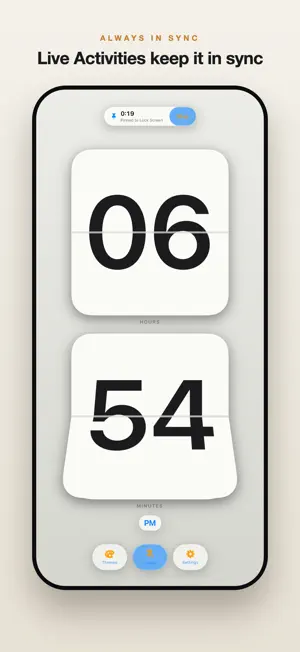
Retrotick turns your iPhone and iPad into a beautiful split-flap clock, the satisfying mechanical flip of a classic station and bedside display, rebuilt for iOS with Apple's Liquid Glass design. Set it on your nightstand, your desk, or your Home and Lock Screens and watch the digits flip on every tick. FEATURES • Authentic split-flap animation that flips on every second • Liquid Glass design with clear, black, and white backdrops • Home Screen and Lock Screen widgets in multiple sizes • Live Activities and Dynamic Island to keep the time glanceable while you use other apps • 12- or 24-hour time, with optional seconds • Multiple digit fonts to match your style • A gallery of themes, from minimal to bold, with a free set to start • A countdown timer with a split-flap duration picker that rings through silent and Focus • Optional flip sound and haptics for the mechanical tick THEMES Unlock premium themes your way. Buy any theme once and keep it forever, or subscribe to Retrotick Plus to unlock every theme while your subscription is active. Preview any theme before you decide, and your purchases stay with your Apple ID. DESIGNED FOR iOS Built in SwiftUI for iOS 26, Retrotick looks right on every device size and adapts to portrait and landscape automatically. No accounts. No ads. No tracking. Just a gorgeous clock. Retrotick Plus is an auto-renewable subscription. Payment is charged to your Apple ID at confirmation of purchase. It renews automatically unless canceled at least 24 hours before the end of the current period, and your account is charged for renewal within 24 hours before the period ends. Manage or cancel anytime in your App Store account settings. Terms of Use: https://makekamac.github.io/retrotick/terms/ Privacy Policy: https://makekamac.github.io/retrotick/privacy/
What’s new
Version 1.1.0 · Updated August 10, 2026
• Retrotick Plus: a new optional subscription that unlocks every premium theme while it is active. One-time theme purchases still work and are unaffected. • Countdown timer: the Timer button opens a split-flap duration picker and schedules a real countdown that rings through silent mode and Focus, with a Lock Screen and Dynamic Island Live Activity. • Flip sound and haptics: opt in from Settings to hear and feel the mechanical tick of every flip. • New Forest Pine theme, a deep evergreen split-flap design. • A smarter StandBy bedside look that eases into a gentler, burn-in-safe rendering after dark. • Legibility and reliability fixes across the widgets and Live Activities. Thanks for using Retrotick! If you're enjoying it, a rating really helps.
App privacy
The developer, Ekam Singh, reported these privacy practices to Apple.
Data Not Collected
The developer does not collect any data from this app.
Alternatives to Retrotick: Split-Flap Clock
Looking for apps like Retrotick: Split-Flap Clock? Here are 6 similar apps on the App Store. The highest rated is BRC Classic (5.0/5), and all 6 are free to download.
-
 UTC Time Converter World Clock
-
 Vintage 90s Clock
-
 BRC Classic
5.0
BRC Classic
5.0
-
 RiseNow: Wake Up Alarm
5.0
RiseNow: Wake Up Alarm
5.0
-
 ClocksOn: Bedside Clock
5.0
ClocksOn: Bedside Clock
5.0
-
 BitTime - Binary Clock
| App | Rating | Price | Last updated | Compare |
|---|---|---|---|---|
| Retrotick: Split-Flap Clock | 5.0 / 5 (1 rating) | Free | August 10, 2026 | |
| UTC Time Converter World Clock | – | Free | Aug 13, 2026 | Compare |
| Vintage 90s Clock | – | Free | Jan 23, 2026 | Compare |
| BRC Classic | 5.0 / 5 (1) | Free | Aug 31, 2026 | Compare |
| RiseNow: Wake Up Alarm | 5.0 / 5 (1) | Free | Jul 18, 2026 | Compare |
| ClocksOn: Bedside Clock | 5.0 / 5 (1) | Free | Oct 4, 2026 | Compare |
| BitTime - Binary Clock | – | Free | Jun 10, 2026 | Compare |