

TripSplitter: Split Expenses
aki creative inc. Travel iPhoneiPadiPod touch
TripSplitter: Split Expenses is a free Travel app for iPhone and iPad by aki creative inc. Requires iOS 16.4. Updated October 23, 2026.
- Price
- Free
- on the App Store
- Size
- 41 MB
- Age 4+
- Updated
- Oct 23
- 2026 · v1.3.2
Screenshots


About TripSplitter: Split Expenses
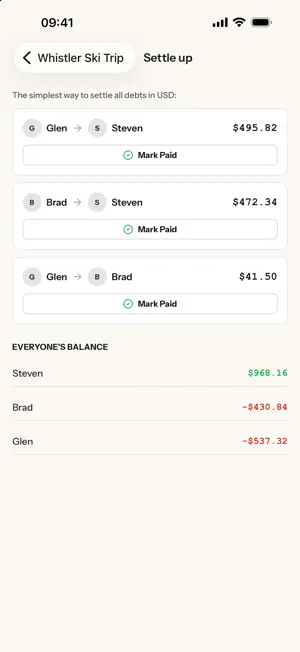
Split expenses, not friendships. TripSplitter keeps group spending straight, whether it is a week away with friends, a house share, or a couple splitting the weekly shop. Create a group, share the code, and everyone adds what they paid as it happens. How It Works Create a group and share the code or a QR. Add expenses as they happen and split them evenly, by item, or as a straight transfer between two people. TripSplitter works out who owes what and settles the whole group in the fewest possible payments. Scan A Receipt, Split By Item Photograph a receipt and TripSplitter reads the line items for you. Assign the steak to whoever ordered it, share the fries across the table, and everyone pays for what they actually had. Settle Up Without The Math Instead of a tangle of small debts between everyone, TripSplitter simplifies the whole group into the shortest list of payments. Mark them paid as they clear. Built For Real Trips - Add an expense with no signal and it syncs when you are back online - Several currencies in one group - Sign in with your email or Apple, no password to remember - Notifications when someone adds an expense or settles up - An activity feed showing everything that has happened in a group Premium TripSplitter is free to use. Premium adds: - Attach receipt photos to expenses - Comment on expenses - More AI receipt scans each month - Protect groups with a passcode Premium is an auto-renewable subscription, offered as a monthly plan or an annual plan that costs less than paying by the month. Both start with a free trial, and the price in your local currency is shown in the app before you buy. Payment is charged to your Apple Account at confirmation of purchase. It renews automatically unless cancelled at least 24 hours before the end of the current period, and you can manage or cancel it any time in your Apple Account settings. Terms of Use: https://tripsplitter.com/terms Privacy Policy: https://tripsplitter.com/privacy
What’s new
Version 1.3.2 · Updated October 23, 2026
iPhone Duo support is here! Cleaned up some user interface annoyances and tried to make things easier for you!
App privacy
The developer, aki creative inc., reported these privacy practices to Apple.
Data Linked to You
The following data, which may be collected and linked to your identity, may be used for the following purposes:
- Contact Info: Name, Email Address
- Identifiers: User ID
Used for: Analytics, App Functionality
Alternatives to TripSplitter: Split Expenses
Looking for apps like TripSplitter: Split Expenses? Here are 6 similar apps on the App Store. The highest rated is Virtual Hangar (4.8/5), and all 6 are free to download.
-
 NZZL
NZZL
-
 Uncover the World
-
 T-Bud
T-Bud
-
 Napa Valley Vine Trail Mobile
1.0
Napa Valley Vine Trail Mobile
1.0
-
 Virtual Hangar
4.8
Virtual Hangar
4.8
-
 Trip Splitter Lite
4.4
Trip Splitter Lite
4.4
| App | Rating | Price | Last updated | Compare |
|---|---|---|---|---|
| TripSplitter: Split Expenses | – | Free | October 23, 2026 | |
| NZZL | – | Free | Jul 16, 2026 | Compare |
| Uncover the World | – | Free | Oct 25, 2026 | Compare |
| T-Bud | – | Free | Sep 13, 2026 | Compare |
| Napa Valley Vine Trail Mobile | 1.0 / 5 (1) | Free | Feb 25, 2026 | Compare |
| Virtual Hangar | 4.8 / 5 (10) | Free | Jul 16, 2026 | Compare |
| Trip Splitter Lite | 4.4 / 5 (23) | Free | Jan 19, 2026 | Compare |