

Timber - Text to Speech, Voice
Truth in the Machine LLC Productivity iPhoneiPadiPod touchApple Watch
Timber - Text to Speech, Voice is a free Productivity app for iPhone and iPad by Truth in the Machine LLC. Rated 4.7/5 from 3 ratings. Requires iOS 18.0.
- Rating
- 4.7
- 3 ratings
- Price
- Free
- on the App Store
- Size
- 287 MB
- Age 4+
- Updated
- Oct 30
- 2026 · v1.1.0
Screenshots


About Timber - Text to Speech, Voice
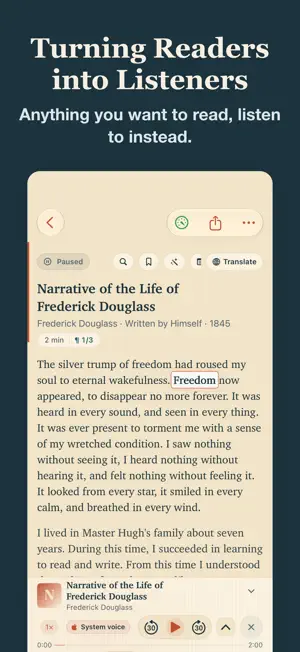
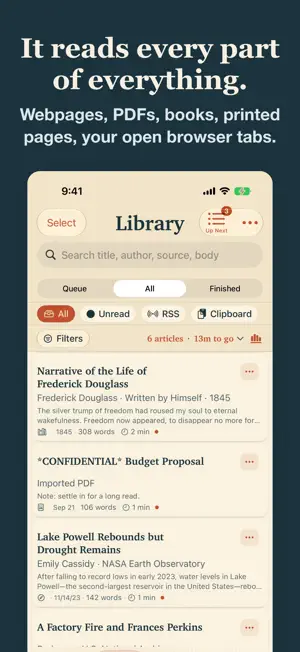
Timber turns readers into listeners. Anything you want to read, you can listen to instead. Paste a link, drop in a PDF, open a book, or snap a photo of a printed page. Timber pulls out the real text, cleanly, and reads it aloud in a voice you pick. There is a companion desktop app that moves your open browser tabs into your ears. Ever asked your phone to read a page aloud and had it stop halfway, or skip the part that mattered? That is not you missing a setting. Most reader tools are not built to get the whole article. Timber pulls the full text out first, before it ever starts speaking. What you paste is what you hear, start to finish. It was built by a teacher, after watching students struggle to read, who could not find one app that read well, respected privacy, and did not hold the basics hostage. WHAT TIMBER PROMISES • No account. No sign-up. Open it and read. • The core reader is free, and stays free. • What you read is nobody's business. Articles, books and clipboard text are processed on your device. What you read is never shared, sold, or used for ads. VOICES, PROPERLY • 300+ voices across 71 languages, free, spoken entirely on your device. • Every Apple voice on your device works, free, including Enhanced and Premium. • Every voice library includes a free male and female voice in your language. No teaser locked behind a trial. • Record a reference of your own voice and Timber can read in it. Created on device, never uploaded. A READER THAT FEELS LIKE PAPER • Warm parchment design. An open book under a reading lamp, not a tech product. • Every word lights up as it is spoken, and keeps pace whether you slow it right down or push it fast. • Tune the size, the face and the line spacing until it is comfortable. 30 palettes built in, plus a full dyslexia mode. BRING ANYTHING • Paste a link and Timber extracts the article. No ads, no popups, just the text. • Share from Safari or any browser. Import PDFs, EPUB, Word and PowerPoint. Follow RSS feeds. • Point your camera at a printed page and Timber reads it back to you. • Scanned chapters carry junk on every page. Timber spots a line that repeats and silences it across the whole document in one tap. • Browse 70,000+ free public-domain books from Project Gutenberg. • Translate an article on device, or get a quick summary on device. No cloud, no AI account. • Export any article as spoken audio to take with you. • Optional iCloud sync keeps your library on all your devices. FOR CLASSROOMS AND STUDY • Mark passages while you listen, then hand out what you marked as a worksheet. • MLA and APA citations built in. • A chapter becomes a lesson in the time it takes to listen to it. TIMBER PRO (optional, subscribe or pay once) The free reader is complete. Pro unlocks the full neural voice catalog beyond each library's free pair, the whole speed range, every palette, and ongoing personal-voice listening after the free 24-hour trial. Monthly, yearly, or lifetime. The trial simply lapses. It never auto-charges. Privacy Policy: https://timberreader.com/privacy.html Terms of Use: https://www.apple.com/legal/internet-services/itunes/dev/stdeula/ Timber was made for the kid in the back row who hears a story better than they can read it, and for everyone whose eyes are tired, busy, or somewhere else. If that is you, welcome.
What’s new
Version 1.1.0 · Updated October 30, 2026
A whole new Voices page. Find natural voices in your language, keep your favorites in Mine, and record your own in Make. One-tap upgrades make voices start faster and use less battery. Reading • Tap any word to look it up, hear it said slowly, or see its syllables. Save it to My Words. • Line focus keeps the spoken line clear and dims the rest of the page. • Select text with a trackpad. On a phone that opens wide, read beside your Library. Listening • Voices stay clear at high speed and read numbers the way people say them. • English Pocket voices respond faster. • Turn on Shorten long pauses to trim long silences. • A Home Screen widget to play or pause, and your progress on the Lock Screen. • The players, Lock Screen, widget and Watch all show the same place. Adding articles • Full articles from New York Times gift links and X links. • When a page is behind a wall, Timber can look for a saved copy after you tap. • Share a link again to bring an article back from Archive or Trash. • Voice downloads keep going in the background.
App privacy
The developer, Truth in the Machine LLC, reported these privacy practices to Apple.
Data Not Linked to You
The following data, which may be collected but is not linked to your identity, may be used for the following purposes:
- Purchases: Purchase History
Used for: App Functionality
Alternatives to Timber - Text to Speech, Voice
Looking for apps like Timber - Text to Speech, Voice? Here are 6 similar apps on the App Store. The highest rated is Paper2Audio: Text to Speech (4.9/5), and all 6 are free to download.
-
 Local TTS - AI Voice Reader
4.6
Local TTS - AI Voice Reader
4.6
-
 Sandbook: Natural Voice Reader
4.6
Sandbook: Natural Voice Reader
4.6
-
 Paper2Audio: Text to Speech
4.9
Paper2Audio: Text to Speech
4.9
-
 Speech Central – Voice Reader
4.6
Speech Central – Voice Reader
4.6
-
 ElevenReader: Read Books Aloud
4.7
ElevenReader: Read Books Aloud
4.7
-
 Text to Speech App - ListenMe
4.2
Text to Speech App - ListenMe
4.2
| App | Rating | Price | Last updated | Compare |
|---|---|---|---|---|
| Timber - Text to Speech, Voice | 4.7 / 5 (3 ratings) | Free | October 30, 2026 | |
| Local TTS - AI Voice Reader | 4.6 / 5 (10) | Free | Sep 28, 2026 | Compare |
| Sandbook: Natural Voice Reader | 4.6 / 5 (153) | Free | Oct 28, 2026 | Compare |
| Paper2Audio: Text to Speech | 4.9 / 5 (765) | Free | Oct 27, 2026 | Compare |
| Speech Central – Voice Reader | 4.6 / 5 (1,563) | Free | Oct 17, 2026 | Compare |
| ElevenReader: Read Books Aloud | 4.7 / 5 (11,081) | Free | Oct 15, 2026 | Compare |
| Text to Speech App - ListenMe | 4.2 / 5 (1,153) | Free | Oct 26, 2026 | Compare |