

Aircraft Maintenance Assist
Soft on the Go Utilities iPhoneiPadiPod touchMac
Aircraft Maintenance Assist is a free Utilities app for iPhone and iPad by Soft on the Go. Requires iOS 17.0. Updated September 19, 2026.
- Price
- Free
- on the App Store
- Size
- 5 MB
- Age 4+
- Updated
- Sep 19
- 2026 · v2.0
Screenshots


About Aircraft Maintenance Assist
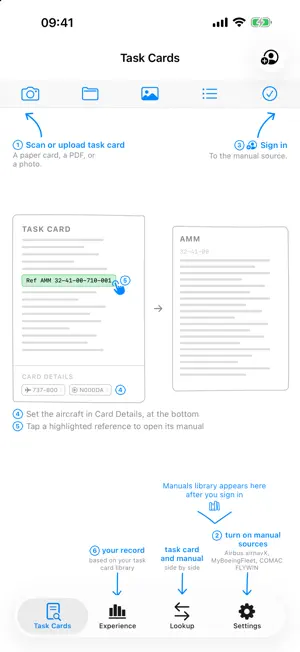
Aircraft Maintenance Assist is a record-keeping tool for aircraft maintenance technicians. Record what you do each day as task cards, keep them organised by aircraft, operator and ATA chapter, and build a lasting, portable record of the working experience those cards represent. YOUR WORK, RECORDED • Scan a paper task card with the camera — edges, perspective and shadows are corrected for you. • Or import a PDF or photo you already have. • On-device text recognition reads the card and fills in the details: title, ATA chapter, aircraft type, registration and operator. • Edit any detail yourself, and add a remark in your own words. YOUR EXPERIENCE, DEMONSTRATED • The Experience tab totals your cards by aircraft type, operator, ATA chapter, month and year. • One airline counts as one airline even when your cards came from different portals, each of which writes its name differently. • Cross-tabulate rows and columns any way you need, then save a report image straight to Photos. • Cards keep counting toward your experience even after their documents are cleaned up. FIND IT IN THE MANUAL • If you hold your own Airbus airnavX, MyBoeingFleet or COMAC FLYWIN account, switch that source on and tap a code on a card — a task number, a page block, or an S1000D data module — and the matching manual document opens beside it. • Each source has its own switch, so the app only ever offers the portals you actually hold an account for. • Codes inside a manual are tappable too, so you can follow a reference chain. • Recognises AMM, AIPC, IPC, FIM, TSM, SSM, ASM, WDM, AWM, SRM and MPP references, in both traditional ATA and S1000D form. • A reference resolves through the manual's own table of contents, so it opens the document your aircraft's library actually holds — or tells you plainly that it holds none. • Browse the whole manual tree for your aircraft in the Manuals tab. • Everything else in the app works without any account. This part is optional and off by default. YOURS, AND PRIVATE • Cards live on your device, or in your own iCloud Drive if you switch it on — your choice, changeable at any time, and the app moves your files for you. • The developer has no server and receives nothing. No analytics, no tracking, no advertising. • No in-app purchases and no subscription. • Sign-in, if you use it, happens on the provider's own web page. Optional Face ID / Touch ID protects a saved sign-in. • A library check validates your folder and rebuilds the index without deleting anything. BUILT FOR THE JOB • One app for iPhone, iPad and Mac. • English, 简体中文 and 繁體中文. • Works fully offline for everything except manual lookup. Aircraft Maintenance Assist is an independent tool. It is not affiliated with, endorsed by or sponsored by Airbus, Boeing or COMAC. Access to any manufacturer's data requires your own authorised account with that provider, and all permissions are enforced by them.
What’s new
Version 2.0 · Updated September 19, 2026
A THIRD SOURCE • Manual lookup now works with your own Airbus airnavX account, alongside MyBoeingFleet and COMAC FLYWIN. • Each source has its own switch in Settings — turn on only the portals you hold an account for, and the app offers nothing else. • Every card says which source it is filed under: airnavX, MBF-Boeing, MBF-787, MBF-NB, FLYWIN — or None, when a card is a record only. FINDING THE RIGHT DOCUMENT • A tapped reference resolves through the manual's own table of contents, so it opens the document your aircraft's library actually holds — and says so plainly when it holds none, instead of opening something close. • A350 references now name the manual they point at — system description, fault isolation, wiring, schematics and the rest — and a wildcard chapter code resolves to the chapter that exists. • Choosing an aircraft follows one rule in every source: pick the first field, then the second, and the matching aircraft are listed for you. YOUR EXPERIENCE • Totals count one airline as one airline, whichever portal a card came from. Card Details shows the airline code with the portal's own name beside it. • The Work Summary title now sits where every other tab's does. SIGNING IN • Tap the account button with no source switched on and you can choose your portals right there, then carry straight on to sign in. • Closing the sign-in page cancels the lookup instead of reopening the page. • In landscape the panel keeps its title, source switch and buttons on one row, and steps out of the way while the keyboard is up. ALSO • Landscape on iPhone gives each pane its own slim header, so more of the card and the document fit on screen. • Task links stay quiet on a card with no source, or one whose source is switched off. • Settings ends with the app name, version and website. • Fixes: a crash in the first-run guide, sign-in state after the app wakes, and the card-detail background on Mac.
App privacy
The developer, Soft on the Go, reported these privacy practices to Apple.
Data Not Collected
The developer does not collect any data from this app.
Alternatives to Aircraft Maintenance Assist
Looking for apps like Aircraft Maintenance Assist? Here are 6 similar apps on the App Store. The highest rated is Fluid Mechanics Calculator (4.5/5), and 5 of the 6 are free to download.
-
 Maintenance Experience Logbook
-
 Aircraft Engineer Toolkit
-
 Tech Logbook By DCR
-
 Fluid Mechanics Calculator
4.5
-
 Mila's Pressure Converter
-
 AI Transcribe, Voice To Text
| App | Rating | Price | Last updated | Compare |
|---|---|---|---|---|
| Aircraft Maintenance Assist | – | Free | September 19, 2026 | |
| Maintenance Experience Logbook | – | Free | Oct 6, 2026 | Compare |
| Aircraft Engineer Toolkit | – | Free | Aug 27, 2026 | Compare |
| Tech Logbook By DCR | – | Free | Feb 2, 2026 | Compare |
| Fluid Mechanics Calculator | 4.5 / 5 (21) | 2.99 USD | Jun 22, 2026 | Compare |
| Mila's Pressure Converter | – | Free | Oct 13, 2026 | Compare |
| AI Transcribe, Voice To Text | – | Free | Jan 21, 2025 | Compare |