

Etch: Write to Remember
宏 周 Education iPhoneiPadiPod touch
Etch: Write to Remember is a free Education app for iPhone and iPad by 宏 周. Requires iOS 17.0. Updated September 12, 2026.
- Price
- Free
- on the App Store
- Size
- 11 MB
- Age 4+
- Updated
- Sep 12
- 2026 · v1.1.1
Screenshots

About Etch: Write to Remember
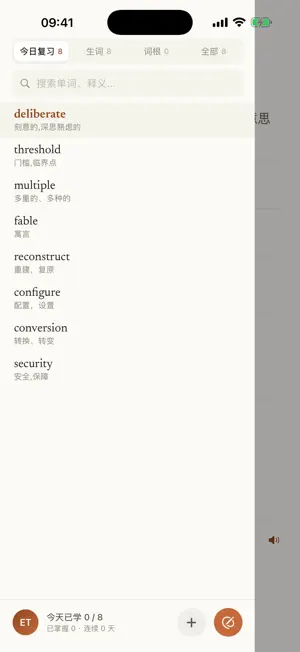
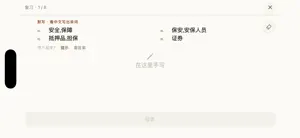
Note: Etch's interface and its AI-generated definitions are in Chinese. It is built for Chinese speakers learning English. I built Etch because vocabulary never stuck for me. Words I looked up were gone the next day. My dictionary app held hundreds of saved words and not one of them had become mine. What I eventually understood is that the problem was not recall — it was writing. Reading a word ten times does less than writing it once. Psychologists call this the generation effect: producing the answer yourself leaves a far stronger trace than reading it. So Etch does one thing well. It makes you write the word. Capture without leaving what you're reading A Shortcut pulls the selected word in along with the sentence it appeared in. The sentence where you met the word is the sentence you'll see again at review time — words stripped of context are the hardest to keep. The entry fills itself in Pronunciation, definitions, example sentences, morpheme breakdown and common collocations arrive a few seconds after you add the word. Senses are ordered to fit the sentence you captured, rather than copied from a dictionary in fixed order. Review by writing, not by recognizing Write with a finger or Apple Pencil, get judged the moment you finish, and see letter by letter where you went wrong. Three modes: write from the meaning, write from the pronunciation, or fill the blank in a sentence. Recognizing a word is not the same as being able to write it — that difference is the whole point of Etch. Scheduling is handled for you Etch uses FSRS-5. It schedules each review from the word’s difficulty, stability, and current retrievability, aiming to bring it back as memory weakens rather than promising an exact moment of forgetting. One vocabulary across Mac and iPhone Capture on the Mac, review on the iPhone, progress syncs both ways. A home screen widget keeps today's words in front of you, and the ink darkens as you finish them. Etch is free, carries no ads, and does not sell your data. You can export your whole vocabulary at any time, and delete your account from inside the app.
What’s new
Version 1.1.1 · Updated September 12, 2026
Refined the About Etch page with updated wording and a compact layout that adapts to smaller screens and larger text.
App privacy
The developer, 宏 周, reported these privacy practices to Apple.
Data Linked to You
The following data, which may be collected and linked to your identity, may be used for the following purposes:
- Contact Info: Email Address
- User Content: Photos or Videos, Other User Content
- Identifiers: User ID
- Usage Data: Product Interaction
- Diagnostics: Other Diagnostic Data
Used for: App Functionality
Alternatives to Etch: Write to Remember
Looking for apps like Etch: Write to Remember? Here are 6 similar apps on the App Store. The highest rated is Scribo: AI Language Learning (5.0/5), and all 6 are free to download.
-
 Learn it! On the go...
-
 猴记单词
猴记单词
-
 Write It! Chinese
-
 SnapSpell 背单词
-
 Scribo: AI Language Learning
5.0
Scribo: AI Language Learning
5.0
-
 Master Chinese: Phrases
| App | Rating | Price | Last updated | Compare |
|---|---|---|---|---|
| Etch: Write to Remember | – | Free | September 12, 2026 | |
| Learn it! On the go... | – | Free | May 8, 2026 | Compare |
| 猴记单词 | – | Free | Mar 20, 2026 | Compare |
| Write It! Chinese | – | Free | Sep 21, 2026 | Compare |
| SnapSpell 背单词 | – | Free | Oct 8, 2026 | Compare |
| Scribo: AI Language Learning | 5.0 / 5 (3) | Free | Oct 12, 2026 | Compare |
| Master Chinese: Phrases | – | Free | Sep 14, 2026 | Compare |