

ReDirect: Read for Screen Time
GAVIN KAI CASTELO VIDA Education iPhoneiPadiPod touch
ReDirect: Read for Screen Time is a free Education app for iPhone and iPad by GAVIN KAI CASTELO VIDA. Rated 5.0/5 from 4 ratings. Requires iOS 16.4.
- Rating
- 5.0
- 4 ratings
- Price
- Free
- on the App Store
- Size
- 56 MB
- Age 12+
- Updated
- Aug 12
- 2026 · v1.9.2
Screenshots


About ReDirect: Read for Screen Time
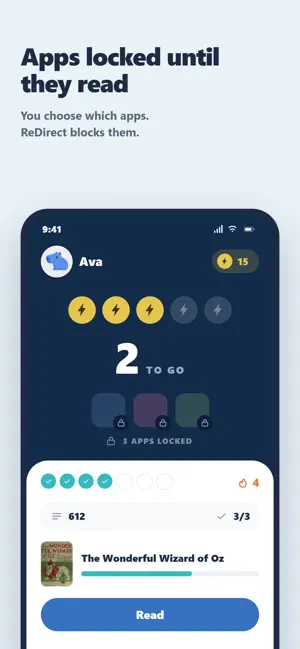
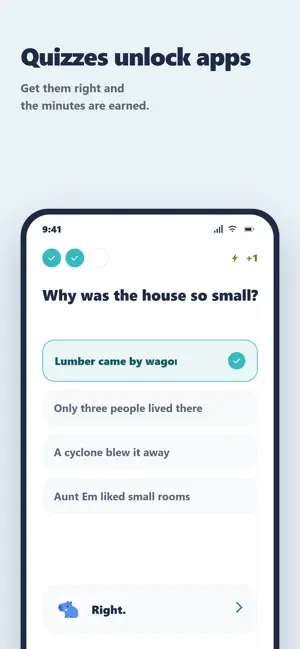
ReDirect turns screen time into a reward for learning. Instead of fighting over the iPhone, parents pick the apps they want gated — TikTok, YouTube, games, social — and ReDirect locks them behind short learning sessions. Each session ends with a few questions; correct answers bank progress toward a "break." Cash in a break and the locked apps unshield for 15 minutes. When the timer runs out, the apps re-lock automatically. HOW IT WORKS 1. Parent installs ReDirect on the child's iPhone and signs in. 2. Parent picks which apps to lock using Apple's Screen Time picker and sets a 4-digit PIN. 3. The child enters Kid Mode (PIN-protected). The locked apps now show a blocked shield instead of opening. 4. The child picks a learning session from the home screen. 5. After the session, they answer a short set of questions. Correct answers count toward earning a break. 6. When the child has earned a break, they tap to redeem it. The shielded apps unlock for 15 minutes, then re-lock on their own. WHAT KIDS LEARN ReDirect currently features short passages from classic public-domain books, matched to the child's grade level, followed by AI-generated comprehension questions. Because the questions are generated fresh each time, there are no answer keys to memorize. PARENT CONTROLS - Pick exactly which apps and categories are gated, anytime. - Set how many correct answers earn one break (e.g. "3 right = 15 min"). - See which sessions the child has completed and how many breaks they've earned. - Change the PIN whenever you want. - Works on the child's iPhone alone. No separate parent device required. BUILT ON APPLE SCREEN TIME ReDirect uses Apple's official Family Controls, Managed Settings, and Device Activity frameworks. The same APIs Apple uses for parental control power the shield, the unlock window, and the automatic re-lock. ReDirect never sees what the child does inside the unlocked apps — only that the break window is active. DESIGNED FOR REAL FAMILIES - No social features, comments, or DMs. - Focused, age-appropriate content. - Works offline for sessions once they're loaded. Stop bargaining over the iPhone. Make learning the price of admission.
What’s new
Version 1.9.2 · Updated August 12, 2026
- Smoother onboarding, better parent analytics, better UI, bug fixes, and more
App privacy
The developer, GAVIN KAI CASTELO VIDA, reported these privacy practices to Apple.
Data Not Linked to You
The following data, which may be collected but is not linked to your identity, may be used for the following purposes:
- Usage Data: Product Interaction, Other Usage Data
- Diagnostics: Crash Data, Performance Data
Used for: Analytics
Alternatives to ReDirect: Read for Screen Time
Looking for apps like ReDirect: Read for Screen Time? Here are 6 similar apps on the App Store. The highest rated is Tale! Family Screen Time (5.0/5), and all 6 are free to download.
-
 KiddyV: Healthy Screen Habits
1.0
KiddyV: Healthy Screen Habits
1.0
-
 Tale! Family Screen Time
5.0
Tale! Family Screen Time
5.0
-
 GraceLock - Pray & Screen Time
5.0
GraceLock - Pray & Screen Time
5.0
-
 VoiceBloom AAC
-
 Qanous
-
 Prayer Lock: Bible App Blocker
4.8
Prayer Lock: Bible App Blocker
4.8
| App | Rating | Price | Last updated | Compare |
|---|---|---|---|---|
| ReDirect: Read for Screen Time | 5.0 / 5 (4 ratings) | Free | August 12, 2026 | |
| KiddyV: Healthy Screen Habits | 1.0 / 5 (1) | Free | Jun 16, 2026 | Compare |
| Tale! Family Screen Time | 5.0 / 5 (2) | Free | Oct 9, 2026 | Compare |
| GraceLock - Pray & Screen Time | 5.0 / 5 (2) | Free | Oct 5, 2026 | Compare |
| VoiceBloom AAC | – | Free | Oct 12, 2026 | Compare |
| Qanous | – | Free | Aug 9, 2026 | Compare |
| Prayer Lock: Bible App Blocker | 4.8 / 5 (55) | Free | Jul 9, 2026 | Compare |