

Aide Calendar: AI Planner
SUMMERCLOUDE PTE. LTD. Productivity iPhoneiPadiPod touch
Aide Calendar: AI Planner is a free Productivity app for iPhone and iPad by SUMMERCLOUDE PTE. LTD. Requires iOS 17.0. Updated September 10, 2026.
- Price
- Free
- on the App Store
- Size
- 6 MB
- Age 17+
- Updated
- Sep 10
- 2026 · v1.3
Screenshots


About Aide Calendar: AI Planner
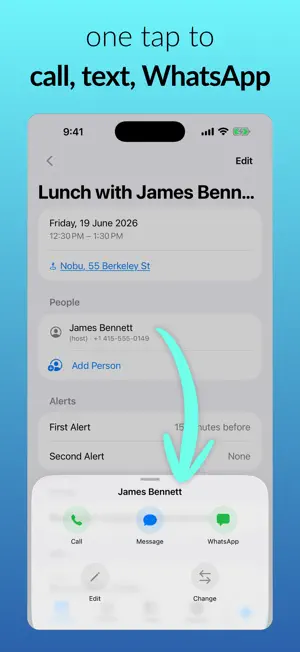
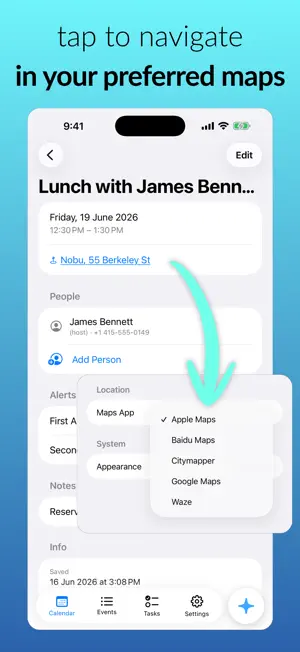
Screenshot a message, snap a photo, or just say it. Aide reads it and puts the event on your calendar — date, time, place and people already filled in. HOW IT WORKS Capture a screenshot, text, photo, or voice note → Aide extracts the title, date, time, place, and contacts → review and save in a tap. FEATURES • AI capture from screenshots, text, photos, and voice • Share straight into Aide from any app • Events and tasks in one clean calendar • Auto-detected times, places, and phone numbers — tap to call, message, or get directions • People linked to your contacts, so you know who each event is with • Smart alerts, repeating events, and prioritized tasks • A morning briefing of your day, quiet on days with nothing on • Home screen widget with what's coming up • Import Apple Calendar & Reminders — read-only, never changes your other apps • Secure sync across iPhone and iPad • Sign in with Apple, Google, or email • Free to use, with 15 AI captures a month — Pro removes the limit BUILT FOR BUSY PEOPLE Client meetings, sales calls, or family plans — what took a minute of typing now takes seconds. PRIVACY Your content is used only to create your events and tasks. We never sell it or use it to train AI models. AIDE PRO Unlimited AI captures, monthly or annual. Fair-use limits apply — see our Terms. Payment is charged to your Apple ID at purchase and renews automatically unless turned off at least 24 hours before the period ends; manage or cancel anytime in your Apple ID settings. Terms of Use: https://summercloude.com/terms Privacy Policy: https://summercloude.com/aide-calendar/privacy-policy
What’s new
Version 1.3 · Updated September 10, 2026
Your day, first thing A single notification each morning with the day's events, tasks and anything overdue. It stays silent on days with nothing on. Change the time or switch it off in Settings. A clearer widget The large widget now groups by day — overdue, today, tomorrow, then the rest. Overdue tasks now appear, which they never used to. Reminders that land properly "Dinner at 7:30, remind me an hour before" now gives you one event with a one-hour alert, instead of an event plus a stray to-do. A new app icon. Also fixed • Changing an alert and a repeat together no longer resets every occurrence • Converting an all-day event to a task no longer lands it at midnight • Completed repeating tasks can no longer reappear after you delete the live one
App privacy
The developer, SUMMERCLOUDE PTE. LTD., reported these privacy practices to Apple.
Data Linked to You
The following data, which may be collected and linked to your identity, may be used for the following purposes:
- Purchases: Purchase History
- Contact Info: Email Address, Name
- Contacts: Contacts
- User Content: Emails or Text Messages, Photos or Videos, Audio Data, Other User Content
- Identifiers: User ID, Device ID
- Usage Data: Product Interaction
- Diagnostics: Other Diagnostic Data
Used for: App Functionality
Alternatives to Aide Calendar: AI Planner
Looking for apps like Aide Calendar: AI Planner? Here are 6 similar apps on the App Store. The highest rated is Kairova: AI Planner (5.0/5), and all 6 are free to download.
-
 Screenshots to Calendar
-
 FluentTasks
-
 Mooli: AI Daily Planner & Todo
-
 Kairova: AI Planner
5.0
Kairova: AI Planner
5.0
-
 Pit.Kit: Text Your Thoughts
5.0
Pit.Kit: Text Your Thoughts
5.0
-
 SilveryChat
| App | Rating | Price | Last updated | Compare |
|---|---|---|---|---|
| Aide Calendar: AI Planner | – | Free | September 10, 2026 | |
| Screenshots to Calendar | – | Free | Sep 7, 2026 | Compare |
| FluentTasks | – | Free | May 6, 2026 | Compare |
| Mooli: AI Daily Planner & Todo | – | Free | Jun 23, 2026 | Compare |
| Kairova: AI Planner | 5.0 / 5 (1) | Free | Sep 14, 2026 | Compare |
| Pit.Kit: Text Your Thoughts | 5.0 / 5 (1) | Free | Oct 1, 2026 | Compare |
| SilveryChat | – | Free | Apr 22, 2026 | Compare |