

NextPlay Highlights
Neil Brown Sports iPhoneiPadiPod touch
NextPlay Highlights is a free Sports app for iPhone and iPad by Neil Brown. Rated 5.0/5 from 3 ratings. Requires iOS 15.1. Updated October 14, 2026.
- Rating
- 5.0
- 3 ratings
- Price
- Free
- on the App Store
- Size
- 47 MB
- Age 4+
- Updated
- Oct 14
- 2026 · v1.0.20
Screenshots


About NextPlay Highlights
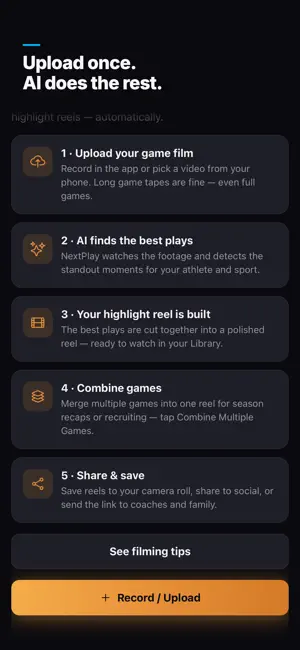
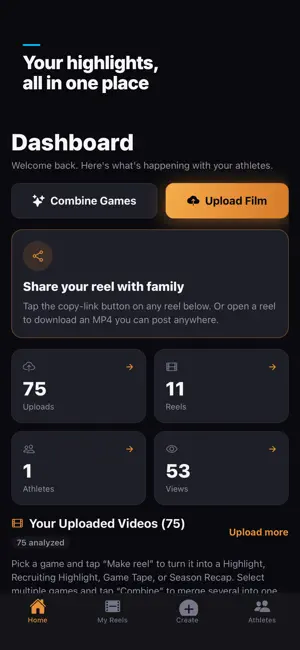
Make a highlight reel of your child's best sports moments from the videos already on your phone. NextPlay Highlights helps parents turn sideline clips, tournament footage and game film into videos to share with family, teammates and coaches. Start with the footage you have, review the plays AI finds, and choose the moments that tell your athlete's story. FOR SPORTS PARENTS - Combine phone clips from a game or across the season. - Keep highlights organized by athlete, including siblings who play different sports. - Make a season recap, a short social highlight or a recruiting video. - Download an MP4 to Photos or share a viewing link in a family group chat. - Use the same account on iPhone, iPad and the website. Sign in with Apple is available on the app and web. FROM CAMERA ROLL TO HIGHLIGHT REEL 1. Upload phone clips or game footage. 2. Review the detected plays and choose what to include. 3. Create a Highlight, Recruiting Highlight or Hype version. 4. Save the video or share it yourself through your preferred app. FOR YOUTH TEAMS AND ORGANIZATIONS Coaches and club organizers can manage athlete profiles and team rosters, review full-game film, and prepare clips to share with families. Game Tape keeps every detected play in order; Coach Film lets you remove plays from the cut. Choose a plan for the number of athlete profiles and teams you manage. FILMING YOUR ATHLETE For individual highlights, keep your athlete and the action in frame. With wide team footage, review the plays and remove those that are not your child's. NextPlay does not automatically identify your child in every play or contact recruiters for you. Full-game analysis takes over an hour; allow time for uploading and preparing the video too. SPORTS Soccer, football, basketball, baseball, softball, volleyball, lacrosse, flag football, hockey, wrestling, swimming, track and field, and more. SUBSCRIPTIONS The app is free to download. Adding film requires a paid plan. NextPlay offers auto-renewable monthly Athlete, Family, Team and Team Pro subscriptions. Current prices are shown in the app before purchase. Payment is charged to your Apple Account at confirmation of purchase. Subscriptions automatically renew unless auto-renew is turned off at least 24 hours before the end of the current period. Your account is charged for renewal within 24 hours prior to the end of the current period. Manage or cancel purchases made through Apple in your App Store account settings. Terms of Use (EULA): https://nextplayhighlights.com/terms Privacy Policy: https://nextplayhighlights.com/privacy Support: https://nextplayhighlights.com/contact
What’s new
Version 1.0.20 · Updated October 14, 2026
Uploads are steadier: a short video you're uploading keeps going if you lock your phone, and pulling down Control Center no longer interrupts it. You can also tap any video in Library > Videos to play it.
App privacy
The developer, Neil Brown, reported these privacy practices to Apple.
Data Linked to You
The following data, which may be collected and linked to your identity, may be used for the following purposes:
- Contact Info: Email Address, Name
- User Content: Photos or Videos, Other User Content
- Identifiers: User ID
- Usage Data: Product Interaction
Used for: App Functionality
Alternatives to NextPlay Highlights
Looking for apps like NextPlay Highlights? Here are 6 similar apps on the App Store. The highest rated is Streetplay Football Highlights (5.0/5), and all 6 are free to download.
-
 Streetplay Football Highlights
5.0
Streetplay Football Highlights
5.0
-
 NextPlayAI
5.0
NextPlayAI
5.0
-
 HighlightLab
5.0
HighlightLab
5.0
-
 CLIP!T
5.0
CLIP!T
5.0
-
 SportReels - Highlights Maker
5.0
SportReels - Highlights Maker
5.0
-
 Jumbotron: Sports Video Editor
5.0
Jumbotron: Sports Video Editor
5.0
| App | Rating | Price | Last updated | Compare |
|---|---|---|---|---|
| NextPlay Highlights | 5.0 / 5 (3 ratings) | Free | October 14, 2026 | |
| Streetplay Football Highlights | 5.0 / 5 (2) | Free | Oct 14, 2026 | Compare |
| NextPlayAI | 5.0 / 5 (4) | Free | Mar 14, 2026 | Compare |
| HighlightLab | 5.0 / 5 (11) | Free | Oct 1, 2026 | Compare |
| CLIP!T | 5.0 / 5 (2) | Free | Jul 24, 2026 | Compare |
| SportReels - Highlights Maker | 5.0 / 5 (28) | Free | Oct 5, 2026 | Compare |
| Jumbotron: Sports Video Editor | 5.0 / 5 (4) | Free | Jun 17, 2025 | Compare |