

QRsuite: Barcode Generator
Abdullah Al Hadi Utilities iPhoneiPadiPod touch
QRsuite: Barcode Generator is a free Utilities app for iPhone and iPad by Abdullah Al Hadi. Requires iOS 17.0. Updated November 1, 2026.
- Price
- Free
- on the App Store
- Size
- 17 MB
- Age 4+
- Updated
- Nov 1
- 2026 · v2.0
Screenshots


About QRsuite: Barcode Generator
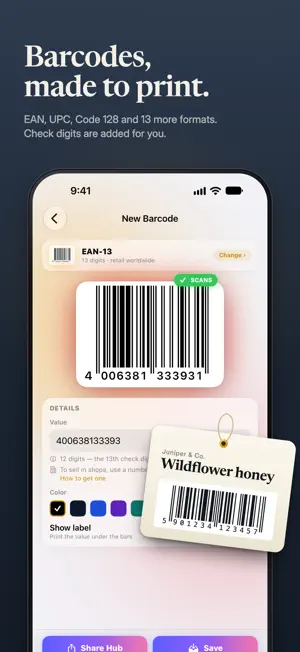
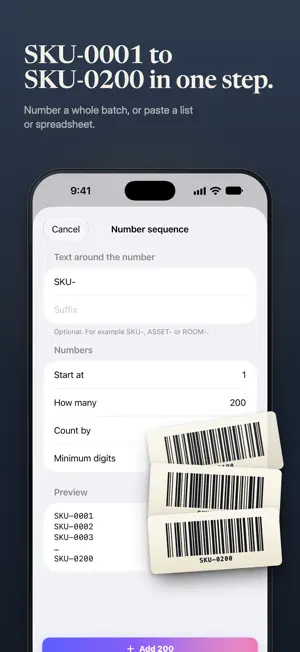
Make barcodes and QR codes in seconds, then print them on standard label sheets. QRsuite handles product barcodes, asset tags, Wi-Fi QR codes and contact cards, with a fast scanner built in. No ads, no account. BARCODE GENERATOR • 16 formats: EAN-13, EAN-8, UPC-A, UPC-E, ISBN, Code 128, GS1-128, ITF-14, Code 39, Code 93, ITF, Codabar, PDF417, Aztec, Data Matrix and GS1 Data Matrix • Export at true print size, with standard GS1 sizes for retail codes, and a scan check before you print • Check digits calculated for you, with a clear warning when a value won't encode • Human-readable digits printed under the bars • Every format is free to create and save LABELS IN BULK • Number a sequence in one step: SKU-0001 to SKU-0200, ASSET-100, ROOM-12 and so on • Or paste a list, or import a .txt or .csv file • Print on 6 common label sheet sizes (US Letter and A4) or on plain paper • Start at any label to finish a partly used sheet • Sharp vector barcodes, ready for any printer QR CODE MAKER • 33 ready-made categories: links, Wi-Fi, contact cards, email, SMS, phone, text, social profiles, events, locations, payments (UPI, PIX, SEPA) and more • Colors, gradients, dot and corner styles, frames and your logo in the center • 98 templates for Wi-Fi, menus, reviews, events and labels, or save your own designs • Print Wi-Fi signs, table tents and sheets of business cards • Brand Kit keeps your colors and logo one tap away SCAN ANYTHING • Fast scanner for QR codes and barcodes, from the camera or from photos and screenshots • Batch mode to scan many codes in a row • Link safety check before you open a URL • Every scan saved to history, with folders, notes, pins and search WORKS THE WAY YOU DO • Export PNG, PDF and SVG • Home Screen widget for your pinned code • Make a QR code from any app with the share sheet • Siri Shortcuts, Spotlight search and optional iCloud sync • App Lock with Face ID or Touch ID • Available in 17 languages QRSUITE PRO The free version covers every barcode and QR format, QR design, the scanner and printing or sharing up to 10 labels at a time, with a small "Made with QRsuite" mark under the code. Pro removes the mark and unlocks batches of up to 10,000 labels, full label sheets, logos, gradients, every template, HD PNG, PDF and SVG export, iCloud sync and unlimited history. Choose a monthly or yearly subscription or a one-time lifetime purchase. Questions or ideas? Reach us from Settings → Support. SUBSCRIPTION, TERMS & PRIVACY QRsuite Pro is available as an auto-renewable monthly or yearly subscription, or as a one-time lifetime purchase. Payment is charged to your Apple Account at confirmation of purchase. Subscriptions renew automatically unless canceled at least 24 hours before the end of the current period, and your account is charged for renewal within 24 hours before the period ends. Manage or cancel subscriptions in your App Store account settings. Terms of Use: https://www.apple.com/legal/internet-services/itunes/dev/stdeula/ Privacy Policy: https://hadicuet.github.io/qrsuite-legal/
What’s new
Version 2.0 · Updated November 1, 2026
QRsuite 2.0 is our biggest update yet. • A new look: a new icon and a short setup on first launch, tailored to what you make • Labels in bulk with a live preview: tap any part of a label to change it, check that every code scans before you print, and save batches to reuse • More ways to print: more label sheets, roll labels, your own custom sheets and printer alignment • New barcode formats: ISBN, ITF-14, GS1-128 and GS1 Data Matrix, with check digits worked out for you and true-size exports • Payment QR codes for UPI, PIX and SEPA (GiroCode), plus fuller contact cards and WPA3 Wi-Fi • A safer scanner: warnings for suspicious links, more formats, batch scanning and a Control Center control • New templates for signs, menus and business cards, and a history with folders, notes and undo • QRsuite Pro now comes as a monthly or yearly subscription, or a lifetime purchase. If you already own Pro, it stays unlocked
App privacy
The developer, Abdullah Al Hadi, reported these privacy practices to Apple.
Data Not Linked to You
The following data, which may be collected but is not linked to your identity, may be used for the following purposes:
- Purchases: Purchase History
- Location: Coarse Location
- Identifiers: Device ID
- Usage Data: Product Interaction
- Diagnostics: Other Diagnostic Data, Crash Data, Performance Data
- Search History: Search History
Used for: Analytics, App Functionality
Alternatives to QRsuite: Barcode Generator
Looking for apps like QRsuite: Barcode Generator? Here are 6 similar apps on the App Store. The highest rated is QR & Barcode Scanner: No Ads (5.0/5), and all 6 are free to download.
-
 eDPPT
-
 QR Barcode: Scanner & Creator
-
 QR & Barcode Scanner: No Ads
5.0
-
 QR & BarCode Generator AI
-
 Kodly: QR Code & Barcode Maker
-
 Smart Print Studio
| App | Rating | Price | Last updated | Compare |
|---|---|---|---|---|
| QRsuite: Barcode Generator | – | Free | November 1, 2026 | |
| eDPPT | – | Free | Jun 28, 2026 | Compare |
| QR Barcode: Scanner & Creator | – | Free | Jul 29, 2026 | Compare |
| QR & Barcode Scanner: No Ads | 5.0 / 5 (1) | Free | Oct 31, 2026 | Compare |
| QR & BarCode Generator AI | – | Free | May 19, 2026 | Compare |
| Kodly: QR Code & Barcode Maker | – | Free | Oct 19, 2026 | Compare |
| Smart Print Studio | – | Free | May 4, 2026 | Compare |