

QlipKeyboard
Dong Yeong Kim Utilities iPhoneiPadiPod touch
QlipKeyboard is a free Utilities app for iPhone and iPad by Dong Yeong Kim. Requires iOS 26.0. Updated October 10, 2026.
- Price
- Free
- on the App Store
- Size
- 21 MB
- Age 4+
- Updated
- Oct 10
- 2026 · v2.1.3
Screenshots



About QlipKeyboard
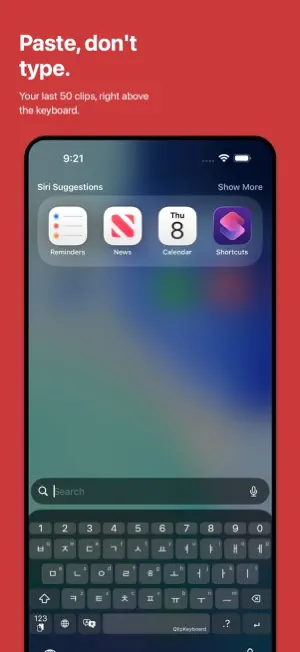
QlipKeyboard brings a keyboard, a clipboard, and translation together in one app. Stop copying and pasting the same things over and over. What you copied recently sits right above the keyboard, ready to reuse with a single tap. • Copy once, paste anywhere Turn on clipboard history, and the text, links, and images you copy are saved on your device and available straight from the keyboard. Press and hold the 123 key to browse what you saved and paste it. • Translate without leaving the keyboard Tap the translate key and the sentence you just typed turns into the language you picked. Select text first and only that part is translated. No more jumping between apps to copy and paste. Translation runs on your device, so it works without an internet connection, and what you type never leaves it. Pick your language in the Translation tab and download the ones you need ahead of time. Text already written in that language is translated back into your device language. • Keep what you use often Pin email addresses, bios, and go-to replies as favorites. Favorites are never removed, even when the history limit kicks in. • Text, links, and images Everything you copy is sorted by type automatically, so it is easy to find what you need. Images can be pasted straight from the keyboard too. Copy the address of an image and the picture itself is saved instead of the link — you can turn that off in settings. • Two Korean layouts, plus English - Korean (Reduced Vowels) - Korean Qwerty — standard two-set layout - English Qwerty Tap the globe key to switch languages instantly. In fields that only take numbers, the keyboard switches to a number pad on its own. • Press and hold for more Hold the 123 key to open the clipboard keyboard. Hold the space bar to turn on trackpad mode and move the cursor. Symbols and clipboard features are always a long press away. • Built for iPhone Duo The keyboard lays itself out for both the folded and the unfolded display. • A split keyboard on wide screens On the iPhone Duo's unfolded display and on iPad, the keyboard splits left and right so you can type comfortably with both thumbs. Turn it on or off in settings. In split mode the number pad appears on both halves. • Make it your own Choose your own colors for key backgrounds, text, functional keys, the clipboard panel, and clipboard cards. Adjust the keyboard height and haptic feedback to match how you type — haptics come with five strength levels and a choice of vibration feel. The 123, language, and translate keys along the bottom can be reordered however you like. • Private by default All clipboard data stays on your device. Clipboard contents are never uploaded to a server, shared, or analyzed. Translation also happens on your device. Sentences you translate are never sent to a server, and it works with no network connection. QlipKeyboard does not use cloud sync and never sends clipboard data off your device. You can clear your clipboard history at any time. • About Full Access Full Access is required for the keyboard to provide clipboard history. It is used only to read clipboard items and save them on your device, and no clipboard data is ever sent off your device. Tip: In Settings → Apps → QlipKeyboard, set "Paste from Other Apps" to "Allow" and clipboard history will be saved more reliably.
What’s new
Version 2.1.3 · Updated October 10, 2026
• Built for iPhone Duo The keyboard lays itself out for both the folded and the unfolded display. On the unfolded display you can split it and type with both thumbs. • Image links are saved as images Copy the address of an image and the picture itself is saved instead of the link. The same picture is kept only once even if the address differs, and you can turn this off in settings.
App privacy
The developer, Dong Yeong Kim, reported these privacy practices to Apple.
Data Not Collected
The developer does not collect any data from this app.
Alternatives to QlipKeyboard
Looking for apps like QlipKeyboard? Here are 6 similar apps on the App Store.
-
 또각또각 - 한글 키보드
-
 TapTiller
-
 NeverCleaner
-
 Tab Destroyer: Hoarder Cleaner
-
 PhotoMove Bridge
-
 ClipNest - Clipboard History
| App | Rating | Price | Last updated | Compare |
|---|---|---|---|---|
| QlipKeyboard | – | Free | October 10, 2026 | |
| 또각또각 - 한글 키보드 | – | Free | Oct 19, 2026 | Compare |
| TapTiller | – | Free | Jun 11, 2026 | Compare |
| NeverCleaner | – | Free | Sep 29, 2026 | Compare |
| Tab Destroyer: Hoarder Cleaner | – | Free | Jul 8, 2026 | Compare |
| PhotoMove Bridge | – | Free | Jun 17, 2026 | Compare |
| ClipNest - Clipboard History | – | Free | Oct 11, 2026 | Compare |
Compare QlipKeyboard with the top alternatives: ratings, updates, ASO score and keyword gaps →