

Vocal Remover & Music Splitter
Dan Nguyen Ngoc Dan Music iPhoneiPadiPod touch
Vocal Remover & Music Splitter is a free Music app for iPhone and iPad by Dan Nguyen Ngoc Dan. Rated 5.0/5 from 2 ratings. Requires iOS 16.0.
- Rating
- 5.0
- 2 ratings
- Price
- Free
- on the App Store
- Size
- 18 MB
- Age 4+
- Updated
- Sep 12
- 2026 · v1.1
Screenshots


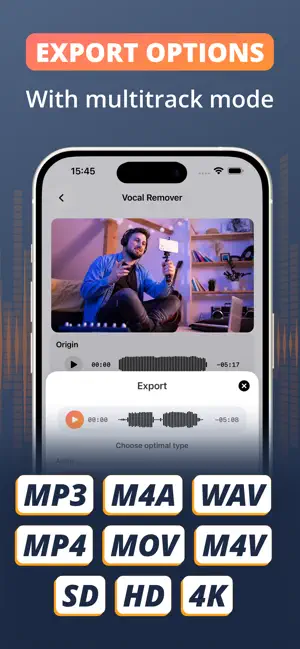

About Vocal Remover & Music Splitter
Separate vocals and instrumentals from audio and video files in seconds. Vocal Remover & Music Splitter is an AI-powered tool that lets you extract vocals, separate instrumental tracks, and edit audio or video files easily. Built for music editing, content creation, and everyday media processing. FEATURES • AI Vocal Separation Split any audio or video file into vocal and instrumental tracks. • Audio & Video Support Import music or video files and extract clean audio tracks. • Vocal Extractor Isolate vocals for practice, remixing, dubbing, and creative use. • Instrumental Extraction Remove vocals and keep the instrumental track from songs or videos. • Pitch Adjustment Change pitch of separated vocal or instrumental tracks. • EQ Controls Adjust bass, mids, and treble for better sound balance. • Audio & Video Trimming Trim audio or video files with precision. • High-Quality Export Export vocals, instrumentals, or edited media in high quality. • Fast Processing Process files quickly with a simple workflow. WHO IS THIS FOR • Singers practicing covers • Musicians working with songs • DJs editing tracks and mixes • Video creators adjusting soundtracks • Content creators producing social media content • Music students analyzing songs Whether you need to remove vocals, extract sound from video, or edit audio for creative use, this app provides a fast and simple solution. SUBSCRIPTION Full features are unlocked after purchase. Payment will be charged to your Apple Account upon confirmation. Subscriptions automatically renew unless canceled at least 24 hours before the end of the current period. You can manage or cancel anytime in your App Store account settings. Terms of Use: https://apptinz.com/vocal-remover/terms_of_user.pdf Privacy Policy: https://apptinz.com/vocal-remover/privacy_policy.pdf
What’s new
Version 1.1 · Updated September 12, 2026
Bug fixes and stability improvements
App privacy
The developer, Dan Nguyen Ngoc Dan, reported these privacy practices to Apple.
Data Used to Track You
The following data may be used to track you across apps and websites owned by other companies:
- Location: Coarse Location
- Identifiers: Device ID
- Usage Data: Product Interaction, Advertising Data
- Diagnostics: Crash Data, Performance Data
Data Not Linked to You
The following data, which may be collected but is not linked to your identity, may be used for the following purposes:
- Location: Coarse Location
- Identifiers: Device ID
- Usage Data: Product Interaction, Advertising Data
- Diagnostics: Crash Data, Performance Data
Used for: Third-Party Advertising, Analytics
Alternatives to Vocal Remover & Music Splitter
Looking for apps like Vocal Remover & Music Splitter? Here are 6 similar apps on the App Store. The highest rated is Stemelo: AI Vocal Remover (5.0/5), and all 6 are free to download.
-
 Music & Vocal Splitter offline
-
 Music Remover Audio Separator
-
 Stem Splitter - Vocal Remover
-
 Stemelo: AI Vocal Remover
5.0
Stemelo: AI Vocal Remover
5.0
-
 AI Vocal Remover - Audio Split
3.5
AI Vocal Remover - Audio Split
3.5
-
 Coolo: Vocal Remover AI
| App | Rating | Price | Last updated | Compare |
|---|---|---|---|---|
| Vocal Remover & Music Splitter | 5.0 / 5 (2 ratings) | Free | September 12, 2026 | |
| Music & Vocal Splitter offline | – | Free | Sep 22, 2026 | Compare |
| Music Remover Audio Separator | – | Free | Sep 22, 2025 | Compare |
| Stem Splitter - Vocal Remover | – | Free | May 12, 2026 | Compare |
| Stemelo: AI Vocal Remover | 5.0 / 5 (3) | Free | Oct 17, 2026 | Compare |
| AI Vocal Remover - Audio Split | 3.5 / 5 (2) | Free | Sep 24, 2025 | Compare |
| Coolo: Vocal Remover AI | – | Free | Jul 28, 2026 | Compare |