

Car Play TV: M3U IPTV Player
锦菊 曾 Navigation iPhoneiPadiPod touch
Car Play TV: M3U IPTV Player is a free Navigation app for iPhone and iPad by 锦菊 曾. Rated 4.2/5 from 5 ratings. Requires iOS 16.0. Updated November 5, 2026.
- Rating
- 4.2
- 5 ratings
- Price
- Free
- on the App Store
- Size
- 235 MB
- Age 4+
- Updated
- Nov 5
- 2026 · v5.2.1
Screenshots
Save to Pinterest
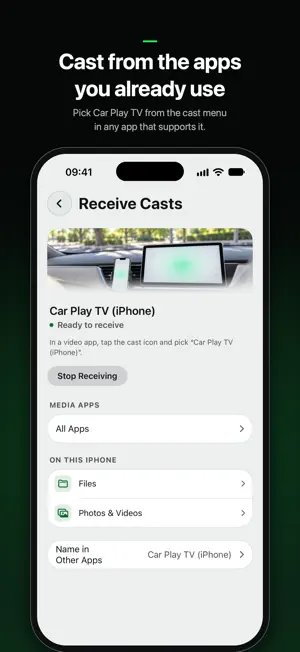


About Car Play TV: M3U IPTV Player
Your phone is smarter than your car's dashboard — Car Play TV finally puts it to work. Cast videos from the apps you already use, mirror your iPhone, and play your own playlists and media servers — made for passengers and parked cars. On the road, Drive Mode turns your iPhone into a clean, driver-friendly screen for any car, even an older one with no built-in display. CAST — TAKE IT TO A BIGGER SCREEN • Receive Casts: pick Car Play TV in the cast menu of video apps that support casting • Mirror your iPhone screen to a display connected by AirPlay or a wired adapter • Play videos from Photos, Files or your media server on that screen • 1 hour of casting free — unlimited with Pro SOURCES — YOUR CHANNELS AND LIBRARIES IN ONE GRID • Add M3U / M3U8 playlists by link, pasted text or QR code, or sign in with Xtream Codes • Connect your own Jellyfin, Emby, Plex or WebDAV media server • Play videos from your Photo Library and the Files app • Search, categories and favorites — built for 10,000+ channel playlists • Programme guide (XMLTV) when your playlist includes one • Live check shows which channels respond, and how fast • Continue Watching, audio tracks, subtitles and a mini player Car Play TV is a player only — it doesn't provide, host or recommend any content. Add only sources you own or are authorized to use. A REAL DRIVING DASHBOARD • Turn-by-turn navigation powered by Apple Maps • Switch between 4 map views: Explore, Drive, Traffic, or Satellite • Live GPS speedometer — clear, honest, easy to read at a glance • Today's weather and hourly forecast while you drive • Tap-to-call your favorite contacts • 6 landscape layouts: Classic is free; Cockpit, Panorama, Compass, Sprint, Circuit with Pro DRIVE AUDIO • Thousands of internet radio stations — browse free, stream with Pro • Apple Music dashboard control with Pro (Apple Music subscription required) • Background playback with lock-screen and Control Center controls MAKE IT YOURS • Light and dark appearance • Pick your car from 680+ models across 33 brands • Home Screen widgets: weather, clock (22 styles), your car, photos, affirmations and more • Swap wallpapers and even the app icon • Siri Shortcuts to launch Drive Mode — hands on the wheel, eyes on the road CAR PLAY TV PRO Unlock the full experience — unlimited casting, unlimited sources, unlimited live captions, all 6 drive layouts, unlimited radio streaming, Apple Music dashboard control, premium widget styles, wallpapers and app icons. Choose a weekly or yearly subscription, or a one-time Lifetime purchase. Eligible new subscribers may get an introductory price for the first week. Prices are shown in your local currency in the app before you buy. Payment is charged to your Apple Account at confirmation of purchase. Subscriptions auto-renew unless cancelled at least 24 hours before the end of the current period. Your account is charged for renewal within 24 hours prior to the end of the current period at the then-current price. Manage or cancel anytime in Settings → your Apple Account → Subscriptions. Lifetime is a one-time purchase and does not renew. HONEST BY DESIGN — the part most car apps skip Car Play TV uses your phone AS the screen. It's not a CarPlay replacement. Video is for passengers or when parked — never while driving. We never invent speed or vehicle data — if your GPS signal is weak, we say so instead of showing a fake number. We never claim to unlock or start your car. We do not collect or store your location; local weather requests go directly from your device to WeatherAPI.com. Your playlists, sign-ins and videos stay on your iPhone. No gimmicks. No fake gauges. Just a genuinely useful screen for the car you already own. Privacy Policy: https://sites.google.com/view/privacy-policy-carplayconnect Terms of Service: https://sites.google.com/view/terms-of-use-carplayconnect
Ratings & reviews
4.2
5 ratings
What’s new
Version 5.2.1 · Updated November 5, 2026
• Tap the video while it plays to show the playback controls • Fixed flickering menus in the player, and switching channels and categories is smoother • Search Sources by voice • Drive Mode no longer asks you to turn on Location Services every time you open it • Swipe from the left edge to go back on more screens • Many other fixes and improvements
App privacy
The developer, 锦菊 曾, reported these privacy practices to Apple.
Data Not Linked to You
The following data, which may be collected but is not linked to your identity, may be used for the following purposes:
- Location: Precise Location
- Identifiers: Device ID
- Usage Data: Product Interaction
- Diagnostics: Crash Data, Performance Data, Other Diagnostic Data
Used for: App Functionality
Alternatives to Car Play TV: M3U IPTV Player
Looking for apps like Car Play TV: M3U IPTV Player? Here are 6 similar apps on the App Store. The highest rated is TrailShed (5.0/5), and 4 of the 6 are free to download.
-
 Translator · Baro
-
 RV-Pilot
-
 TrailShed
5.0
-
 VisitedMap - PinTracker
-
 CarDash: Car Dashboard & HUD
5.0
-
 Car Play Connect: Mirror & GPS
5.0
| App | Rating | Price | Last updated | Compare |
|---|---|---|---|---|
| Car Play TV: M3U IPTV Player | 4.2 / 5 (5 ratings) | Free | November 5, 2026 | |
| Translator · Baro | – | 0.99 USD | Nov 4, 2026 | Compare |
| RV-Pilot | – | Free | Oct 10, 2026 | Compare |
| TrailShed | 5.0 / 5 (2) | 0.99 USD | Jun 25, 2026 | Compare |
| VisitedMap - PinTracker | – | Free | May 13, 2026 | Compare |
| CarDash: Car Dashboard & HUD | 5.0 / 5 (1) | Free | Oct 1, 2026 | Compare |
| Car Play Connect: Mirror & GPS | 5.0 / 5 (1) | Free | Jun 4, 2026 | Compare |