

Stop Motion MT
PEDRO IUA CORTINHAS FONTES Photo & Video iPhoneiPadiPod touch
Stop Motion MT is a free Photo & Video app for iPhone and iPad by PEDRO IUA CORTINHAS FONTES. Requires iOS 13.0. Updated September 2, 2026.
- Price
- Free
- on the App Store
- Size
- 23 MB
- Age 4+
- Updated
- Sep 2
- 2026 · v1.2.7
Screenshots



About Stop Motion MT
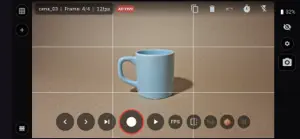
Full control stop motion: manual camera, external Bluetooth/USB keyboard, onion skin, reference video, and frame-by-frame synced audio. Stop Motion MT (from "Mágicas e Truques," or Magic Tricks) is an app dedicated to animating objects by capturing sequential photos, which can be previewed and edited within the app and exported as an MP4 video or as a ZIP-compressed sequence of JPG images. The interface is simple and intuitive, bringing together everything you need for full-control animation. The goal is to democratize access to stop motion, both for beginners and for those who want to create professional-level animations. The app's main differentiator is external keyboard control. Stop Motion MT works with Bluetooth and USB keyboards, so every function can be operated without touching the camera: not only capturing frames, but also stepping forward and back frame by frame, playing clips or the entire scene, onion skin, flip, FPS, and much more. The camera offers full control, from automatic to 100% manual mode, and even photographic settings — focus, zoom, white balance, shutter speed, and ISO — can be controlled remotely and changed frame by frame, and even animated. All settings are saved per scene, ensuring far finer control and a smoother animation workflow. On the timeline, you can delete, duplicate, and repeat frames or entire sections (with undo), and easily change playback speed in frames per second — all without touching the original photos. The app also lets you import a reference video to animate over, with adjustable opacity, scale, and position, and add an audio track synced frame by frame, with a waveform on the timeline and frame-by-frame listening for checking sync. Complete your workflow with adjustable onion skin, composition grids, time-lapse mode, and a final export with reference and audio already included in the video — all within the app, with no internet required. In the free version, scenes are created in 720p with every feature unlocked; the Pro version adds Full HD and 4K resolutions for professional delivery. Stop Motion MT is an independent app, created by an animator with over 28 years of stop motion experience. By supporting the Pro version, you directly support the app's development and help bring new features and continuous improvements.
What’s new
Version 1.2.7 · Updated September 2, 2026
Bug fixes and camera stability improvements.
App privacy
The developer, PEDRO IUA CORTINHAS FONTES, reported these privacy practices to Apple.
Data Not Collected
The developer does not collect any data from this app.
Alternatives to Stop Motion MT
Looking for apps like Stop Motion MT? Here are 6 similar apps on the App Store. The highest rated is Stop Motion Lab (4.8/5), and all 6 are free to download.
-
 Stop Motion Video Maker
4.2
-
 Stop Motion Lab
4.8
-
 Stop Motion Magic
4.7
-
 Animatives - stop motion maker
4.3
-
 Easy Stop Motion Camera Lite
3.0
-
 Sway Motion slideshow maker
4.5
| App | Rating | Price | Last updated | Compare |
|---|---|---|---|---|
| Stop Motion MT | – | Free | September 2, 2026 | |
| Stop Motion Video Maker | 4.2 / 5 (6) | Free | Oct 14, 2026 | Compare |
| Stop Motion Lab | 4.8 / 5 (40) | Free | Sep 13, 2026 | Compare |
| Stop Motion Magic | 4.7 / 5 (71) | Free | Sep 25, 2026 | Compare |
| Animatives - stop motion maker | 4.3 / 5 (7) | Free | Apr 9, 2025 | Compare |
| Easy Stop Motion Camera Lite | 3.0 / 5 (1) | Free | Aug 23, 2026 | Compare |
| Sway Motion slideshow maker | 4.5 / 5 (17) | Free | Sep 17, 2024 | Compare |
Compare Stop Motion MT with the top alternatives: ratings, updates, ASO score and keyword gaps →