

Otso: Visual Timer
SIMON HEUSCHKEL Education iPhoneiPadiPod touchMacApple Watch
Otso: Visual Timer is a paid Education app for iPhone and iPad by SIMON HEUSCHKEL. Rated 5.0/5 from 1 ratings. Requires iOS 18.0. Updated October 22, 2026.
- Rating
- 5.0
- 1 ratings
- Price
- 0.99 USD
- on the App Store
- Size
- 5 MB
- Age 4+
- Updated
- Oct 22
- 2026 · v1.4
Screenshots


About Otso: Visual Timer
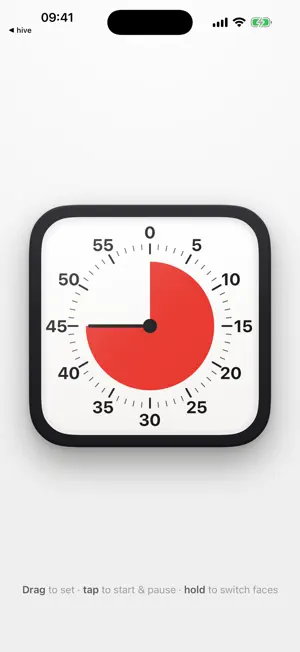
A colored wedge shrinks as time runs down. See how much is left at a glance, without having to read the numbers or do the math. Buy once and use it on iPhone, iPad, Apple Watch, and Mac. No ads, no subscriptions, no account. No tracking or data collection. MAKE IT YOURS • Choose a dial maximum of 5, 10, 15, 30, 60, or 120 minutes • Count clockwise or counterclockwise • Adjust sound and haptic feedback on supported devices ON iPHONE AND iPAD • Drag the dial to set a timer; tap to start, pause, or resume • Turn the dial with two fingers, like a real knob • Smooth dialing at up to 120 Hz on ProMotion displays • Swipe beside the dial to change faces, or swipe up for settings • Check the countdown on the Lock Screen and, on supported iPhones, in the Dynamic Island • Keep the screen awake while the timer is running in the foreground • Receive a finish notification in the background when notifications are enabled • Made for iPhone Duo: Otso fills the whole display, closed or open, and keeps the dial clear of the fold and the status items • Half folded, the countdown gets one side of the screen and the dial stays on the other • Works in Split View: put Otso next to another app, and the dial adapts as you resize it ON APPLE WATCH All fifteen faces, right on your wrist. Turn the Digital Crown to set the time, tap to start or pause, swipe left or right to change faces, and swipe up for settings. The Watch timer works independently of the iPhone timer. ACCESSIBILITY VoiceOver labels and timer actions, keyboard controls on Mac and iPad, and animations that adapt to Reduce Motion. DETAILS YOU CAN FEEL Each face has its own sounds: Wood knocks, Glass chimes, and LCD clicks like a watch button. Flick the dial and it spins on, clicking past each mark as it slows to a stop. The faces catch the light like real objects: tilt your iPhone or iPad, or move the pointer on Mac, and the glass glints, shadows deepen under the rim and the knobs, and Neon’s glow floats behind its tube. Party celebrates with confetti, while Aurora adds a soft shimmer. Motion effects are reduced when Reduce Motion is on. FIFTEEN FACES Each has its own character. • Classic — charcoal body, glass lens, red disc • Pastel — soft candy colors and a textured knob • Rainbow — lilac, with an arc that shrinks color by color • Neumorph — soft, sculpted, quiet • Glass — translucent, on a light wall • Flat — pure, bold, no chrome • Paper — warm stationery, an ink needle • Wood — turned walnut, terracotta wedge • LCD — dot matrix on a backlit sage screen • Rugged — machined blades behind thick rubber • Midnight — black with a hot coral glow • Halo — a glowing amber ring • Neon — a magenta glow against the dark • Aurora — a curtain of light over a starfield • Party — a frosted cake that bursts into confetti Otso takes its name from the bear of Finnish folklore. A timer should sit quietly in the room and be understood at a glance. For lessons, workshops, exams, focused work, homework, and cooking — whenever it helps to see time passing.
What’s new
Version 1.4 · Updated October 22, 2026
• Made for iPhone Duo: Otso fills the whole display, closed or open, and keeps the dial clear of the fold and the status items • Half folded, the countdown gets one side of the screen and the dial stays on the other • Works in Split View: put Otso next to another app, and the dial adapts as you resize it • The faces now catch the light: tilt your iPhone or iPad, or move the pointer on Mac, and the glass glints, shadows deepen under the rim and the knobs, and Neon’s glow floats behind its tube • Turn the dial with two fingers on iPhone and iPad, just like a real knob • In case you missed it: Otso is now on Apple Watch, with all fifteen faces
App privacy
The developer, SIMON HEUSCHKEL, reported these privacy practices to Apple.
Data Not Collected
The developer does not collect any data from this app.
Alternatives to Otso: Visual Timer
Looking for apps like Otso: Visual Timer? Here are 6 similar apps on the App Store. The highest rated is Joggle Research (5.0/5), and 4 of the 6 are free to download.
-
 Fourth Grade Math Games Kids
-
 Joggle Research
5.0
Joggle Research
5.0
-
 Working4
4.9
Working4
4.9
-
 Fusandolo alla Minerva
-
 Focus with Study Timer
-
 Visual Timer - See Time Left
| App | Rating | Price | Last updated | Compare |
|---|---|---|---|---|
| Otso: Visual Timer | 5.0 / 5 (1 rating) | 0.99 USD | October 22, 2026 | |
| Fourth Grade Math Games Kids | – | 0.99 USD | Jul 4, 2025 | Compare |
| Joggle Research | 5.0 / 5 (1) | Free | Aug 26, 2022 | Compare |
| Working4 | 4.9 / 5 (7) | 0.99 USD | Aug 26, 2026 | Compare |
| Fusandolo alla Minerva | – | Free | Jul 25, 2025 | Compare |
| Focus with Study Timer | – | Free | Jun 11, 2026 | Compare |
| Visual Timer - See Time Left | – | Free | Aug 18, 2026 | Compare |
Compare Otso: Visual Timer with the top alternatives: ratings, updates, ASO score and keyword gaps →