

Profit Tracker: Income Expense
Phuc Pham Finance iPhoneiPadiPod touch
Profit Tracker: Income Expense is a free Finance app for iPhone and iPad by Phuc Pham. Requires iOS 17.0. Updated August 21, 2026.
- Price
- Free
- on the App Store
- Size
- 3 MB
- Age 4+
- Updated
- Aug 21
- 2026 · v1.1.0
Screenshots



About Profit Tracker: Income Expense
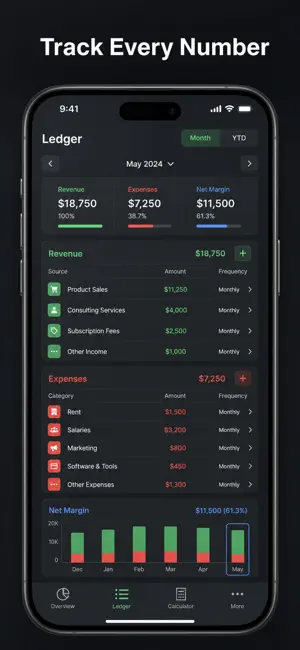
Know your real monthly profit — not just what came in. Most tracking apps stop at a list of transactions. This one does the math you actually care about: it normalizes every entry to a monthly figure (a yearly cost is divided by 12, a quarterly one by 3), subtracts total cost from total revenue, and shows profit per month, per year and per day — plus the margin percentage that tells you how much of every sale you keep. One-time amounts are kept out of the recurring figure so your run-rate stays honest. WHAT YOU GET - Your profit answered in one number: monthly, yearly and daily, updated the moment you add an entry - Margin percentage so you know what share of revenue survives your costs - Every recurring cost normalized to a monthly figure — yearly, quarterly, monthly or one-time, all finally comparable - A cost structure you can see: bar chart of revenue vs cost vs profit, plus a donut of where the money goes - A ranked list of your biggest cost drains, sorted with percentages, so the thing to cut is obvious - A guided setup that builds your first revenue and cost entry for you, plus a daily reminder to keep the numbers current PERFECT FOR - Indie makers and app developers tracking product revenue against tool and platform bills - Freelancers who want the take-home number after subscriptions, taxes and insurance - Small shop and service owners watching monthly burn and margin - Anyone tired of guessing whether this month actually made money WHY NOT JUST USE A SPREADSHEET Because a spreadsheet will not divide your annual bills for you, will not tell you your margin, and is not in your pocket at the moment you sign up for one more tool. Here, adding a cost takes seconds and the profit number recalculates instantly — no formulas to maintain, no file to open on a laptop. PRIVACY Everything you enter is stored locally on your device. No account, no sign-up, no tracking, no ads, no data leaving your phone. FULL ACCESS Full access unlocks the complete app: the profit dashboard, the entries list with unlimited revenue and cost items, the charts and cost ranking, the built-in USD converter with your own editable exchange rate, and settings. It is available as a weekly subscription, a yearly subscription, or a one-time lifetime purchase. Subscriptions renew automatically until cancelled in your Apple account settings; the lifetime option is a single payment with no renewal. Add your revenue and your three biggest costs — in under a minute you will see the number that matters: what you actually keep. Terms of Use (EULA): https://web-levi.web.app/terms Privacy Policy: https://web-levi.web.app/privacy-policy Questions? [email protected]
What’s new
Version 1.1.0 · Updated August 21, 2026
Bug fixes and performance improvements.
App privacy
The developer, Phuc Pham, reported these privacy practices to Apple.
Data Not Collected
The developer does not collect any data from this app.
Alternatives to Profit Tracker: Income Expense
Looking for apps like Profit Tracker: Income Expense? Here are 6 similar apps on the App Store.
-
 Profit Margin Calculator & ROI
-
 MarginFlow: Profit Calculator
-
 Money: Simple Tracker
-
 Gig Income Tracker - Hustle
-
 Craft Pricing Calculator Pro
-
 Fundery
| App | Rating | Price | Last updated | Compare |
|---|---|---|---|---|
| Profit Tracker: Income Expense | – | Free | August 21, 2026 | |
| Profit Margin Calculator & ROI | – | Free | Jun 1, 2026 | Compare |
| MarginFlow: Profit Calculator | – | Free | Mar 2, 2026 | Compare |
| Money: Simple Tracker | – | Free | Mar 14, 2026 | Compare |
| Gig Income Tracker - Hustle | – | Free | Aug 21, 2026 | Compare |
| Craft Pricing Calculator Pro | – | Free | Aug 20, 2026 | Compare |
| Fundery | – | Free | Oct 8, 2026 | Compare |