

FlowProd: Daily Planner
Jamal ZALOUKI Productivity iPhoneiPadiPod touch
FlowProd: Daily Planner is a free Productivity app for iPhone and iPad by Jamal ZALOUKI. Requires iOS 15.1. Updated November 6, 2026.
- Price
- Free
- on the App Store
- Size
- 48 MB
- Age 4+
- Updated
- Nov 6
- 2026 · v1.0.1
Screenshots
Save to Pinterest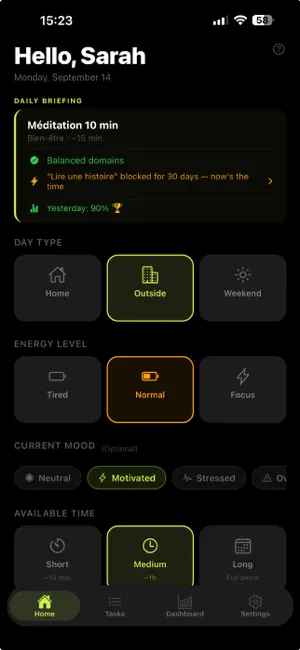
About FlowProd: Daily Planner
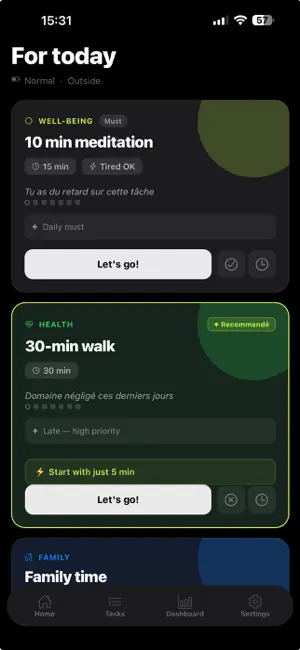
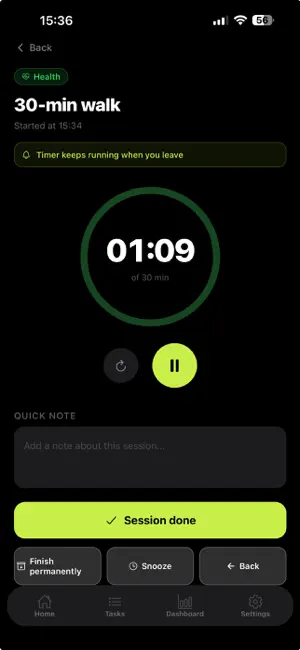
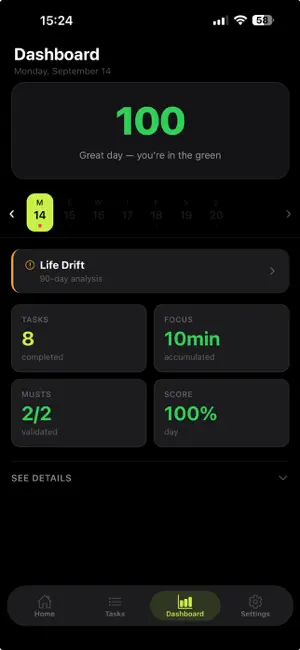
Stop wondering where to start. You don't need to do everything now. You only need to know what to do first. Every morning you tell FlowProd your energy, your context and how much time you have. It gives you 3 tasks — not thirty. The ones that match how you actually feel, your priorities, and the balance between your areas of life. HOW IT WORKS 1. Start your day with one question: how do you feel? 2. The app shows 3 tasks to do now. Finish one, a new one appears. 3. In the evening, see everything you accomplished by area. Streaks, balance, progress. AN ALGORITHM THAT EXPLAINS ITSELF Every suggestion shows why it is there. The score combines urgency, area priority, life balance and the theme of the day. Nothing is hidden: recalculate with a different energy or context and watch the list change. YOUR AREAS OF LIFE, NOT YOUR TO-DO LIST Religion, Family, Health, Career, Entertainment, Reading, Learning, Well-being, Finances, Social, Creativity: pick between 2 and 5. FlowProd watches the balance between them and flags the ones you keep neglecting. WHAT'S INSIDE - Today's suggestions — 3 scored tasks, regenerable - Active session — timer that keeps running in the background, voice-dictated notes - Daily Briefing — a daily status built from your real data - Dashboard — balance by area, streaks, daily score - Drift detection — areas ignored for too long - Recurring tasks, mini-projects split into steps, reminders - Calendar — the app reads your free slots and places tasks in them - French, English, Spanish FREE 3 suggestions every day, full task management, dashboard, Daily Briefing, mood context. FLOWPROD PRO - Finished task instantly replaced by the next one - Unlimited suggestion regenerations - 90-day drift detection - Automatic monthly summary - Connected calendar: free slots and auto-scheduling - AI-enriched explanations on every task AI-GENERATED CONTENT Suggestion explanations and the daily briefing are written by AI from your own data. The app tells you before the first call. No generated content is published or shared. SUBSCRIPTION FlowProd Pro is available weekly, monthly or yearly. Payment is charged to your Apple account at confirmation of purchase. Subscriptions renew automatically unless cancelled at least 24 hours before the end of the current period. You can manage or cancel your subscription in your Apple account settings. Privacy: https://legal.flowprods.com/en/privacy-policy Terms of Use: https://legal.flowprods.com/en/terms-of-service
What’s new
Version 1.0.1 · Updated November 6, 2026
The Life Drift screen now follows the app language. Stronger protection for AI features and various fixes.
App privacy
The developer, Jamal ZALOUKI, reported these privacy practices to Apple.
Data Linked to You
The following data, which may be collected and linked to your identity, may be used for the following purposes:
- Usage Data: Product Interaction
- Purchases: Purchase History
- Contact Info: Email Address, Name
- User Content: Customer Support, Other User Content
- Identifiers: User ID, Device ID
Used for: Analytics, App Functionality
Alternatives to FlowProd: Daily Planner
Looking for apps like FlowProd: Daily Planner? Here are 6 similar apps on the App Store. The highest rated is Daily Schedule: Plan NextDay (5.0/5), and all 6 are free to download.
-
 Rubato: Stack Your Day
-
 Checkomat: Private Checklists
-
 Calendoc: Parallel Calendars
-
 Daily Schedule: Plan NextDay
5.0
-
 Daily Life Calendar Wallpaper
5.0
-
 PlanSense
4.3
| App | Rating | Price | Last updated | Compare |
|---|---|---|---|---|
| FlowProd: Daily Planner | – | Free | November 6, 2026 | |
| Rubato: Stack Your Day | – | Free | Oct 15, 2026 | Compare |
| Checkomat: Private Checklists | – | Free | Oct 30, 2026 | Compare |
| Calendoc: Parallel Calendars | – | Free | Nov 4, 2026 | Compare |
| Daily Schedule: Plan NextDay | 5.0 / 5 (7) | Free | Apr 27, 2026 | Compare |
| Daily Life Calendar Wallpaper | 5.0 / 5 (2) | Free | Apr 2, 2026 | Compare |
| PlanSense | 4.3 / 5 (18) | Free | Nov 15, 2026 | Compare |