

AI Photo Editor & Retouch
Barbaros IHTIYAR Photo & Video iPhoneiPadiPod touch
AI Photo Editor & Retouch is a free Photo & Video app for iPhone and iPad by Barbaros IHTIYAR. Requires iOS 15.1. Updated October 21, 2026.
- Price
- Free
- on the App Store
- Size
- 60 MB
- Age 4+
- Updated
- Oct 21
- 2026 · v1.2.0
Screenshots
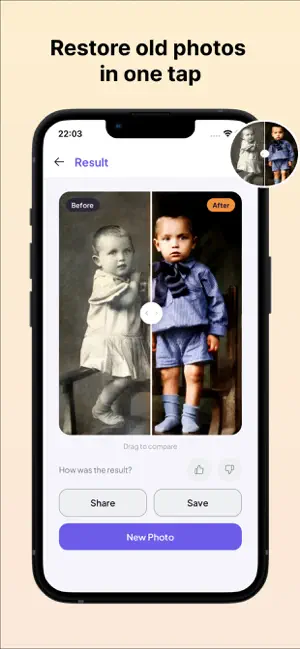

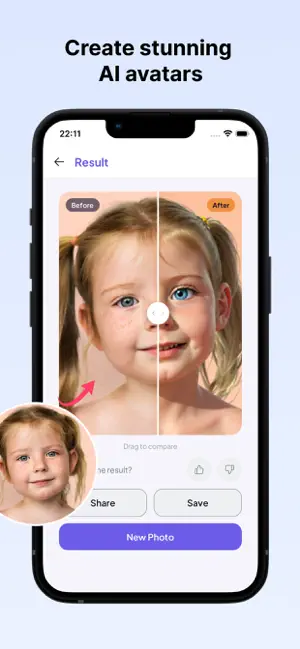
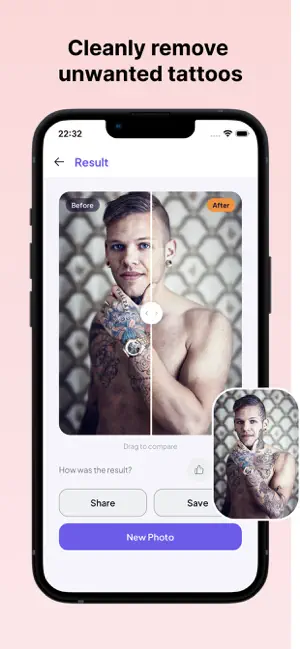
About AI Photo Editor & Retouch
Reviora – AI Photo Generator & AI Image Editor Transform your ideas into stunning AI-generated images with Reviora. Create high-quality photos, artistic portraits, realistic images, anime characters, fantasy artwork, professional headshots, logos, wallpapers, and more using powerful AI models. Reviora combines multiple advanced AI models, allowing you to generate unique images in different styles with incredible speed and quality. Whether you're creating social media content, profile pictures, digital art, marketing visuals, or creative concepts, Reviora helps you bring your imagination to life. Features • Multiple AI models for different artistic styles • AI Image Generator from text prompts • AI Photo Creator with realistic results • Professional AI Portrait Generator • Anime, Fantasy, Realistic, 3D and Digital Art styles • AI Headshots and Profile Pictures • AI Avatar Creator • AI Logo & Icon Generator • High-quality image generation • Fast AI processing • Simple and easy-to-use interface • Save and share your creations instantly Create Amazing AI Images Generate almost anything with AI: AI portraits AI selfies Professional headshots Anime characters Fantasy art Cinematic scenes Wallpapers Logos Stickers Social media content Product mockups Concept art Digital illustrations Multiple AI Models Unlike many AI image apps, Reviora gives you access to multiple powerful AI models. Choose the model that best matches your style and generate unique, high-quality images for every project. Perfect For • Content creators • Designers • Artists • Students • Social media creators • Entrepreneurs • Anyone who loves AI-generated art Whether you want realistic photos, artistic illustrations, anime characters, or professional-quality AI artwork, Reviora gives you the creative freedom to generate stunning images in seconds. Download Reviora today and discover the easiest way to create incredible AI images with multiple powerful AI models. Terms of Use: https://www.apple.com/legal/internet-services/itunes/dev/stdeula/
What’s new
Version 1.2.0 · Updated October 21, 2026
Added new feature & performance improvement
App privacy
The developer, Barbaros IHTIYAR, reported these privacy practices to Apple.
Data Used to Track You
The following data may be used to track you across apps and websites owned by other companies:
- Identifiers: Device ID
Data Linked to You
The following data, which may be collected and linked to your identity, may be used for the following purposes:
- Identifiers: Device ID
- Usage Data: Product Interaction, Advertising Data
- Purchases: Purchase History
- Contact Info: Email Address, Name
- User Content: Photos or Videos
Used for: Analytics, Product Personalization, App Functionality
Data Not Linked to You
The following data, which may be collected but is not linked to your identity, may be used for the following purposes:
- Diagnostics: Crash Data, Performance Data
Used for: Analytics
Alternatives to AI Photo Editor & Retouch
Looking for apps like AI Photo Editor & Retouch? Here are 6 similar apps on the App Store. The highest rated is Eye Opener: Fix Close Eyes (5.0/5), and all 6 are free to download.
-
 AI Photo Enhancer & Unblur HD
-
 Eye Opener: Fix Close Eyes
5.0
Eye Opener: Fix Close Eyes
5.0
-
 Tattoo Remover AI - Editor
5.0
Tattoo Remover AI - Editor
5.0
-
 Restore Old Photos ·Revpic Pro
-
 Lomograph Camera Instant 1888
5.0
Lomograph Camera Instant 1888
5.0
-
 EZPIC: AI Photo Editor, Eraser
5.0
EZPIC: AI Photo Editor, Eraser
5.0
| App | Rating | Price | Last updated | Compare |
|---|---|---|---|---|
| AI Photo Editor & Retouch | – | Free | October 21, 2026 | |
| AI Photo Enhancer & Unblur HD | – | Free | May 9, 2026 | Compare |
| Eye Opener: Fix Close Eyes | 5.0 / 5 (1) | Free | Sep 30, 2026 | Compare |
| Tattoo Remover AI - Editor | 5.0 / 5 (1) | Free | Oct 3, 2026 | Compare |
| Restore Old Photos ·Revpic Pro | – | Free | Feb 12, 2026 | Compare |
| Lomograph Camera Instant 1888 | 5.0 / 5 (1) | Free | Feb 25, 2026 | Compare |
| EZPIC: AI Photo Editor, Eraser | 5.0 / 5 (2) | Free | Jan 29, 2026 | Compare |