

ClearSpace: Photo Cleaner
Sahil Jain Utilities iPhoneiPadiPod touch
ClearSpace: Photo Cleaner is a free Utilities app for iPhone and iPad by Sahil Jain. Requires iOS 17.0. Updated September 29, 2026.
- Price
- Free
- on the App Store
- Size
- 3 MB
- Age 4+
- Updated
- Sep 29
- 2026 · v1.3
Screenshots


About ClearSpace: Photo Cleaner
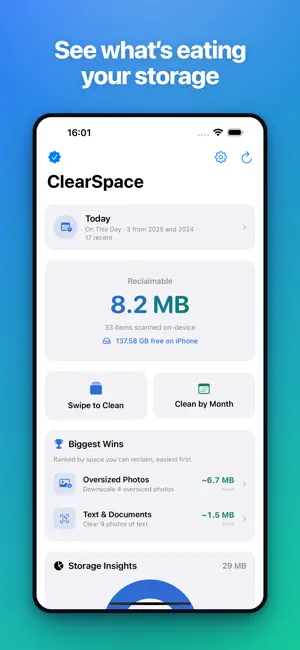
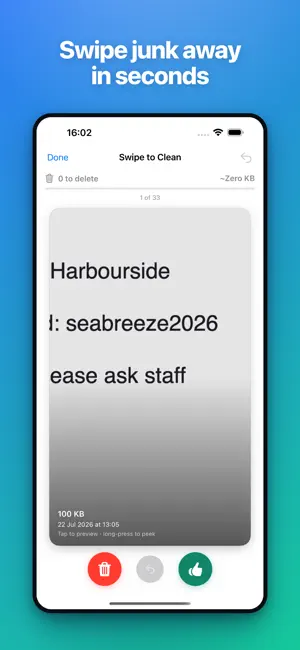
Your photo library is quietly eating your storage. ClearSpace finds the clutter, helps you clear it in a few taps, and even shrinks the space-hogs you want to keep - all right on your device. Your photos never leave your phone. YOUR DAILY TWO MINUTES Open the Today card for an "On This Day" deck - the photos you took on this date in earlier years, plus anything new worth a second look. Swipe through in about two minutes, keep what matters, and watch your streak grow. Add the home-screen widget to see your streak, today's count, and reclaimable space at a glance. Optional weekly reminders are there if you want them, and never switch themselves on. PAPERWORK, FOUND Receipts, notes, whiteboards and pages pile up in a camera roll without anyone noticing. ClearSpace spots photos that are mostly text and gathers them in one place. The reading happens entirely on your device — the text is never stored, never sent anywhere. IT REMEMBERS WHAT YOU KEEP Decide to keep a photo and ClearSpace stops suggesting it. Every future scan skips it, so the app never nags you about a decision you already made. Settings shows how many photos are skipped and lets you bring them all back — nothing is ever deleted by ignoring. WHAT CLEARSPACE FINDS - Duplicates & near-identical shots: burst photos and look-alikes are grouped automatically, with the sharpest, best version pre-selected to keep. - Blurry photos: out-of-focus and shaky shots are detected and flagged so you can sweep them away. - Screenshots & screen recordings: receipts, memes, and one-off captures gathered in one place. - Large videos, large photos & Live Photos: the storage-hungry items taking up the most space, sorted biggest first. SWIPE TO CLEAN Fly through your library card by card: swipe to delete, swipe to keep. It turns tidying up into something you'll actually finish. Long-press any card for a full-screen preview before you decide. CLEAN BY MONTH Browse your library month by month and clear out an old trip or a busy week in one focused pass. SHRINK, DON'T JUST DELETE Keep the memory, lose the bulk. ClearSpace can compress large videos, convert Live Photos to crisp stills, and downscale oversized photos - reclaiming space without losing the shots you love. SEE EXACTLY WHAT YOU'LL FREE A clean dashboard shows total reclaimable space, a Storage Insights breakdown, and Biggest Wins ranked by how much you'll save. Open any category, review a thumbnail grid, fine-tune your selection, and delete in bulk. After each scan, "new since last scan" surfaces just what's piled up since you last tidied. 100% PRIVATE - BY DESIGN Everything runs locally using on-device intelligence. There is no account, no sign-in, no cloud, no analytics, and no tracking. ClearSpace contains zero networking code - your photos and your data stay with you, always. HONEST, ONE-TIME PRICING ClearSpace is free to use and genuinely useful on its own. The free tier lets you clean up to 10 items in a single bulk action. Want unlimited bulk cleanup plus video compression and downsizing? Unlock ClearSpace Pro for a single one-time purchase - yours forever. No weekly subscriptions, no recurring charges, no traps. The App Store is full of "cleaner" apps that charge every single week for the same on-device work. We think that's wrong. Pay once, clean forever. SAFE BY DEFAULT Deletions use the system Photos confirmation and move items to "Recently Deleted," so nothing is permanently removed without your say-so. Suggested "keeper" photos in duplicate groups are protected and can never be accidentally deleted. DESIGNED FOR EVERYONE - Full Dark Mode and Dynamic Type support - VoiceOver labels throughout, including the photo grid - Reduce Motion support and gentle haptics - Handles limited photo access with a quick "Select More Photos" option Free up space. Keep your photos private. Pay once. That's ClearSpace.
What’s new
Version 1.3 · Updated September 29, 2026
Two changes, both about respecting your decisions: - Text & Documents: ClearSpace now finds photos of receipts, notes, whiteboards and pages — the paperwork that quietly piles up in your camera roll. Reading happens entirely on your device; the text is never stored or sent anywhere. - Never Suggest This: keep a photo on purpose and ClearSpace will stop flagging it. Every future scan skips it. You can see how many are skipped, and undo it all, in Settings. As always: 100% on-device, no accounts, no tracking. One-time Pro unlock, no subscriptions.
App privacy
The developer, Sahil Jain, reported these privacy practices to Apple.
Data Not Collected
The developer does not collect any data from this app.
Alternatives to ClearSpace: Photo Cleaner
Looking for apps like ClearSpace: Photo Cleaner? Here are 6 similar apps on the App Store. The highest rated is Delety: Photo & Video Cleaner (5.0/5), and all 6 are free to download.
-
 Rollbreeze: Photo Cleaner
-
 Check My Color
-
 Delety: Photo & Video Cleaner
5.0
Delety: Photo & Video Cleaner
5.0
-
 Wipey: Swipe Photo Cleaner
5.0
Wipey: Swipe Photo Cleaner
5.0
-
 Honest Cleaner
5.0
Honest Cleaner
5.0
-
 Photo Cleaner: Cleanup Storage
3.0
Photo Cleaner: Cleanup Storage
3.0
| App | Rating | Price | Last updated | Compare |
|---|---|---|---|---|
| ClearSpace: Photo Cleaner | – | Free | September 29, 2026 | |
| Rollbreeze: Photo Cleaner | – | Free | Aug 6, 2026 | Compare |
| Check My Color | – | Free | Aug 8, 2026 | Compare |
| Delety: Photo & Video Cleaner | 5.0 / 5 (1) | Free | Oct 21, 2026 | Compare |
| Wipey: Swipe Photo Cleaner | 5.0 / 5 (2) | Free | Oct 8, 2026 | Compare |
| Honest Cleaner | 5.0 / 5 (1) | Free | Apr 14, 2026 | Compare |
| Photo Cleaner: Cleanup Storage | 3.0 / 5 (1) | Free | Aug 11, 2026 | Compare |