

VidMask - Video Face Blur
东方 刘 Productivity iPhoneiPadiPod touch
VidMask - Video Face Blur is a free Productivity app for iPhone and iPad by 东方 刘. Rated 5.0/5 from 1 ratings. Requires iOS 17.6. Updated October 19, 2026.
- Rating
- 5.0
- 1 ratings
- Price
- Free
- on the App Store
- Size
- 28 MB
- Age 4+
- Updated
- Oct 19
- 2026 · v1.1.3
Screenshots
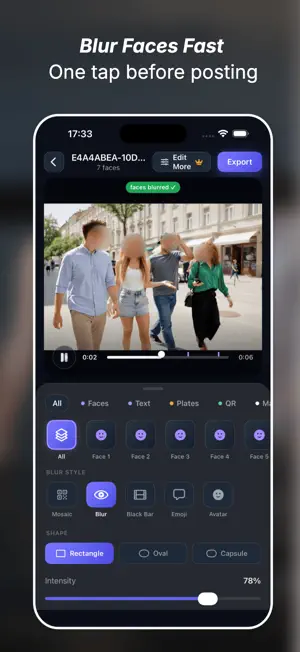
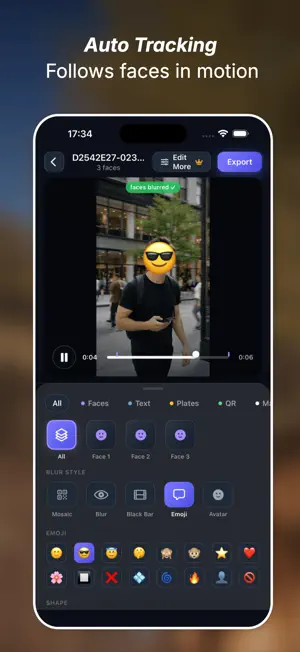


About VidMask - Video Face Blur
VidMask is a video privacy blur tool built for creators. When you record vlogs, street videos, interviews, classroom clips, events, real estate videos, or everyday moments, your footage may include faces, strangers, license plates, door numbers, QR codes, screens, or private text. VidMask helps you quickly find and hide sensitive areas before posting. KEY FEATURES Automatic Face Detection Import a video and let VidMask scan for faces automatically. Blur all faces with one tap, or choose specific people to protect. Moving Face Tracking Blur regions follow moving faces, reducing the need for manual frame-by-frame editing. Multiple Blur Styles Choose from mosaic, blur, black bar, emoji, or avatar cover to match your video style. Private Text & QR Detection VidMask can detect text, QR codes, barcodes, and possible plate-like areas, helping you review privacy risks before sharing. Manual Fine-tuning Automatic detection is helpful, but not perfect. Add manual blur areas, resize them, move them, and apply them to a specific moment, a time range, or the whole clip. Advanced Editor For more control, use the advanced editor with timeline layers, keyframes, draggable layer duration, per-layer styles, and precise manual corrections. On-device Processing Your videos are processed on your device. No cloud upload is required for the core video blur workflow. PERFECT FOR - Vloggers and short video creators - Street photography and city walk videos - Interviews and documentary-style videos - Classroom and school activity videos - Real estate and local business videos - Dashcam, parking, and outdoor clips - Social media posts that need privacy protection VidMask is not a full video editor. It is a focused privacy blur tool designed to help you hide faces and sensitive information quickly before posting. Auto blur, fine-tune, and export with confidence. Privacy Policy: https://vidmask.picsfit.com/privacy.html Terms of Service: https://vidmask.picsfit.com/terms.html Email: [email protected]
What’s new
Version 1.1.3 · Updated October 19, 2026
• Fixed avatar blurring glitches during fast camera panning. • Introduced voice blocking/muting feature. • Improved blurring accuracy and detail. • General bug fixes and performance optimizations • Fix crash bug
App privacy
The developer, 东方 刘, reported these privacy practices to Apple.
Data Not Linked to You
The following data, which may be collected but is not linked to your identity, may be used for the following purposes:
- Diagnostics: Crash Data, Performance Data
Used for: App Functionality
Alternatives to VidMask - Video Face Blur
Looking for apps like VidMask - Video Face Blur? Here are 6 similar apps on the App Store. The highest rated is 灵云听语-录音转文字 (5.0/5), and 5 of the 6 are free to download.


| App | Rating | Price | Last updated | Compare |
|---|---|---|---|---|
| VidMask - Video Face Blur | 5.0 / 5 (1 rating) | Free | October 19, 2026 | |
| Tmibao - File Redaction | – | Free | Aug 20, 2026 | Compare |
| 乐动按摩 | – | Free | Oct 16, 2026 | Compare |
| Podcript - Podcast Transcripts | – | Free | Oct 21, 2026 | Compare |
| 灵云听语-录音转文字 | 5.0 / 5 (1) | Free | Jan 20, 2025 | Compare |
| LED Magic Light | – | Free | Aug 12, 2026 | Compare |
| 文图 | – | 0.99 USD | Mar 27, 2025 | Compare |