

Mojiokoshi: Voice to Text
GYOU GI Utilities iPhoneiPadiPod touchApple Watch
Mojiokoshi: Voice to Text is a free Utilities app for iPhone and iPad by GYOU GI. Rated 5.0/5 from 1 ratings. Requires iOS 18.0. Updated October 13, 2026.
- Rating
- 5.0
- 1 ratings
- Price
- Free
- on the App Store
- Size
- 174 MB
- Age 4+
- Updated
- Oct 13
- 2026 · v1.12
Screenshots

About Mojiokoshi: Voice to Text
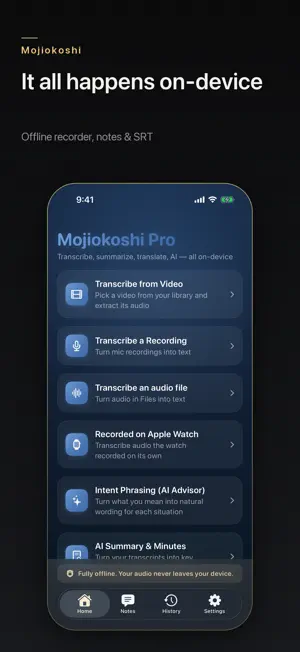
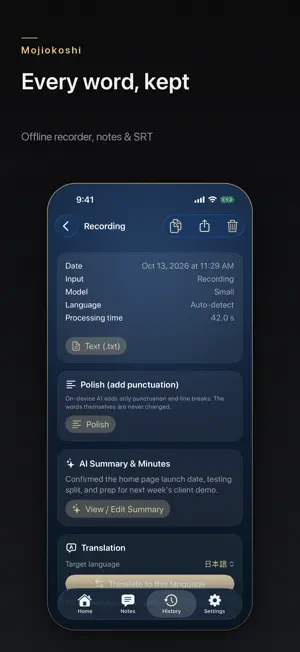
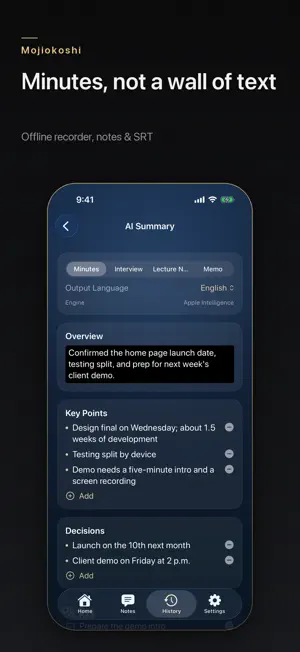
On-device AI transcription. Your audio never leaves your iPhone. Mojiokoshi turns recordings and your own videos into text using on-device AI. All recognition happens right on your iPhone — your audio is never uploaded to the internet. That means it works on a plane, underground, or anywhere with no signal. ■ Highlights • Fully offline — audio and video never leave your device • Record and transcribe — speak and get text on the spot • Works with Apple Watch — tap the watch screen while recording to drop a marker; when your iPhone isn't with you, the watch can record on its own (up to 45 minutes per recording) • Quick Notes on Apple Watch — tap the watch face and speak. Each passing thought shows up as text in the Notes tab on your iPhone, in the order you said them (Pro adds a title and category, and turns dates into calendar drafts) • Transcribe from video — pull text from videos in your library • Transcribe an audio file — bring m4a / mp3 / wav from the Files app straight into text • Japanese, English, and Chinese, with automatic language detection • Chinese shown in Simplified or Traditional script • Translate transcripts into many languages — on-device, offline once language packs are installed • AI Advisor "Intent Phrasing" — turn what you mean into natural, situation-aware wording (on-device AI, Pro) • AI Summary & Minutes — organize transcripts into an overview, key points, decisions, and to-dos; export as PDF / Markdown / Word (on-device AI, Pro) • Polish — add punctuation and line breaks to a transcript so it reads cleanly. The words themselves are never changed (on-device AI, Pro) • Export text (.txt) and subtitles (.srt) (Pro) • Automatic paragraphs at natural pauses — long recordings don't come back as one solid block • Search, organize, copy, and share your history • Choose your model — from lightweight to high-accuracy Large v3 • Light/Dark support with 7 American-retro themes ■ Great for Meeting minutes, interview transcripts, lecture and field notes, jotting down passing thoughts, organizing voice memos, creating subtitles for videos, and finding the right way to say something to people abroad. ■ Privacy first No analytics, no ad SDKs. Transcripts are stored only on your device. We do not collect your data. ■ Pricing Free: up to 1 minute per transcription, 5 per day. Apple Watch quick notes don't count toward this (up to 1 minute each). Mojiokoshi Pro removes the time and count limits and unlocks text / subtitle (SRT) export, AI Summary & Minutes (PDF/Word export), Polish, and the AI Advisor. Mojiokoshi Pro is a one-time purchase — buy once, use forever. No subscription. A single one-time payment — there is no auto-renewal. Restore your purchase on any device signed in with the same Apple ID via "Restore Purchases". Apple, Apple Watch, and iPhone are trademarks of Apple Inc., registered in the U.S. and other countries. Privacy Policy: https://mojiokoshi.glspace.co.jp/privacy.html Terms of Use (EULA): https://www.apple.com/legal/internet-services/itunes/dev/stdeula/
What’s new
Version 1.12 · Updated October 13, 2026
Fixes and stability improvements. No new features in this update. ■ Keeping your recordings • When a recording was interrupted by a call or Siri, what had been recorded could be judged "too short" and discarded • When audio could not be saved, it could disappear with nothing shown. The transcript is now kept, and you are told right away that the audio is not available for playback • An Apple Watch recording could be transcribed a second time after a failed save, leaving two identical entries in History ■ Purchases • Starting a recording immediately after launch could apply free-tier limits even if you own Pro • A recording stopped at the purchase screen can now be continued after you buy • Restore Purchases now reports its result (restored / no purchase found / could not connect) on both Settings and the purchase screen ■ Also • Model downloads can now be cancelled while in progress • Cancel now takes effect immediately for summaries and clean-up • Line breaks you added when editing a summary were lost in Word, PDF and HTML exports • At the largest text sizes, Restore Purchases and the export buttons could be squeezed until unreadable • On iPad, the app could quit if an entry you deleted from the list was still open on the right
App privacy
The developer, GYOU GI, reported these privacy practices to Apple.
Data Not Collected
The developer does not collect any data from this app.
Alternatives to Mojiokoshi: Voice to Text
Looking for apps like Mojiokoshi: Voice to Text? Here are 6 similar apps on the App Store.
-
 Kotonote: On-Device Transcribe
-
 Voice to Text - AI Transcribe
-
 Vocatim: Offline Transcription
-
 元梦录音笔记
-
 JetsoGo
-
 もしもし
もしもし
| App | Rating | Price | Last updated | Compare |
|---|---|---|---|---|
| Mojiokoshi: Voice to Text | 5.0 / 5 (1 rating) | Free | October 13, 2026 | |
| Kotonote: On-Device Transcribe | – | Free | Jun 13, 2026 | Compare |
| Voice to Text - AI Transcribe | – | Free | Jul 29, 2026 | Compare |
| Vocatim: Offline Transcription | – | Free | Oct 13, 2026 | Compare |
| 元梦录音笔记 | – | Free | Oct 23, 2026 | Compare |
| JetsoGo | – | Free | Aug 11, 2026 | Compare |
| もしもし | – | Free | Sep 5, 2026 | Compare |