

Dropling: Lock Screen Learning
Duckino s.r.o. Education iPhoneiPadiPod touchApple Watch
Dropling: Lock Screen Learning is a free Education app for iPhone and iPad by Duckino s.r.o. Requires iOS 17.0. Updated September 2, 2026.
- Price
- Free
- on the App Store
- Size
- 30 MB
- Age 4+
- Updated
- Sep 2
- 2026 · v1.5
Screenshots


About Dropling: Lock Screen Learning
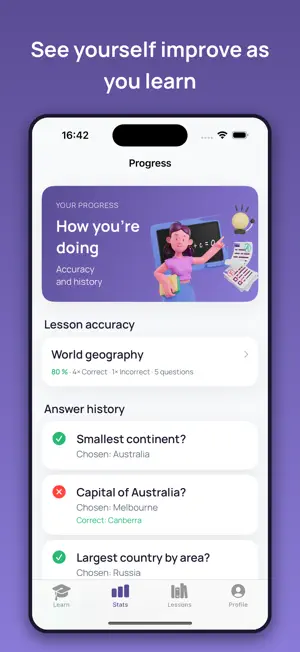
Dropling is a learning app that fits around your day. No need to find a free hour or sit over books. Instead, every now and then a single question arrives with two to four answers. You pick the right one and carry on with whatever you were doing. That way you learn something new without having to spend hours in one go. CHOOSE HOW YOU LEARN • Gradually – questions arrive as notifications, spaced sensibly apart. A question waits like an ordinary message, and you answer when it suits you. • Intensively – when you have a spare moment, on the bus or waiting somewhere, start a session right on your Lock Screen. Questions then come one after another for as long as you enjoy it. AI BUILDS YOUR LESSONS No need to think anything up. Just type what you want to learn and the AI prepares the questions and answers for you. Then you can start right away – on iPhone and Apple Watch. WHAT DROPLING GIVES YOU • New knowledge in passing – you learn in small doses through the day, without long concentration. • Learning when it suits you – you decide when to answer. The app fits around you, not the other way round. • A clear view of progress – for each lesson you see what you know and what still deserves another round. ARE A FEW QUESTIONS A DAY ENOUGH? Yes. The strength is in regularity. When you revisit material at sensible intervals, you remember it far better than after one long cram. A few questions a day add up to a fine stack of knowledge over a week and a month – and what you already know, you simply reinforce. Download Dropling and learn in small drops – whenever and wherever it suits you. Dropling+ is an auto-renewable subscription. Payment is charged to your Apple ID at confirmation of purchase. It renews automatically unless cancelled at least 24 hours before the end of the current period; your account is charged for renewal within 24 hours prior to the end of the period. Manage or cancel anytime in your Account Settings after purchase. Terms of Use (EULA): https://dropling.app/terms?lang=en Privacy Policy: https://dropling.app/privacy?lang=en
What’s new
Version 1.5 · Updated September 2, 2026
A question opened from the Lock Screen is now fully visible. • When you tap a question, the window opens at the right size for the text. Longer questions are no longer cut off, and you don't have to drag the window up.
App privacy
The developer, Duckino s.r.o., reported these privacy practices to Apple.
Data Not Linked to You
The following data, which may be collected but is not linked to your identity, may be used for the following purposes:
- Purchases: Purchase History
- User Content: Other User Content
- Identifiers: Device ID
- Diagnostics: Crash Data, Performance Data, Other Diagnostic Data
Used for: App Functionality
Alternatives to Dropling: Lock Screen Learning
Looking for apps like Dropling: Lock Screen Learning? Here are 6 similar apps on the App Store. The highest rated is 1% Smarter: Fun Facts All Day (5.0/5), and all 6 are free to download.
-
 Redo - Improve Speaking
-
 LingoDrop
-
 1×1 Master
-
 Vocab First: Word Builder
-
 Orator: Speech Coach
-
 1% Smarter: Fun Facts All Day
5.0
| App | Rating | Price | Last updated | Compare |
|---|---|---|---|---|
| Dropling: Lock Screen Learning | – | Free | September 2, 2026 | |
| Redo - Improve Speaking | – | Free | Sep 12, 2026 | Compare |
| LingoDrop | – | Free | Oct 12, 2026 | Compare |
| 1×1 Master | – | Free | Jul 7, 2026 | Compare |
| Vocab First: Word Builder | – | Free | Oct 18, 2026 | Compare |
| Orator: Speech Coach | – | Free | Jul 21, 2026 | Compare |
| 1% Smarter: Fun Facts All Day | 5.0 / 5 (1) | Free | Apr 7, 2026 | Compare |