

WOBZ Mobile
MPWB Corporation Productivity iPhoneiPadiPod touch
WOBZ Mobile is a free Productivity app for iPhone and iPad by MPWB Corporation. Requires iOS 18.2. Updated July 29, 2026.
- Price
- Free
- on the App Store
- Size
- 212 MB
- Age 4+
- Updated
- Jul 29
- 2026 · v1.0.4
Screenshots


About WOBZ Mobile
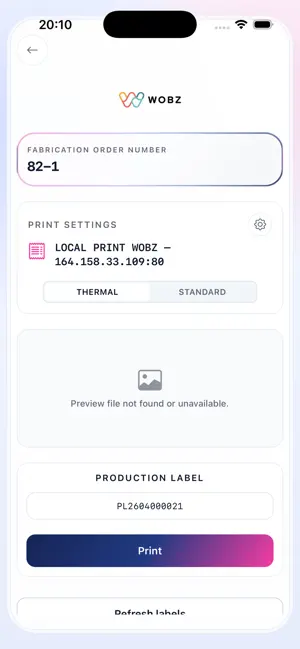
WOBZ Mobile brings your entire warehouse and logistics operations directly to your smartphone or tablet. Built for warehouse operators, production teams, and logistics managers, WOBZ Mobile connects to your company ERP in real time - giving you instant access to fabrication orders, shipping labels, picking tasks, and order details without ever going back to a desktop. --- BARCODE SCANNING --- Scan fabrication orders (OF numbers) and Digicup barcodes instantly using your device camera or a connected hardware barcode scanner. WOBZ Mobile supports both embedded scanners and camera-based scanning, so your team can work with any device on the floor. Every scan is processed in real time and triggers the relevant action automatically - no manual entry, no errors, no wasted time. --- LABEL PRINTING --- Print shipping labels, production labels, and commercial invoices directly from your mobile device with a single scan. WOBZ Mobile supports: - Thermal printers (Zebra ZPL) for shipping and production labels - Standard network printers for commercial invoices (A4) - Sequential print mode: scan once, print automatically, return to home Configure your printers once in the settings and print instantly from anywhere on the warehouse floor. Printer availability is synced live from your ERP, so you always print to the right device. --- LOGISTICS & PICKING --- Manage your full picking operations from a single screen. - View your assigned picking lines and their current status - Browse awaiting pickings and take them in charge individually or in bulk - Complete picking lines and move fabrication orders to packaging - Access warehouse stock coordinates and product availability - Consult packaging details: box dimensions, products per box, and box count Picking statuses (pending, in progress, completed) are updated in real time, keeping your entire team in sync at all times. --- ORDER CONSULTATION --- Look up any fabrication order instantly by scanning or entering an OF number or Digicup barcode. Access the full order record: - Order number, SKU, and product name - Requested shipping date, sales channel and carrier - Label design preview - Complete action history and status timeline --- SETUP & CONFIGURATION --- Getting started takes less than a minute: 1. Enter your company ERP server URL 2. Sign in with your ERP credentials 3. Select your printers and scanning mode 4. Start scanning --- KEY HIGHLIGHTS --- - Real-time ERP synchronization - Supports English and French - Portrait mode optimized for one-hand use - Zebra ZPL thermal printer support - Camera and hardware barcode scanner - Secure token-based ERP authentication - Fast and lightweight - built for daily field use WOBZ Mobile - warehouse operations, fully mobile.
What’s new
Version 1.0.4 · Updated July 29, 2026
Fixed: shipping labels for orders marked as Shipped or Completed can now be automatically regenerated if the label is missing from the ERP, instead of showing a permanent "label not found" error.
App privacy
The developer, MPWB Corporation, reported these privacy practices to Apple.
Data Not Collected
The developer does not collect any data from this app.
Alternatives to WOBZ Mobile
Looking for apps like WOBZ Mobile? Here are 6 similar apps on the App Store. The highest rated is Summ by Amie (5.0/5), and all 6 are free to download.
-
 Contact Journal - Personal CRM
3.5
Contact Journal - Personal CRM
3.5
-
 VUSION Link 2
4.0
VUSION Link 2
4.0
-
 Summ by Amie
5.0
Summ by Amie
5.0
-
 Tungsten Business Connect™
3.0
Tungsten Business Connect™
3.0
-
 MDLZ Digital Workplace
1.7
MDLZ Digital Workplace
1.7
-
 DYMO® LabelManager® Connect
1.8
DYMO® LabelManager® Connect
1.8
| App | Rating | Price | Last updated | Compare |
|---|---|---|---|---|
| WOBZ Mobile | – | Free | July 29, 2026 | |
| Contact Journal - Personal CRM | 3.5 / 5 (19) | Free | Mar 4, 2026 | Compare |
| VUSION Link 2 | 4.0 / 5 (1) | Free | Sep 24, 2026 | Compare |
| Summ by Amie | 5.0 / 5 (2) | Free | Sep 4, 2025 | Compare |
| Tungsten Business Connect™ | 3.0 / 5 (1) | Free | Jul 2, 2026 | Compare |
| MDLZ Digital Workplace | 1.7 / 5 (6) | Free | Aug 20, 2026 | Compare |
| DYMO® LabelManager® Connect | 1.8 / 5 (5) | Free | Jan 28, 2025 | Compare |
Compare WOBZ Mobile with the top alternatives: ratings, updates, ASO score and keyword gaps →