

Vivace: Lossless FLAC Player
Matthew Wong Music iPhoneiPadiPod touchMacApple Watch
Vivace: Lossless FLAC Player is a free Music app for iPhone and iPad by Matthew Wong. Rated 5.0/5 from 3 ratings. Requires iOS 17.0.
- Rating
- 5.0
- 3 ratings
- Price
- Free
- on the App Store
- Size
- 29 MB
- Age 4+
- Updated
- Oct 21
- 2026 · v1.0.44
Screenshots

About Vivace: Lossless FLAC Player
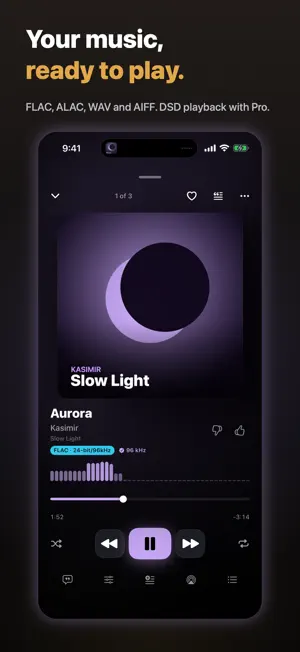
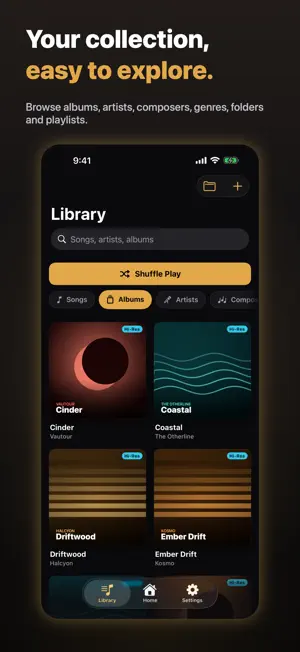
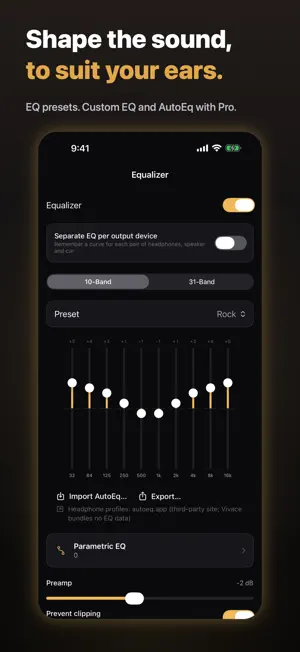
Your own music, organized around the way you listen. Vivace plays local audio files on iPhone and iPad. Import songs and folders, build playlists, and make Home your own. No streaming catalog is included. YOUR LIBRARY, WITHIN REACH • Play FLAC, ALAC, WAV, AIFF, CAF, AAC/M4A, MP3 and Opus. • Browse songs, albums, artists, composers, genres, folders and playlists. Reuse recent searches to find favorites faster. • Copy music into Vivace or play supported folders from their original location. • Pin playlists on Home and arrange the sections you use most. • See a song's playlist memberships and add or remove it in one place. • Repeat your playlist or current queue. Choose Auto transitions, crossfade or ordinary back-to-back playback. • Read embedded lyrics and matching local .lrc files imported with folders. CUE tracks, favorites, a sleep timer and free EQ presets are included. • Use Now Playing and Quick Access widgets. Updates and background controls follow operating-system rules. MORE WITH VIVACE PRO • Volume Normalization: one switch reduces loudness differences between songs, using existing tags or automatic analysis on your device. • DSD (.dsf/.dff) playback, decoded to PCM. • Custom 10- and 31-band EQ, parametric filters, AutoEq profiles and EQ per output device. • Automatic online lyrics through LRCLIB, listening stats, all themes, Smart Playlists and unlimited ordinary playlists. • Optional iCloud Backup & Sync for music and library metadata, using your private iCloud account and available storage. • Ad removal and headphone crossfeed on supported routes. AI SUGGESTIONS, YOUR CHOICE Add AI suggestions to an ordinary playlist for Driving, Gym, a mood or your own activity. Use the songs already there and optional examples to guide it. Search songs, artists and albums, listen in Preview, then select what to add. Remove saved songs and keep using normal playlist controls. Feedback does not replace your preview; refresh when you are ready. Recommendations use your library's metadata, sampled audio characteristics and feedback on this device. Audio and activity descriptions are not uploaded to an AI provider. AI functions require active Pro; existing playlist songs remain playable under their format entitlements. Activity preferences and Home layout stay on this device. The free iPhone/iPad player includes a browsing banner and occasional full-screen ads at eligible app openings. Full-screen ads are not presented during playback. Pro also works in the native Mac app with the same Apple Account. Monthly and annual subscriptions renew automatically until canceled. Lifetime is a one-time purchase. Current localized prices and eligible offers appear before purchase. Trials are available only when offered by the App Store for your account. Manage subscriptions in Apple Account settings; restore purchases in Vivace. Output depends on the file, sound settings and connected hardware. Gapless transitions require compatible formats and processing; normalization can introduce a short gap when songs need different adjustments. Bluetooth and AirPlay may convert audio. Terms of Use: https://www.apple.com/legal/internet-services/itunes/dev/stdeula/ Privacy: https://mwsupplylimited.github.io/vivace/privacy.html Preview six Smart Playlist presets for free; saving and editing their rules requires Pro. Batch tag editing for multiple songs requires Pro. Editing one song stays free, and existing edited metadata is preserved. Tag edits update Vivace’s library, not the audio files. Apple Watch Free: Control your iPhone from your Watch. Pro: Take selected music with you and listen without your iPhone. New downloads require Pro. Downloaded music remains playable if your subscription ends. Vivace prepares AAC copies; your originals stay unchanged. Music storage limit: 512 MiB Free: Remove Download / Remove All Downloads / Clean Up Storage
What’s new
Version 1.0.44 · Updated October 21, 2026
A calmer free listening experience: full-screen ads have been removed, and banner loading is more reliable. Compare Free and Pro with a clearer comparison link and an updated plan layout. Eligible free listeners may see a Pro introduction that can be dismissed immediately.
App privacy
The developer, Matthew Wong, reported these privacy practices to Apple.
Data Used to Track You
The following data may be used to track you across apps and websites owned by other companies:
- Identifiers: Device ID
- Usage Data: Product Interaction, Advertising Data
Data Linked to You
The following data, which may be collected and linked to your identity, may be used for the following purposes:
- Location: Coarse Location
- Identifiers: Device ID
- Usage Data: Product Interaction, Advertising Data
- Other Data: Other Data Types
- Diagnostics: Performance Data
Used for: Third-Party Advertising, Developer’s Advertising or Marketing, Analytics, App Functionality
Data Not Linked to You
The following data, which may be collected but is not linked to your identity, may be used for the following purposes:
- Diagnostics: Other Diagnostic Data, Crash Data
- Purchases: Purchase History
Used for: Third-Party Advertising, Developer’s Advertising or Marketing, Analytics, App Functionality
Alternatives to Vivace: Lossless FLAC Player
Looking for apps like Vivace: Lossless FLAC Player? Here are 6 similar apps on the App Store. The highest rated is Lumiya Music (4.7/5), and all 6 are free to download.
-
 Tonar: FLAC Hi-Res Player
3.8
Tonar: FLAC Hi-Res Player
3.8
-
 fidelplayer: Hi-Res Audio
-
 Flaccy – Lossless FLAC Player
-
 Lumiya Music
4.7
Lumiya Music
4.7
-
 PurePlayer Hi-Res
4.0
PurePlayer Hi-Res
4.0
-
 Tanuki Beats: Music Player
3.0
Tanuki Beats: Music Player
3.0
| App | Rating | Price | Last updated | Compare |
|---|---|---|---|---|
| Vivace: Lossless FLAC Player | 5.0 / 5 (3 ratings) | Free | October 21, 2026 | |
| Tonar: FLAC Hi-Res Player | 3.8 / 5 (5) | Free | Oct 27, 2026 | Compare |
| fidelplayer: Hi-Res Audio | – | Free | Oct 11, 2026 | Compare |
| Flaccy – Lossless FLAC Player | – | Free | Oct 26, 2026 | Compare |
| Lumiya Music | 4.7 / 5 (6) | Free | Oct 24, 2026 | Compare |
| PurePlayer Hi-Res | 4.0 / 5 (2) | Free | Oct 11, 2026 | Compare |
| Tanuki Beats: Music Player | 3.0 / 5 (1) | Free | Oct 24, 2026 | Compare |