

PDF Editor — Sign & Scanner
Eneko Careaga Utilities iPhoneiPadiPod touch
PDF Editor — Sign & Scanner is a free Utilities app for iPhone and iPad by Eneko Careaga. Requires iOS 16.4. Updated June 13, 2026.
- Price
- Free
- on the App Store
- Size
- 8 MB
- Age 4+
- Updated
- Jun 13
- 2026 · v1.1
Screenshots


About PDF Editor — Sign & Scanner
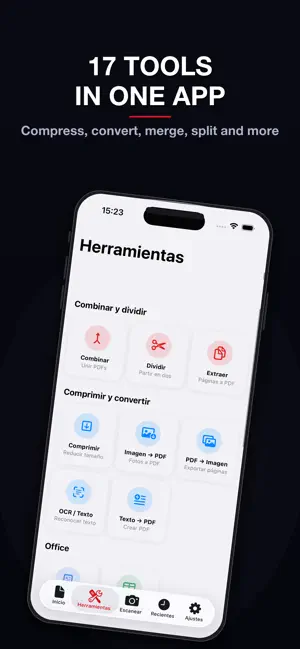
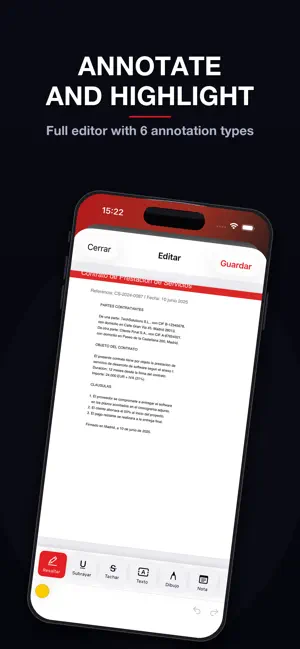
Edit, sign and convert your PDFs without limits or subscriptions. PDF Editor is the most complete tool for managing documents on iPhone and iPad — with 17 professional tools, document scanner and digital signature. All free, all on your device. -> ANNOTATION EDITOR Highlight text in 5 colors, underline, strikethrough and add sticky notes. Draw freehand with variable stroke width, insert stamps (APPROVED, REJECTED) and geometric shapes. Unlimited undo and redo. -> DIGITAL SIGNATURE Draw your signature with your finger and save up to 5 reusable signatures. Insert your signature anywhere in the document with a tap. Sign contracts from your phone. -> DOCUMENT SCANNER Turn paper into PDF instantly using your camera. Automatic edge detection and perspective correction included. · 17 PDF TOOLS MERGE & SPLIT — Merge PDFs: combine multiple documents into one — Split PDF: cut the document in two — Extract pages: select and export specific pages COMPRESS & CONVERT — Compress PDF at 3 levels: high quality, balanced and maximum compression — Images to PDF: convert JPG, PNG and HEIC photos to PDF — PDF to images: export each page as an image — OCR: recognize and extract text from scanned documents — Text to PDF: create documents from scratch OFFICE CONVERSION — Word to PDF: convert DOC and RTF files — Excel to PDF: convert CSV and XLSX files SECURITY — Password-protect PDF — Unlock PDF: remove password if you know it ADVANCED EDITING — Watermark: text with custom opacity, color, rotation and size — Automatic page numbering — Page Manager: reorder, rotate, delete and insert blank pages — Rotate entire document -> TOTAL PRIVACY All PDF processing is done on your own device. Your documents are never uploaded to any external server. No account or registration required. -> DOCUMENT MANAGEMENT Organize PDFs in folders, mark as favorites and search by name. Sort by name, date or size. Auto-trash after 30 days. Lock with Face ID and Touch ID. -> DESIGNED FOR YOU Full dark mode, iPhone and iPad support, import from Files, gallery and other apps. Share results to any app. · Download PDF Editor now and manage all your documents from your pocket — no subscription, no limits, no servers.
App privacy
The developer, Eneko Careaga, reported these privacy practices to Apple.
Data Used to Track You
The following data may be used to track you across apps and websites owned by other companies:
- Identifiers: Device ID
- Usage Data: Product Interaction, Advertising Data
Data Not Linked to You
The following data, which may be collected but is not linked to your identity, may be used for the following purposes:
- Identifiers: Device ID
- Usage Data: Product Interaction, Advertising Data
- Diagnostics: Crash Data, Performance Data
Used for: Third-Party Advertising, Analytics, App Functionality
Alternatives to PDF Editor — Sign & Scanner
Looking for apps like PDF Editor — Sign & Scanner? Here are 6 similar apps on the App Store. The highest rated is PDF Editor & Scanner: DocKit (5.0/5), and all 6 are free to download.
-
 Simple PDF Editor
4.6
Simple PDF Editor
4.6
-
 PDF Editor & Scanner: DocKit
5.0
PDF Editor & Scanner: DocKit
5.0
-
 Convert Picture to PDF +
-
 PDF Reader: Edit & Sign
5.0
PDF Reader: Edit & Sign
5.0
-
 PDF converter: Image to PDF
5.0
PDF converter: Image to PDF
5.0
-
 PDF Scanner - File Reader
3.6
PDF Scanner - File Reader
3.6
| App | Rating | Price | Last updated | Compare |
|---|---|---|---|---|
| PDF Editor — Sign & Scanner | – | Free | June 13, 2026 | |
| Simple PDF Editor | 4.6 / 5 (17) | Free | Sep 12, 2026 | Compare |
| PDF Editor & Scanner: DocKit | 5.0 / 5 (6) | Free | Oct 1, 2026 | Compare |
| Convert Picture to PDF + | – | Free | Aug 21, 2026 | Compare |
| PDF Reader: Edit & Sign | 5.0 / 5 (2) | Free | Oct 28, 2026 | Compare |
| PDF converter: Image to PDF | 5.0 / 5 (4) | Free | Jul 8, 2026 | Compare |
| PDF Scanner - File Reader | 3.6 / 5 (20) | Free | Jun 19, 2026 | Compare |