

Mira - Reverse Image Search
Muhammed Taskiran Utilities iPhoneiPadiPod touch
Mira - Reverse Image Search is a free Utilities app for iPhone and iPad by Muhammed Taskiran. Requires iOS 17.0. Updated September 1, 2026.
- Price
- Free
- on the App Store
- Size
- 18 MB
- Age 17+
- Updated
- Sep 1
- 2026 · v1.0.0
Screenshots


About Mira - Reverse Image Search
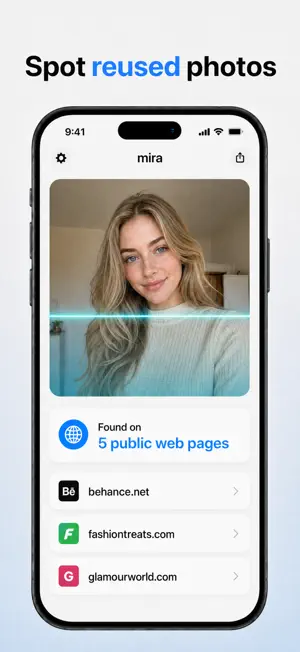
Mira is a reverse image search for photos. Add a picture and Mira searches the public web to show you where that image appears — a list of links and matching pages you open yourself. It works like a visual search engine: you get public web results (links and thumbnails), and you decide which to open. Your search history stays on your device. WHAT YOU CAN DO • Reverse image search — find where a photo appears across the open web. • Protect yourself — see where your own photos show up online. • Spot reused photos — check whether a picture has been copied or reposted (helps against catfish and fake profiles). • Search by photo — match a picture to public pages that contain a similar image. HOW IT WORKS 1. Add a photo. 2. Mira runs a reverse image search across public web sources (powered by a third-party search provider). 3. You get links and matching images — open any result at its source. PRIVACY • Your results come straight from the public web; your search history stays on your device. • Your photo is sent to our search provider only to run the search, and is never sold. • Use Mira responsibly and legally. — Mira offers search credits through auto-renewing subscriptions and one-time in-app purchases. Payment is charged to your Apple Account at confirmation of purchase. Subscriptions renew automatically unless auto-renew is turned off at least 24 hours before the end of the current period; your account is charged for renewal within 24 hours before the period ends. Unused credits may expire per your plan. Manage or cancel anytime in your Apple Account settings. Privacy Policy: https://docs.google.com/document/d/1SKai09QXQiQN9KWKb6MbH3aDv41ZozfkgmMixq5F6XE/preview Terms of Use: https://docs.google.com/document/d/16UfzXPxkX1jr1w_EeJWTtFPtg-pNOVEzDuzdN_AWHZY/preview Apple Standard EULA: https://www.apple.com/legal/internet-services/itunes/dev/stdeula/
App privacy
The developer, Muhammed Taskiran, reported these privacy practices to Apple.
Data Linked to You
The following data, which may be collected and linked to your identity, may be used for the following purposes:
- Identifiers: Device ID
- Usage Data: Product Interaction
- User Content: Photos or Videos
- Search History: Search History
Used for: Analytics, App Functionality
Data Not Linked to You
The following data, which may be collected but is not linked to your identity, may be used for the following purposes:
- Purchases: Purchase History
- Location: Coarse Location
- Diagnostics: Other Diagnostic Data, Crash Data
Used for: Analytics, App Functionality
Alternatives to Mira - Reverse Image Search
Looking for apps like Mira - Reverse Image Search? Here are 6 similar apps on the App Store. The highest rated is VeriShot Location Proof (5.0/5), and all 6 are free to download.
-
 Reverse Image Search (RIS)
-
 VeriShot Location Proof
5.0
VeriShot Location Proof
5.0
-
 GPS Investiga
-
 FirstFinder
5.0
FirstFinder
5.0
-
 Keyboard for Ai
-
 Reverse Image Search Pro HD
| App | Rating | Price | Last updated | Compare |
|---|---|---|---|---|
| Mira - Reverse Image Search | – | Free | September 1, 2026 | |
| Reverse Image Search (RIS) | – | Free | Oct 13, 2026 | Compare |
| VeriShot Location Proof | 5.0 / 5 (1) | Free | Apr 22, 2026 | Compare |
| GPS Investiga | – | Free | Aug 17, 2026 | Compare |
| FirstFinder | 5.0 / 5 (1) | Free | Oct 30, 2024 | Compare |
| Keyboard for Ai | – | Free | Jun 10, 2026 | Compare |
| Reverse Image Search Pro HD | – | Free | Aug 17, 2026 | Compare |