

Archipic
SAMI ABDULNOUR Graphics & Design iPhoneiPadiPod touch
Archipic is a free Graphics & Design app for iPhone and iPad by SAMI ABDULNOUR. Requires iOS 17.0. Updated October 13, 2026.
- Price
- Free
- on the App Store
- Size
- 3 MB
- Age 4+
- Updated
- Oct 13
- 2026 · v1.5
Screenshots


About Archipic
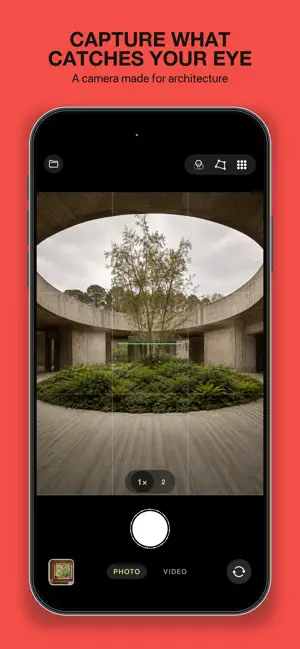
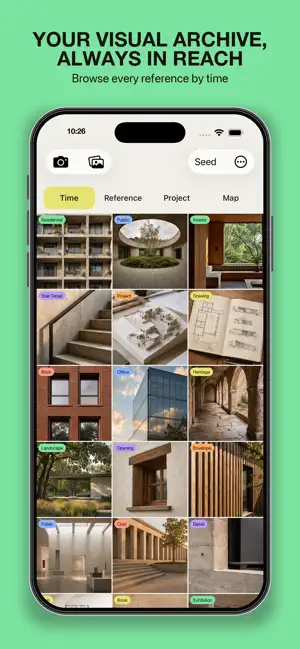
Archipic is a private photo journal for architects and architecture students. Photograph a reference, answer two quick prompts, and it is filed in a structured archive you can still search years from now. Architecture turns up everywhere: a façade on a walk, a joint at an exhibition, a plan in a book, a model on someone's desk. In the camera roll those photos sink among everything else. Archipic gives each one a type, a few tags and a place, so it can be found again. CAPTURE IN SECONDS The camera is built for the street. One tap takes the photo and two more file it, quickly enough to do while walking. The viewfinder has a grid, a level, aspect-ratio guides, tap-to-focus and exposure, pinch zoom and film-inspired colour looks, and it records video as well as stills. Assign Capture to the Action Button, Siri or Shortcuts to reach the viewfinder without opening the app, optionally filing straight into a named project. STRUCTURED TAGS, NOT TYPING Every photo is filed with a small, fixed vocabulary of buttons instead of a keyboard: - Building: typology (residential, office, public, commercial, civic, hospitality, heritage, industrial, landscape) and room. - Element: structure, openings, envelope, finishes, details and more. - Graphic: artwork, book, drawing, plan, render, model, web and more. Materials, concepts, a rating, keywords, author and year, or a project can be added when needed, and any field you don't use can be switched off. If you can't remember where a tag lives, type its name and Archipic jumps to it. Photograph a book page or a wall label and the app reads it on the device, offering the title, author and year to confirm with one tap. GET REFERENCES IN Share an image from Photos, Files, Messages or a screenshot straight to Archipic. Pick Building, Element or Graphic and it is in the archive, ready to finish tagging later. FIND IT AGAIN Browse by Time, by Reference (what is in the photo), by Project, or by Place on a map. Search runs across every tag. Filter by type, project, favourites or minimum rating, and pinch the grid to change its size. BOARDS Turn any selection into a print-ready poster, laid out as a gallery wall, or into an A4 journal, with captions taken from the tags. Export it as a PDF, or as a square, portrait or story image for posting. WORKS WITH YOUR TOOLS Exported photos carry their tags as standard metadata (keywords, caption, title and rating), so they open correctly in Lightroom, Bridge and InDesign. The capture date travels with them. A single setting keeps or strips the location when you share. ON IPHONE AND IPAD On iPad the four ways of browsing move into a sidebar and the grid fills the screen. The Board composer splits into two panes, with your photos on one side and a live preview of the poster on the other. PRIVATE BY DESIGN Photos and tags are stored on your device and sync through your own iCloud. There is no account and no sign-in. There are no ads, no analytics and no developer server, so the developer cannot see your archive. The App Store privacy label reads "Data Not Collected". Designed by an architect.
What’s new
Version 1.5 · Updated October 13, 2026
BOARDS CARRY A SMALL MARK Exported Boards now carry a small archipic.app mark on their footer line, set like the captions. A switch in the Board composer turns it off. BOARDS FILL THE PAGE A Board of only a few photos used to sit at the top of the sheet. The photos now grow to fill it, on posters and on feed images alike, and feed images export at exactly 1080 × 1350 and 1080 × 1920 pixels. COMPLETE POSTER FOOTERS The third line of the B1 and A2 poster footer, the plate sequence, was being cut off. It now prints. RATE AND SHARE Two new rows in Settings: one opens the App Store review page, the other sends a colleague a link to Archipic.
App privacy
The developer, SAMI ABDULNOUR, reported these privacy practices to Apple.
Data Not Collected
The developer does not collect any data from this app.
Alternatives to Archipic
Looking for apps like Archipic? Here are 6 similar apps on the App Store. The highest rated is Housy: AI Interior Design (5.0/5), and all 6 are free to download.
-
 Mora AI - AI Interior Design
-
 Home Interior Design AI Decor
-
 AI Home Exterior Planner
-
 Lofto: AI Interior Design
-
 NestMuse: AI Home Interior
-
 Housy: AI Interior Design
5.0
Housy: AI Interior Design
5.0
| App | Rating | Price | Last updated | Compare |
|---|---|---|---|---|
| Archipic | – | Free | October 13, 2026 | |
| Mora AI - AI Interior Design | – | Free | Oct 20, 2026 | Compare |
| Home Interior Design AI Decor | – | Free | Mar 5, 2026 | Compare |
| AI Home Exterior Planner | – | Free | Apr 20, 2026 | Compare |
| Lofto: AI Interior Design | – | Free | Jun 4, 2026 | Compare |
| NestMuse: AI Home Interior | – | Free | Dec 27, 2025 | Compare |
| Housy: AI Interior Design | 5.0 / 5 (3) | Free | Jun 17, 2026 | Compare |
Compare Archipic with the top alternatives: ratings, updates, ASO score and keyword gaps →